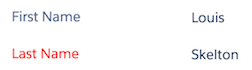
In a Field Editor I want all the required fields to be red. Can someone let me know how I would go about achieving this?



Enter your E-mail address. We'll send you an e-mail with instructions to reset your password.
 +10
+10In a Field Editor I want all the required fields to be red. Can someone let me know how I would go about achieving this?
Enter your E-mail address. We'll send you an e-mail with instructions to reset your password.