
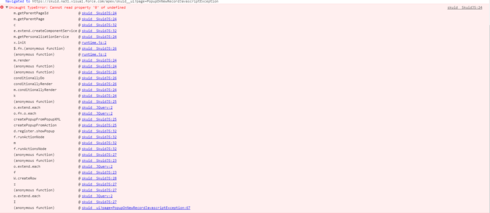
When a popup is displayed in the model event ‘new row created’, a javascript exception “cannot read property ‘0’ of undefined” is encountered.
Notes
- The popup is triggered when a “new row” is added to model
- if the model is marked to “process client side” the exception is NOT encountered
- Removing the field editor from the popup leaving only the page title, and the popup properly displays without encountering an exception
Steps to reproduce:
- Create page using XML below
- Preview page
Expected Behavior
Popup displays
Actual Behavior
Javascript exception encountered
Sample Page XML
<skuidpage unsavedchangeswarning="yes" personalizationmode="server" showsidebar="true" showheader="true" tabtooverride="Account">   <models>
  <model id="Account" limit="1" query="false" createrowifnonefound="true" sobject="Account" adapter="" type="" doclone="" processonclient="false">
     <fields>
        <field id="Name"></field>
        <field id="CreatedDate"></field>
     </fields>
     <conditions></conditions>
     <actions>
        <action>
           <actions>
              <action type="showPopup">
                 <popup title="New Popup" width="90%">
                    <components>
                       <pagetitle model="Account" uniqueid="sk-2rU-Jx-105">
                          <maintitle>
                             <template>{{Name}}</template>
                          </maintitle>
                          <subtitle>
                             <template>{{Model.label}}</template>
                          </subtitle>
                          <actions></actions>
                          <conditions>
                             <condition type="contextrow" field="Id" mergefield="Id" operator="="></condition>
                          </conditions>
                       </pagetitle>
                       <basicfieldeditor showheader="true" showsavecancel="true" showerrorsinline="true" model="Account" buttonposition="" uniqueid="sk-2rVuwQ-150" mode="read">
                          <columns>
                             <column width="100%">
                                <sections>
                                   <section title="Section A" collapsible="no">
                                      <fields>
                                         <field id="Name"></field>
                                      </fields>
                                   </section>
                                </sections>
                             </column>
                          </columns>
                          <conditions>
                             <condition type="contextrow" field="Id" mergefield="Id" operator="="></condition>
                          </conditions>
                       </basicfieldeditor>
                    </components>
                 </popup>
              </action>
           </actions>
           <events>
              <event>row.created</event>
           </events>
        </action>
     </actions>
  </model>