




Topic
When an Admin for RPA Central sets up a Botflow so that it can run on multiple Bots, this article will explain:
- How RPA Central makes the decision on which Bot to use each time.
- And help the Admin to know what to expect in different scenarios.
Instructions
If there are multiple users that run a specific botflow, it could be a best practice to add the Bots of each of the users to the Botflow before publishing the Botflow. This way any one of the users can run the Botflow in the event of a regular user being absent that day.
Keep in mind that a Bot is created from the User Name and Machine Name. Because of this, users can have multiple Bots each having the same User Name but differing Machine Names.
The Bot that is assigned to a Botflow needs to be in ready status and the user needs to be active for RPA Central to consider that users Bot to run the Botflow. Otherwise, the Botflow will be assigned to another users Bot or remain in Queued status until one of the users Bots assigned to the Botflow meet the criteria above.
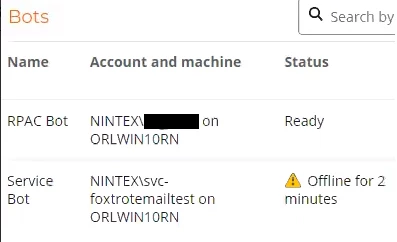
Please see the link in the Additional Information section below regarding Botflows that are Stuck in Queued Status for more information, but if a user is not active in Active Directory, the Bot screen in RPA Central will show the Bot as Offline for X minutes. This can be seen in the screenshot below, there are 2 users on one machine and the top user is active while the bottom user is inactive.
The running Botflow is not tied to the User. Any user with the relevant access can run the Botflow. RPA Central will keep a list of the Bots in order of installation in an internal Connected Bots dictionary in the RPA Central database.
Then RPA Central will assign the Botflow to the first Bot in the Connected Bots dictionary that is in Ready Status and the User is Active in Active Directory.
The dictionary is sequential so the first Bot installed will be on top. However, if a Bot is removed and re-installed, this will reorder the dictionary. The dictionary is synced with the RPA Central database, therefore, changes can reorder the dictionary.
As an example:
BotflowOne is accessible by both users and is assigned to both users Bots.
BotflowTwo is accessible by both users but is only assigned to User1s Bot.
One of the users decides to run both botflows, BotflowOne and then BotflowTwo while BotflowOne is still running. (This applies to botflows that are scheduled to run from RPAC and also manually started from RPAC.)
Results:
User1's Bot was added first and User 2's Bot was added second, so BotflowOne will run on User1’s Bot. It doesn't matter which user runs the Botflow from RPA Central, it will always run on User 1's Bot unless that Bot is busy running another Botflow or not in Ready status even if both User 1 and User 2 are online.
BotflowTwo will remain in queued status until BotflowOne is complete and User 1's Bot is back in ready status.
For this reason, if it is desired that the Botflow always runs on the User's Bot that is requesting the run, then the Admin will need to remove the extra Bots.
Another way to ensure that all users can run a botflow on their Bot machine is to have the Admin create multiple copies of the Botflow, renaming each with the users name at the end, for example, and only assign the users Bot. (FYI: the botflow name can just be one character different and RPAC will see it as a different botflow)
Additional Information
Additional Links for this topic:
Role-based-Access-Control-RBAC-in-RPA
Botflow Stuck in Queued Status, Bot is in Ready Status in RPAC