



Topic
This article explains how to send messages from a Wizard directly to Telegram Group/Bot.
Please note: It is recommended that the desktop version of Telegram is installed.
Instructions
1. In the Search panel type BotFather
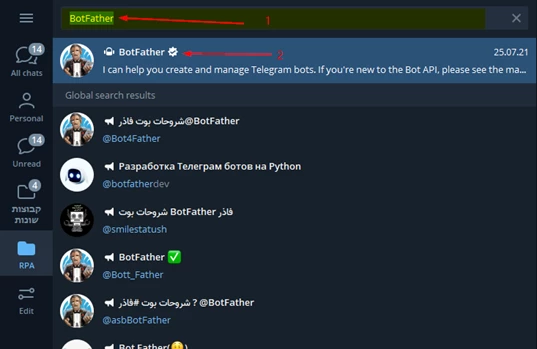
**Be sure to choose the Bot with the checkmark.
2. Open a chat with @BotFather in Telegram and click the /start command.
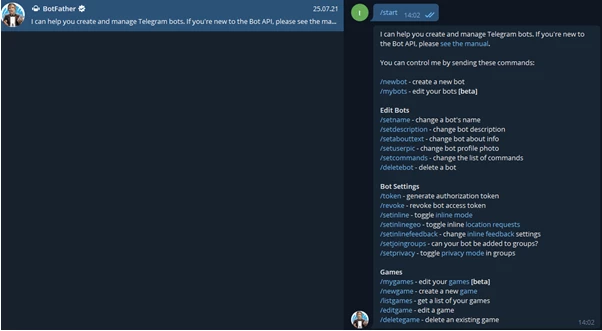
3. After you get a list of commands, select the command /newbot to get this Message:
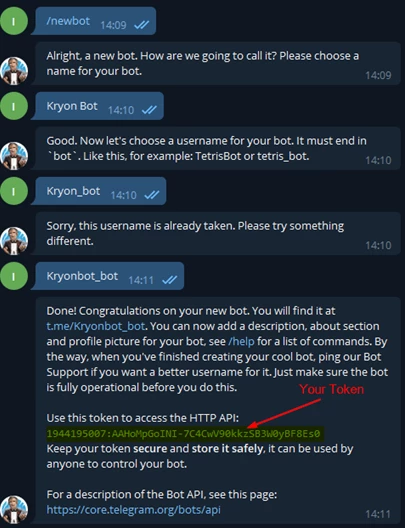
Please choose a name for your bot.
4. Enter a name for your bot, and send it. **Note: there are no name requirements.
5. The BotFather will ask for a username for your bot as shown in the message below:

**Note: The username must end with “bot”. If your desired username is taken or not available, try again with another username.
6. Send a test message to the bot. For example: /my_id @my_bot
7. Go to the following url: https://api.telegram.org/botXXX:YYYY/getUpdates
8. Replace XXX:YYYY with your bot token
9. Look for "chat":{"id":-zzzzzzzzzz,
-zzzzzzzzzz is your chat id (with the negative sign).

10. Testing: You can test sending a message to the group with a curl:
curl -X POST https://api.telegram.org/botXXX:YYYY/sendMessage -d "chat_id=-zzzzzzzzzz&text
or you can use the wizard I created to send a message
