

This article describes, how to flush REDIS cluster. REDIS is responsible for the caching, which could help to resolve the issue.
If you have a REDIS cluster and you need to clear the REDIS cluster, follow the below steps. These step can be performed on the Master Redis cluster node.
Tools required P3X Redis UI.
1.Open Redis UI ( P3X Redis UI). Create a connection with the master node.
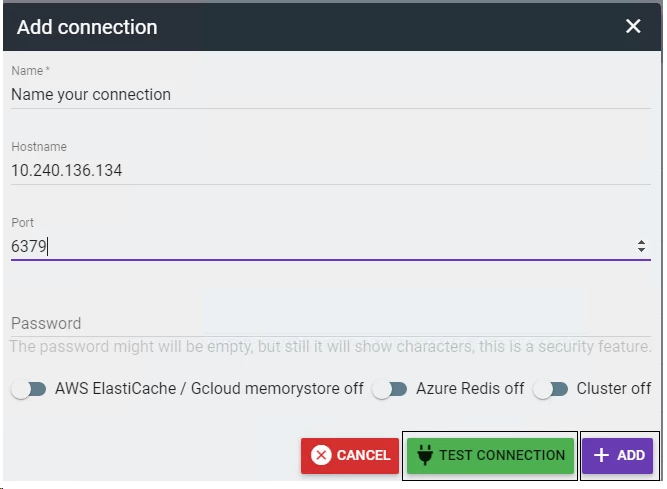
add a password (username is not required!) for a successful connection(default passwords are Kryon2022! Kryon2021! Kryon123! )
2. Connect using the newly created connection (step 1) .
3. Select Home from the P3X Redis UI menu to load the REDIS cache.
4. Click on the Kryon folder in the left pane and delete it.
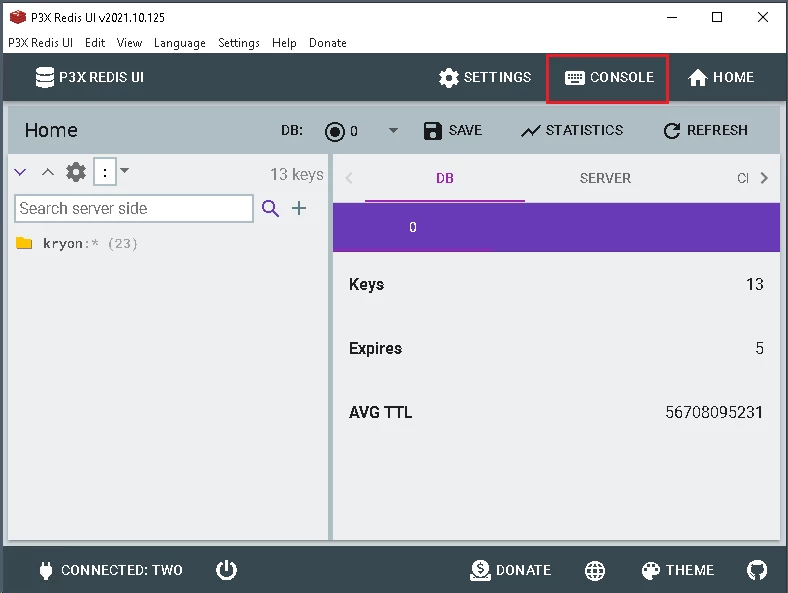
5. Restart Kryon/Nintex Main Service
Clearing REDIS cache in a High Availability environment
The correct sequence should be :
1. Stop the second server, clear REDIS then restart Rabbit and Kryon/Nintex Main Service on the first one.
2. Stop the first server, start the second one clear REDIS then restart Rabbit and Kryon/Nintex Main Service on the same server.
3. The final step is to start the first server again.