




Product: Kryon RPA
Components: Kryon Studio
Article Contributors: Darren Cheng
It is sometimes necessary to run command line commands and scripts and parse the output from them. This short guide will show you how to obtain the output of a CMD command for use in your wizards.
Prerequisites: None.
Steps: A small utility called clip is included in the Windows operating system, located under C:WindowsSystem32, that can be used to store data piped from a command prompt into the clipboard. Clip, in conjunction with the Get From Clipboard advanced command, can therefore be used to feed CMD output into your wizards.
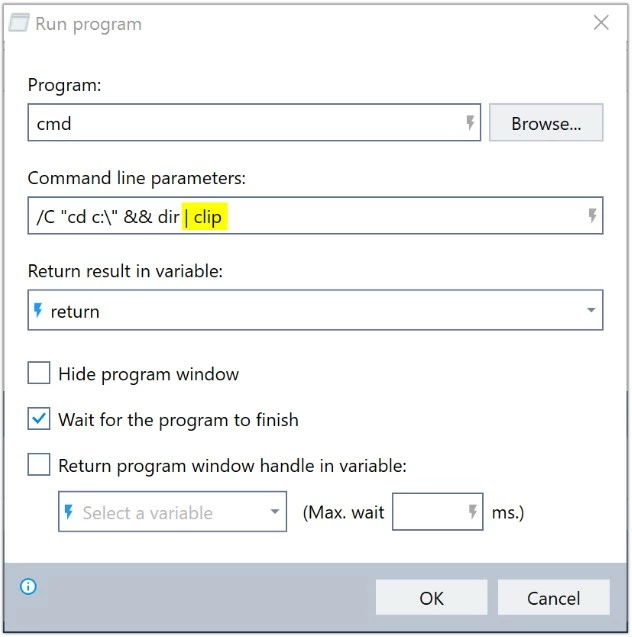
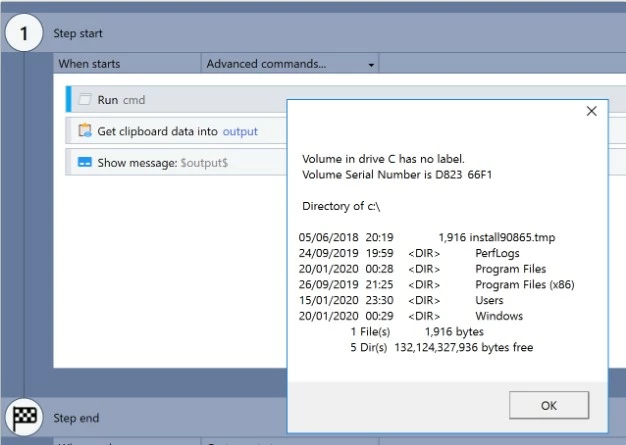
Here is an example that can be used with the Run Program advanced command. This will store the output of the dir command into the clipboard which can then be extracted using the Get From Clipboard advanced command. From there, the contents of the variable can be manipulated as required.
Here is an example that can be used with the Run Program advanced command. This will store the output of the dir command into the clipboard which can then be extracted using the Get From Clipboard advanced command. From there, the contents of the variable can be manipulated as required.
More Information: None.