Nintex Community Menu Bar
Solved

Xtension - Nintex Workflow Integration

  • May 6, 2026
  • 11 replies
  • 95 views

Forum|alt.badge.img+2

Hi Team,

Can advise what is the error message means?

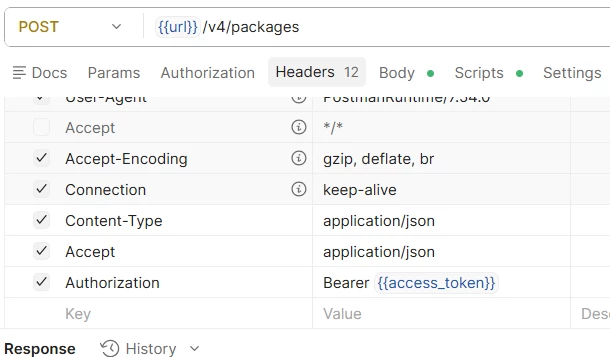
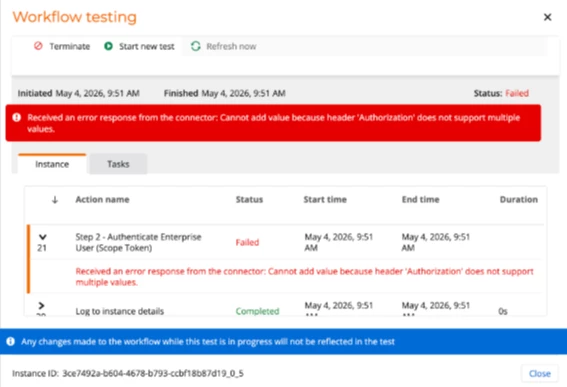
We were trying the API integration via Postman testing and is working fine however when apply into Xtension and it prompt the error as below screenshot.

In step1 using Xtension able to get client access token. In step 2 to get Authenticate Enterprise User token and it prompt error.



Best answer by RC1101

could be issue with the openapi spec json file

11 replies

PeterByun
Nintex Employee
Forum|alt.badge.img+2
  • Nintex Employee
  • May 12, 2026

Hi ​@CatherineChee

Thanks for the detailed post. The error is being returned from the downstream service, but given Postman works fine, it's likely something in how the request is being constructed on the Xtension side.

This one is best tracked through a support ticket so a support engineer can investigate further and work with you on a resolution. Could you please submit a support ticket and link this thread for context?

Thank you,
Peter


Simon Muntz
Nintex Partner
Forum|alt.badge.img+23
  • Nintex Partner
  • May 12, 2026

Hi ​@CatherineChee,

Unfortunately, you will find that Nintex Support are not able to help you with the Xtension as they do not support custom code. Please see the FAQ section here: https://www.nintex.com/customer-success/support/

Please provide a copy of your Swagger, or at least the part that has the authorisation header, so we can possibly assist.


Forum|alt.badge.img+5
  • Scholar
  • Answer
  • May 13, 2026

could be issue with the openapi spec json file


Forum|alt.badge.img+2
  • Author
  • Nintex Partner
  • May 21, 2026

Hi,

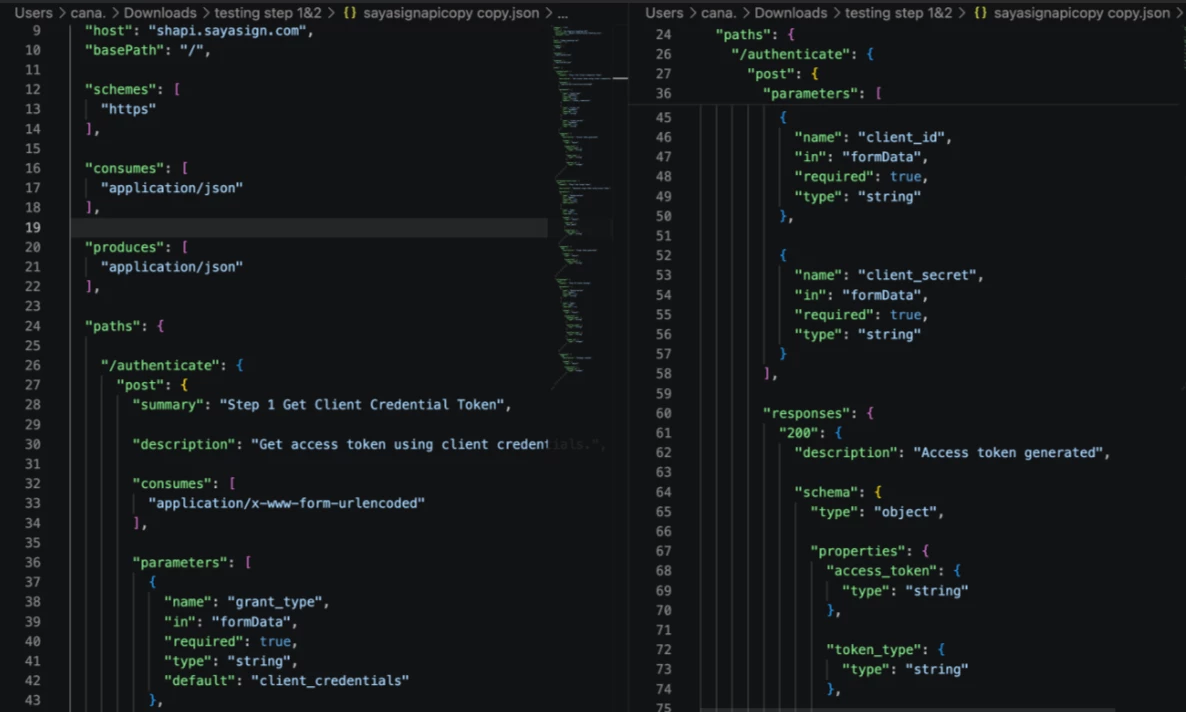
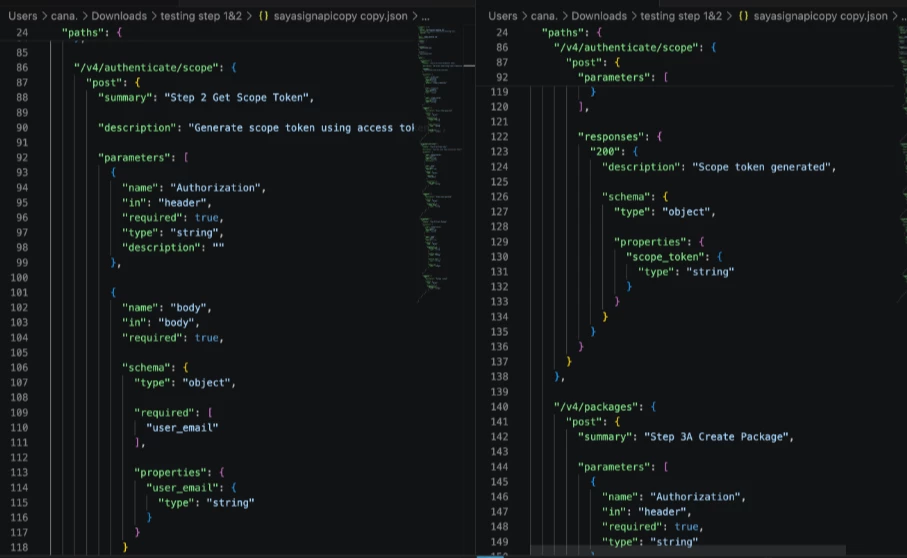
Kindly refer below screenshot and advise. Thanks.


Simon Muntz
Nintex Partner
Forum|alt.badge.img+23
  • Nintex Partner
  • May 22, 2026

Hi ​@CatherineChee,

It appears that you have added the security as an endpoint.
This is not how Nintex handles security.
Instead, you need to configure a security definition.

When you import the Xtension, the security is configured at that point and not in the action itself.
This keeps the credentials secure within Nintex Workflow.
Please see the help Documentation regarding configuring an Oauth2 connection.
https://help.nintex.com/en-US/xtensions/04_Reference/Tutorials/OAuth.htm?tocpath=Connect%20and%20authenticate%7C_____3


Forum|alt.badge.img+2
  • Author
  • Nintex Partner
  • May 22, 2026

Hi,

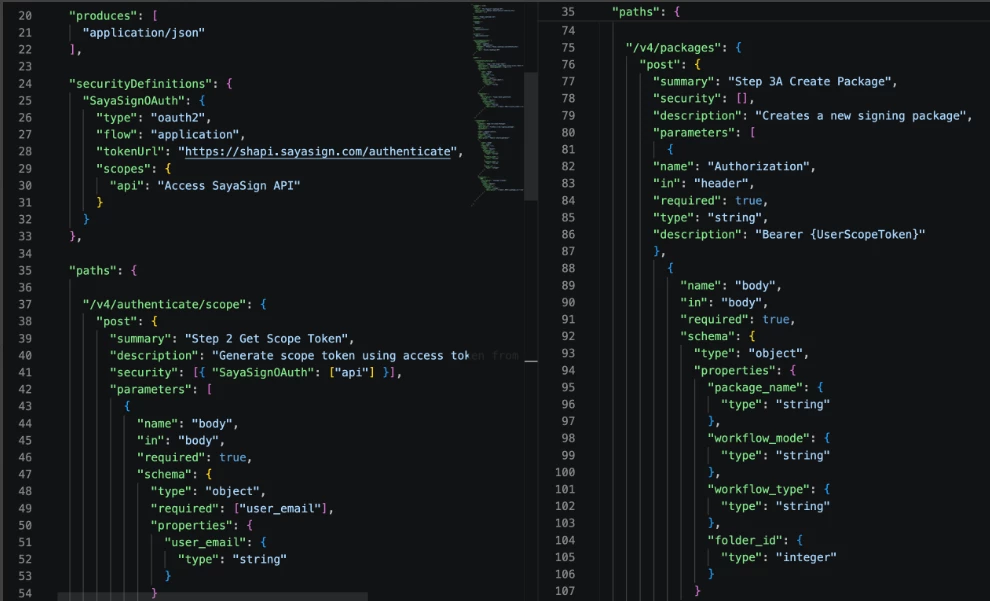
Can advise as we still hit the same error.


Thanks.


Simon Muntz
Nintex Partner
Forum|alt.badge.img+23
  • Nintex Partner
  • May 22, 2026

Hi ​@CatherineChee,

Without access to the API documentation and the API to test its hard to diagnose the issue.
Does this approach work?
 

{
"swagger": "2.0",
"info": {
"title": "SayaSign API",
"description": "SayaSign API for document signing and package management",
"version": "4.0.0",
"contact": {
"name": "SayaSign Support",
"url": "https://www.sayasign.com"
}
},
"host": "shapi.sayasign.com",
"basePath": "/",
"schemes": [
"https"
],
"consumes": [
"application/json",
"application/x-www-form-urlencoded"
],
"produces": [
"application/json"
],
"securityDefinitions": {
"SayaSignOAuth": {
"type": "oauth2",
"flow": "application",
"tokenUrl": "https://shapi.sayasign.com/v4/authenticate",
"scopes": {
"api": "Access SayaSign API"
}
}
},
"paths": {
"/v4/authenticate/scope": {
"post": {
"summary": "Step 2 Get Scope Token",
"description": "Generate scope token using access token",
"operationId": "getAuthenticateScope",
"consumes": [
"application/x-www-form-urlencoded"
],
"parameters": [
{
"name": "grant_type",
"in": "formData",
"description": "Grant type for authentication",
"required": true,
"type": "string",
"default": "client_credentials"
},
{
"name": "client_id",
"in": "formData",
"description": "Client ID for authentication",
"required": true,
"type": "string"
},
{
"name": "client_secret",
"in": "formData",
"description": "Client secret for authentication",
"required": true,
"type": "string"
}
],
"responses": {
"200": {
"description": "Scope token generated",
"schema": {
"type": "object",
"properties": {
"scope_token": {
"type": "string"
},
"token_type": {
"type": "string"
}
}
}
}
}
}
},
"/v4/authenticate": {
"post": {
"summary": "Step 1 Get Client Credential Token",
"description": "Get access token using client credentials",
"operationId": "getAuthenticate",
"consumes": [
"application/x-www-form-urlencoded"
],
"x-nintex-oauth-source": true,
"parameters": [
{
"name": "grant_type",
"in": "formData",
"description": "Grant type for authentication",
"required": true,
"type": "string",
"default": "client_credentials"
},
{
"name": "client_id",
"in": "formData",
"description": "Client ID for authentication",
"required": true,
"type": "string"
},
{
"name": "client_secret",
"in": "formData",
"description": "Client secret for authentication",
"required": true,
"type": "string"
}
],
"responses": {
"200": {
"description": "Access token generated",
"schema": {
"type": "object",
"properties": {
"access_token": {
"type": "string"
},
"token_type": {
"type": "string"
}
}
}
}
}
}
},
"/v4/packages": {
"post": {
"summary": "Step 3A Create Package",
"description": "Creates a new signing package",
"operationId": "createPackage",
"security": [
{
"SayaSignOAuth": []
}
],
"parameters": [
{
"name": "body",
"in": "body",
"required": true,
"schema": {
"type": "object",
"properties": {
"package_name": {
"type": "string"
},
"workflow_mode": {
"type": "string"
},
"workflow_type": {
"type": "string"
},
"folder_id": {
"type": "integer"
}
}
}
}
],
"responses": {
"200": {
"description": "Package created successfully",
"schema": {
"type": "object",
"properties": {
"package_id": {
"type": "string"
}
}
}
}
}
}
}
},
"definitions": {
"Package": {
"type": "object",
"properties": {
"package_name": {
"type": "string"
},
"workflow_mode": {
"type": "string"
},
"workflow_type": {
"type": "string"
},
"folder_id": {
"type": "integer"
}
},
"required": [
"package_name"
]
},
"AuthToken": {
"type": "object",
"properties": {
"access_token": {
"type": "string"
},
"token_type": {
"type": "string"
}
}
},
"ScopeToken": {
"type": "object",
"properties": {
"scope_token": {
"type": "string"
},
"token_type": {
"type": "string"
}
}
}
}
}


Forum|alt.badge.img+5
  • Scholar
  • May 22, 2026

are you using oauth on some and bearer on other?


add the bearer type in securityDefinitions then set the security for that path to use that

and not trying to pass authorization as a parameter


Forum|alt.badge.img+2
  • Author
  • Nintex Partner
  • May 28, 2026

Hi,

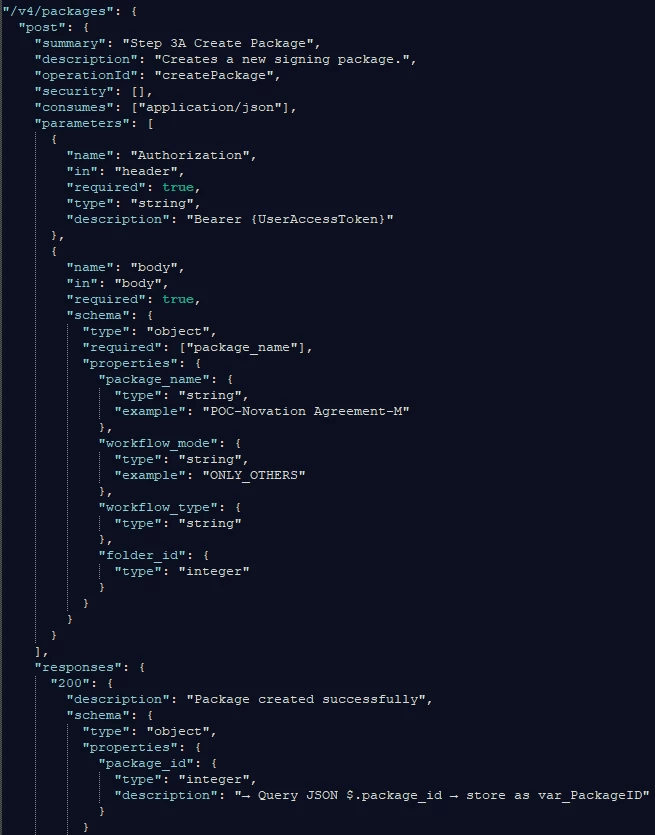
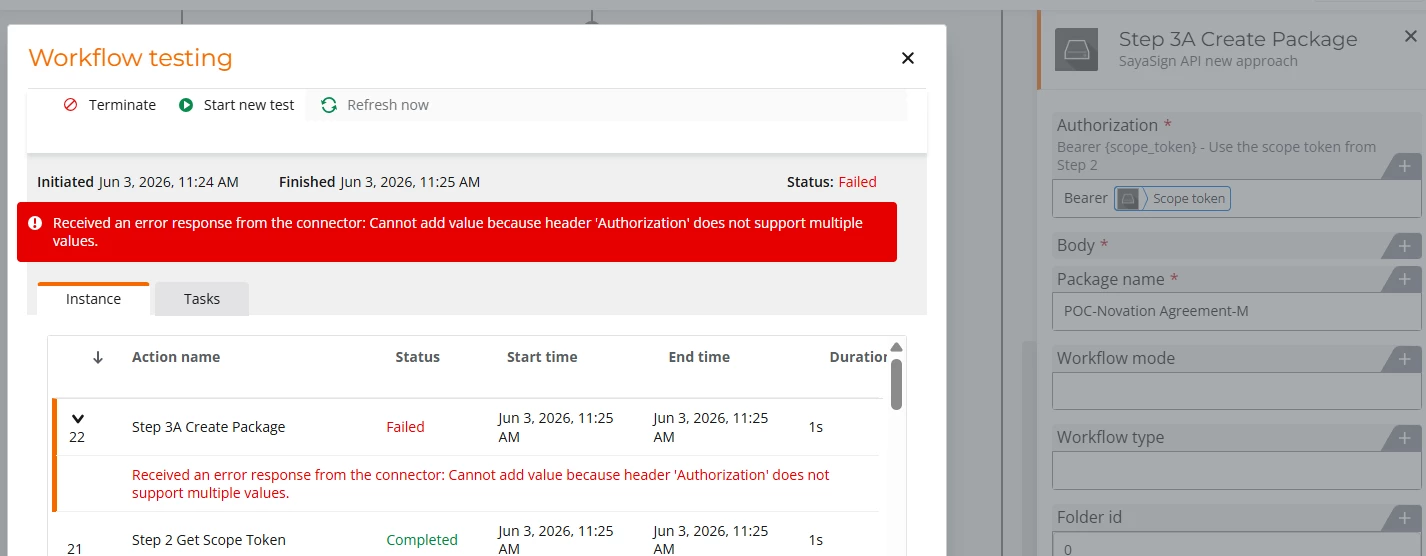
Refer to Simon reply, we can proceed step1 & step 2 from the sharing script. However when we proceed the next API calling, it prompt the same error header 'Authorization' does not support multiple values in Nintex xtension. Tested the API calling is working via postman. Can advise is the script issue or can share a standard json working file for us as reference? Many thanks.


sample:


Simon Muntz
Nintex Partner
Forum|alt.badge.img+23
  • Nintex Partner
  • May 28, 2026

Because Steps 1 and 2 are already generating the header, I don’t think it’s needed in Step 3. Adding the security in step 3 means 2 authentication headers are being sent.

Try:
 

"/v4/packages": {
"post": {
"summary": "Step 3A Create Package",
"description": "Creates a new signing package",
"operationId": "createPackage",
"security": [],
"parameters": [
{
"name": "Authorization",
"in": "header",
"description": "Bearer {scope_token} - Use the scope token from Step 2",
"required": true,
"type": "string"
},
{
"name": "body",
"in": "body",
"required": true,
"schema": {
"type": "object",
"properties": {
"package_name": { "type": "string" },
"workflow_mode": { "type": "string" },
"workflow_type": { "type": "string" },
"folder_id": { "type": "integer" }
},
"required": ["package_name"]
}
}
],
"responses": {
"200": {
"description": "Package created successfully",
"schema": {
"type": "object",
"properties": {
"package_id": { "type": "string" }
}
}
}
}
}
}


Forum|alt.badge.img+2
  • Author
  • Nintex Partner
  • May 29, 2026

Hi,

Thanks for the advise. We will try and update status again.