



Unlocking New Use Cases with Table Forms in Nintex Data
For a long time, Nintex has been exceptionally good at orchestrating workflows.
Approvals, routing, escalations we’ve got that covered.
But here’s the thing we’ve heard consistently from the community “Not everything needs to be a workflow.”
At time we do come across situations where you just want to capture data, maybe attach a file or two, store it safely, and move on, no approvals, no emails, no workflow entitlements quietly disappearing in the background. That’s exactly where Nintex Data Tables and Table Forms step in. And with the introduction of the new File column type, they just became a whole lot more powerful.
In the Past
Traditionally, Nintex didn’t offer a native way to store persistent data with files.
So, if you wanted to:
- Capture a signature
- Upload inspection photos
- Store feedback attachments
You usually had to:
- Push the file into a Document Management System (SharePoint, Box, Google Drive, OneDrive etc.)
- Trigger a workflow just to store or move the data
- Worry about permissions, integrations, and entitlement usage
For scenarios like feedback forms or inspections, this often felt like overengineering using a full workflow engine to do what should have been simple data capture.
Why Table Forms Change the Game
Table Forms let you collect and persist data without forcing a workflow into the picture. There are number of scenarios where this could be very helpful.
Some of the most common scenarios are:
Human Resources (HR)
Not everything in HR is an onboarding or offboarding workflow.
- Employee feedback and pulse surveys
Capture comments, optional attachments, and sentiment no workflow required.
- Training attendance and acknowledgments
Employees submit proof of completion or certificates.
- Policy acknowledgments
Store confirmation records and signed documents without routing anything.
- Exit interviews
Collect structured responses and supporting documents, all in one place.
Operations & Facilities
Operational teams are heavy data collectors. Table Forms work well for:
- Maintenance logs
- Safety observations – Workflow can be triggered only if needed
- Equipment condition tracking
IT & Internal Services
IT doesn’t need a workflow for everything either. Table Forms are perfect for:
- Service feedback
- Application access requests (pre-approval)
- Asset acknowledgments
Table forms have been around for few months now. Nintex has further enhanced table forms with File Column Type.
Introducing the File Column Type in Nintex Data
We have a new File column type in Nintex Data designed specifically to work hand-in-hand with Tables and Table Forms.
The File column allows you to store one or more files directly against a table record, no external storage or custom logic required.
When configuring a File column, you can control:
- How many files can be uploaded
- The maximum size per file
- Allowed file types (specified as a comma-separated list)
These guardrails help ensure consistency, security, and compliance without complicating the form experience.
Users can upload files via drag and drop or by selecting them from their device exactly how they expect modern forms to work.
And yes, we stop duplicate filenames too:
“A file with this name already exists. Rename the file and try again.”
Because nobody needs three versions of inspection_final_FINAL.pdf.
Real-World Example: Automotive Inspections
Let’s bring this to life with a familiar scenario.
Vehicle Inspection at a Dealership
A service advisor needs to capture:
- Vehicle details
- Photos of damaged parts
- Collect Signature
Here is how you will set up a table form with file column type.
This is not a workflow. No approvals, No routing. Just structured data and supporting files.
With Table Forms and a File column:
- Each inspection is a single table row
- Photos are uploaded directly to the record
- File types are restricted to images only
- Data is persistent, searchable, and reportable
Later, if a workflow is needed (for example, repairs above a certain cost), it can reference the table.
Workflow becomes optional, not mandatory exactly how it should be.
Table forms also work Seamlessly with Nintex Workflow
Of course, workflows are still a key part of the platform, and this is how majority of the processes are automated.
File columns behave just like other table columns in Nintex Workflow:
- Use Tables actions to create or update rows
- Add files using collections
- Loop through files and update records as needed
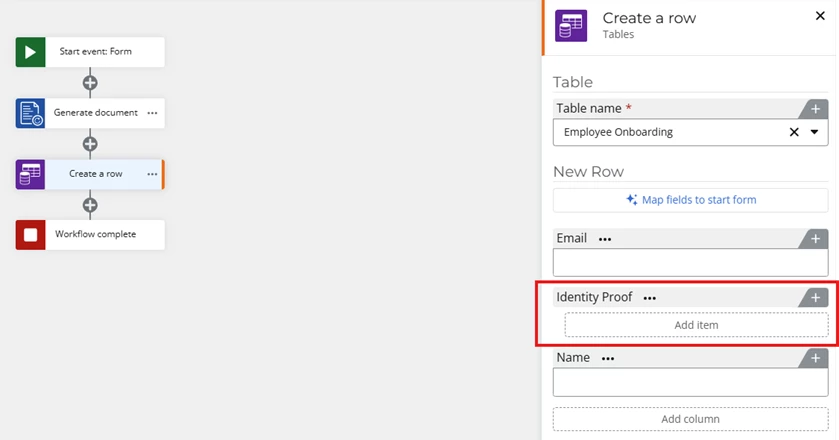
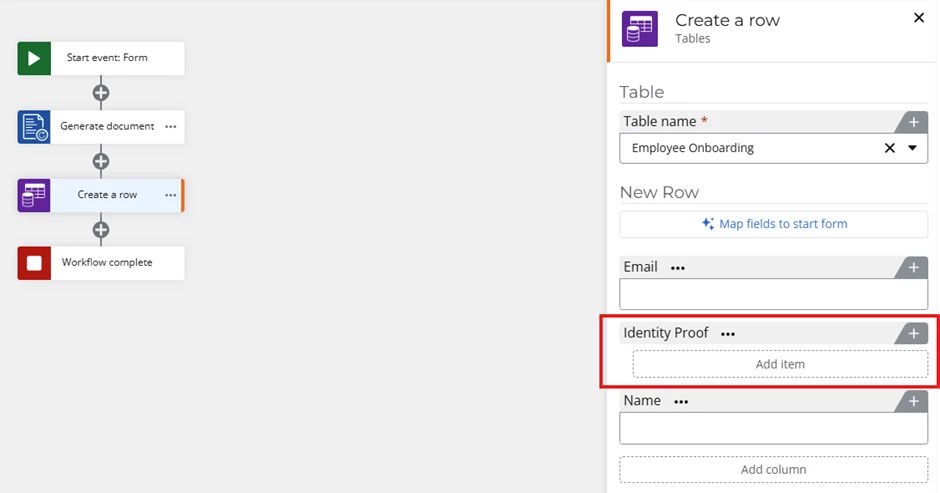
With this option users can now use table forms which is created automatically based on the Table created in Nintex Data and trigger the workflow once they have captured all necessary information.
A very common use case is integrating with disconnected systems. Organizations often deal with multiple backend systems that are either disconnected, legacy, or tightly controlled. These systems may not support real-time integration, or any integration at all, without RPA or custom development. At the same time, business teams need a simple, governed way to capture requests, route approvals, and maintain an audit trail before any data is pushed downstream, which can now be very easily managed in Nintex Data. Integration is triggered only after approvals are completed. The workflow ensures correct sequencing, validation, and role-based authorization in the interim data source Nintex Data, before calling the API and pushing the data into the backend data source.
This approach reduces the risk of premature data creation and ensures downstream systems only receive approved and compliant data.
Table Forms and the new File column type fundamentally change how teams think about data capture in Nintex. What once required a workflow, external storage, and careful entitlement planning can now be handled with a simple, secure, and persistent data layer in Nintex Data. It’s a simpler, smarter way to build processes where workflows are powerful when needed and optional when they’re not.