Nintex Community Menu Bar
Question

Querying a list daily for dates that are 2 months away

  • January 6, 2026
  • 4 replies
  • 18 views

Forum|alt.badge.img

Hi all, I’m pretty new to the Nintex world. I am creating a workflow that i want in the end to query daily to send reminders for due dates that are 2 months out.


To further explain….I have a SharePoint list already set up. There is a column called due date. I want my workflow to look at the list daily and remind me when the due date is 2 months from today’s date. I currently have it set as a scheduled start event.


4 replies

Forum|alt.badge.img+11
  • Nintex Employee
  • January 6, 2026

Hi ​@Depar72 

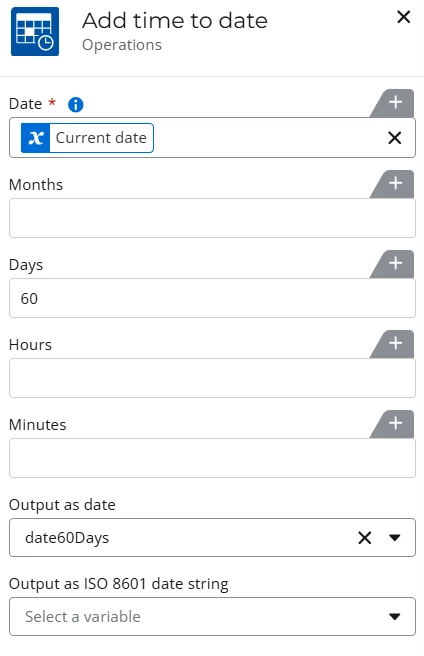
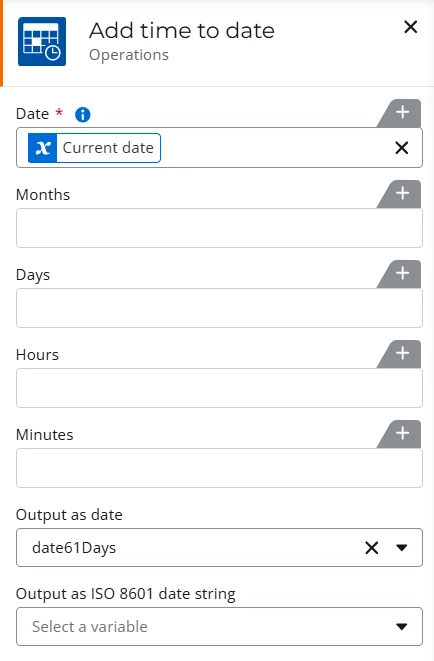
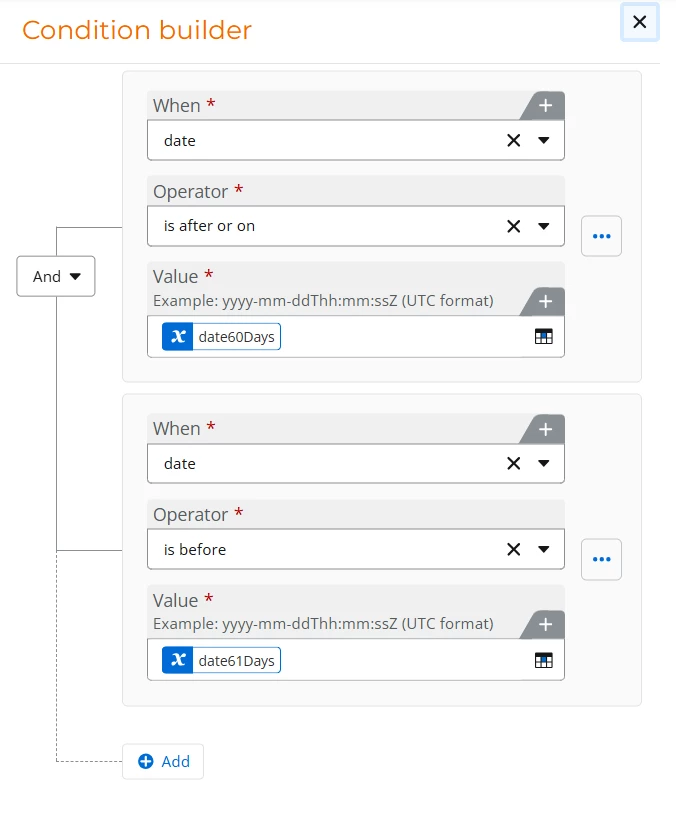
To accomplish something along these lines you can use the add time to date action to get the date 60 days out from the current date and the date 61days out from the current date.  Then in the query list action you can check that the due date is after or on to the first variable and before the second variable.  Note that you’ll want to use days instead of months in advance to make sure you don’t miss any values on the list.  See the screenshots below for the setup:

Date Time Variables:


Query List Condition:


SimonMuntz
Forum|alt.badge.img+23
  • Collaborator
  • January 6, 2026

Hi ​@Depar72,

Welcome to the community.
I will go through the general concepts for this workflow.
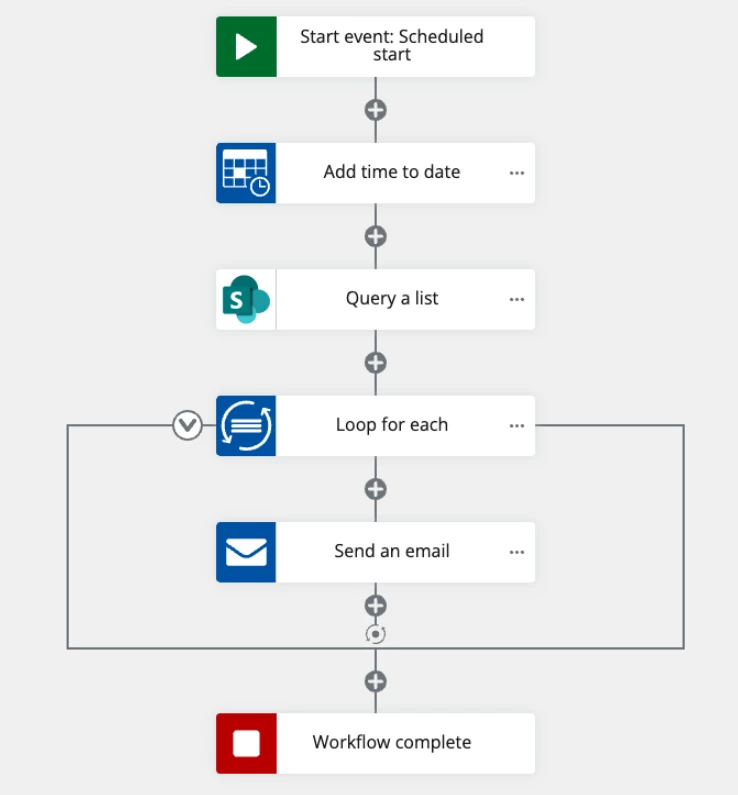
1. The first thing you will need to do is calculate a date 2 months from the current date. Use the Add time to date action to do this calculation.
2. Query the SharePoint list. Configure a condition in the query where the due date is equal to or less than the date calculated in step 1.
3. Loop through the items returned and send an email.

The structure of the workflow will look something like this:


Forum|alt.badge.img
  • Author
  • Novice
  • January 7, 2026

Hi ​@Depar72 

To accomplish something along these lines you can use the add time to date action to get the date 60 days out from the current date and the date 61days out from the current date.  Then in the query list action you can check that the due date is after or on to the first variable and before the second variable.  Note that you’ll want to use days instead of months in advance to make sure you don’t miss any values on the list.  See the screenshots below for the setup:

Date Time Variables:


Query List Condition:


Thank you so much for this help! One more clarifying question When I'm creating the variable “date60Days” and Date61Days” is the default value just 2 months from now? and it will always calculate 2 months from the current date? I think that's where I mainly get lost creating the variable and how it pertains to the current selection.


Forum|alt.badge.img+11
  • Nintex Employee
  • January 7, 2026

@Depar72 The default doesn’t matter in this case because the action config will reset it to be the current date + 60 days.  The basic way to think of this is in the add time to date action, we take the Current Date Context variable and add 60 days to it then store it in the date variable we created.  That would overwrite the default value for the variable.  We do the same thing on the 61 day variable.  Then because the workflow is scheduled (presumably every day), the workflow runs, get’s the current day plus 60 and plus 61, then checks the list for your due dates between those two dates.