Nintex Community Menu Bar
Solved

Parallel Task staying active after completion of parallel branches in WorkflowCloud

  • December 31, 2025
  • 4 replies
  • 26 views

Forum|alt.badge.img+4

Setup:

Parallel paths split into two branches. Branch 1 has task 1, and branch 2 has task 2. The completion condition is true so it will complete if only a single branch is complete. 


Issue:

Both tasks are assigned and created, but if Task 1 is completed causing the parallel paths to complete, the Task 2 is still available and can be complete even if the flow has already processed actions past the parallel paths action.


How can we have Task 2 be invalid or inactive and not show up in the assignee’s My Nintex tasks once the parallel paths have been completed?


Best answer by SimonMuntz

Hi ​@LukeR,

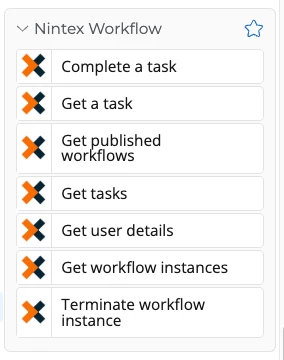
There is a set of actions that enable you to locate tasks and then complete them.
Does this resolve your issue?


4 replies

SimonMuntz
Forum|alt.badge.img+23
  • Collaborator
  • Answer
  • January 4, 2026

Hi ​@LukeR,

There is a set of actions that enable you to locate tasks and then complete them.
Does this resolve your issue?


Forum|alt.badge.img+4
  • Author
  • Rookie
  • January 5, 2026

I think I can make that work. But out of curiosity, what is the logic behind keeping a task active once past the parallel branch? It seems like a bug since logically, the task should no longer be valid.


SimonMuntz
Forum|alt.badge.img+23
  • Collaborator
  • January 5, 2026

Hi ​@LukeR,

Thank you for your question.
I would not call this a bug. I think it's just non-implemented functionality.
I understand your point of view, but it is also possible that some workflows still require the task to be actioned at a later date. If you would like to see this functionality added to the product, you can submit your idea on the Ideas Forum.


Forum|alt.badge.img+4
  • Author
  • Rookie
  • January 5, 2026

@SimonMuntz I understand what you’re saying and can see how some may want that. I added it into the Ideas Forum incase there is an option that can be added to allow it to auto-close. Also, I was able to use the Nintex Tasks actions to accomplish it in my flow.