
Nintex Community Menu Bar
Solved

Nintex Workflow Cloud Choice Fields with Conditional Rules NOT Refreshing

  • Sep 17, 2024 1:47 PM UTC
  • 4 replies
  • 137 views
  • Translate All

Forum|alt.badge.img+1

I have a Nintex Workflow Cloud form with multiple choice fields. Some of these choice fields have follow up questions which will be displayed based on preceding response.  An example:

Choose Preferred Social Activity Type:

  1. Online events
  2. In-person meetups
  3. Other
    If other, list activity type below: _______________________

If a user selects (C) or ‘Other’, the follow question will display (If other, list activity type below: ______________________ ) as a required field.  However, as in some cases, a user may change their mind, check back on another option, say option  (A): Online events.

The problem: When a user switches response to A, Nintex will still force the user to fill-in the “If other, list activity type below: _________________” field. 

This is definately, refreshing issue and does not meet my requirement. See attached snippet of the error message.

Best answer by Simon Muntz

Hi @tadugna,

This sounds like an issue with the rule.
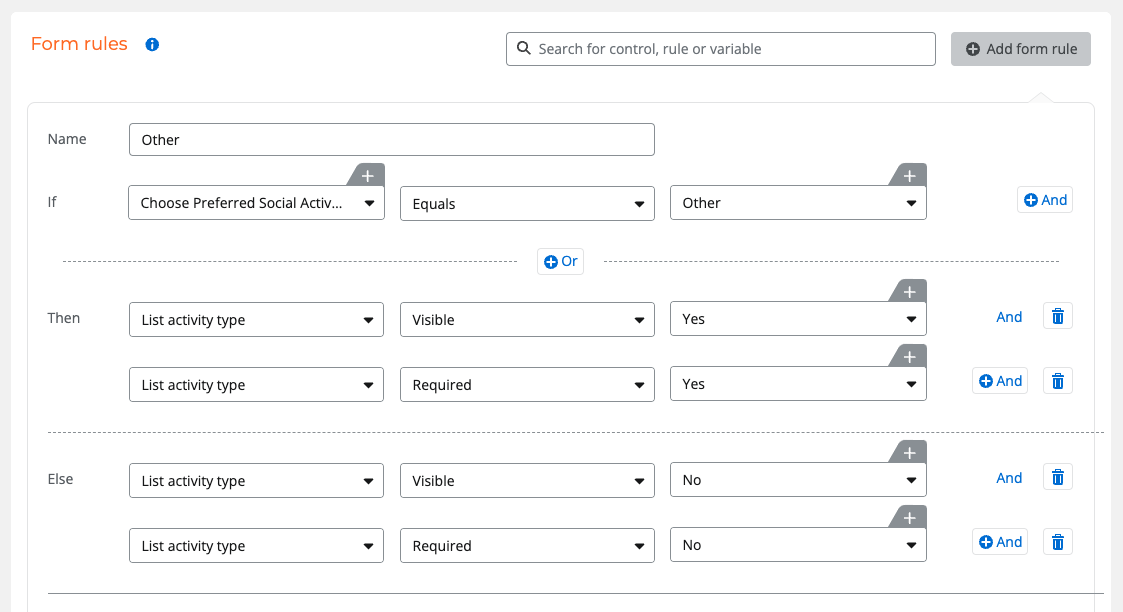
Ensure you add an Else clause to your rule to reverse the field being displayed and required.
Example:


View original

4 replies

Simon Muntz
Nintex Partner
Forum|alt.badge.img+23
  • Nintex Partner
  • Answer
  • Sep 17, 2024 11:09 PM UTC

Hi @tadugna,

This sounds like an issue with the rule.
Ensure you add an Else clause to your rule to reverse the field being displayed and required.
Example:


Translate

MillaZ
Nintex Employee
Forum|alt.badge.img+23
  • Nintex Employee
  • Sep 23, 2024 10:53 AM UTC

Hi @tadugna 

Have you resolved your issue?

Translate

Forum|alt.badge.img+1
  • Author
  • Novice
  • Sep 24, 2024 2:26 AM UTC

Hi @tadugna,

This sounds like an issue with the rule.
Ensure you add an Else clause to your rule to reverse the field being displayed and required.
Example:


Hi @tadugna,

This sounds like an issue with the rule.
Ensure you add an Else clause to your rule to reverse the field being displayed and required.
Example:


Thank you much! This worked for my workflow but hope there is a native way of dynamically refreshing dependent fields, especially for non dev fox. Thank you!!

Translate

Simon Muntz
Nintex Partner
Forum|alt.badge.img+23
  • Nintex Partner
  • Sep 25, 2024 4:34 AM UTC

Hi @tadugna 

In previous Nintex Forms products, form rules did automatically reversed if not true.
This seems to make Nintex Automation Cloud forms look inferior, but in fact, the reverse is true.
This makes the rule structure even more flexible. I don’t think it is a matter of having to be a developer but just a different learning curve. Thank you for your feedback.

Translate