



We're excited to introduce the Organization Portal, a new portal to help organization admins manage their Nintex organization more effectively.
Many Nintex customers have more than one tenant, but what you might not be aware of is that those tenants are part of the same organization. Some settings are shared between all tenants in the organization, such as SSO or SCIM. Until now, those features have been configured from within a tenant, but they affect all tenants, leading to potentially unexpected impacts.
The Organization Portal is our first step in exposing the concept of an organization to all customers and making it easier and clearer the impact of changing organization-level features.
Who has access to the Organization Portal?
To access the Org Portal, you need to be assigned a new role: Organization Admin. The Organization Admin role will replace domain verification as a method for getting additional permission to manage SSO or SCIM.
All existing domain verifiers have been assigned the Organization Admin role as part of the release of the Org Portal. If you don’t know who your Organization Admin is, please contact support.
How do I find the Organization Portal?
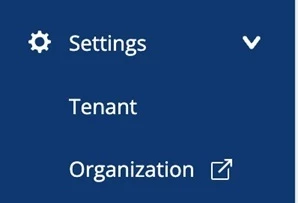
For customers with the new navigation the Organization Portal can be accessed by clicking “Settings” in the left menu bar to expand the full settings menu and then clicking “Organization” in the expanded menu.
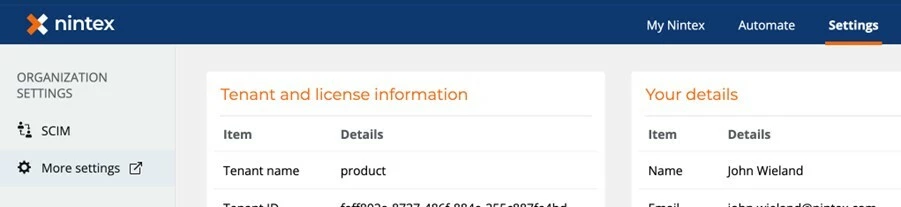
For customers with the old navigation the Organization Portal can be accessed by clicking “Settings” in the top menu bar and then clicking “More settings” under “Organization Settings”.
How do I add more Org Admins?
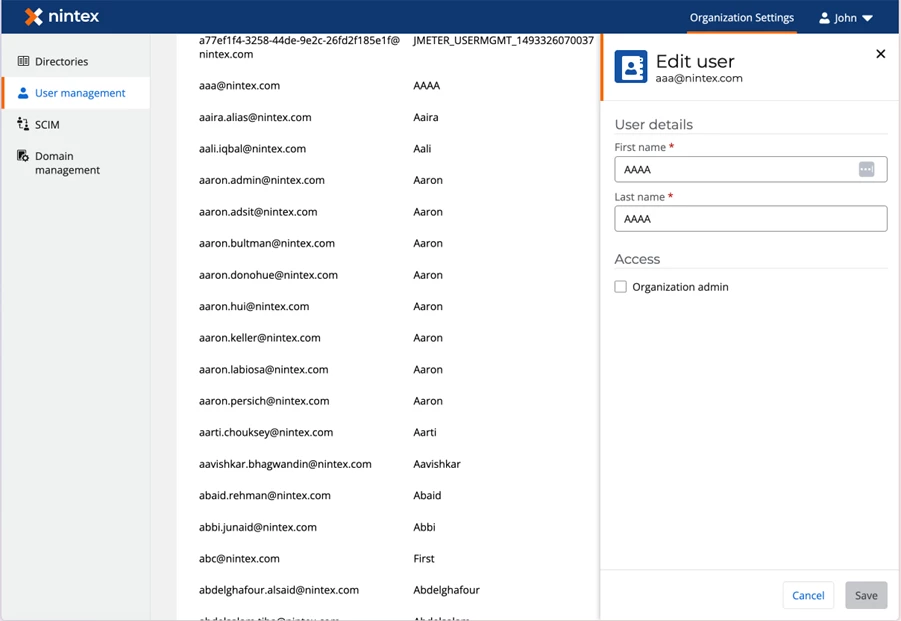
New Organization Admins can be assigned from within the Org Portal using the following steps:
- Open the Org Portal
- Click the users page
- Find the user you want to assign as an Org Admin and click the ‘...’ and select edit
- Check the “Organization Admin” checkbox and they will now have access to the org portal and all associated functionality
What can I do in the Org Portal?
To start with the following features are available in the org portal:
- Users – View all the users in your organization in one place.
- Directories – Configure and manage identity providers at the organization level.
- SCIM – Automate user lifecycle management across your environment.
- Domain Management – Manage the verified domains for your organization.
What’s next?
We’ll be continuing to migrate org-level features into the organization portal. We’ll also be adding new features such as support for multiple SSO and tenant-level auth configuration, and full user lifecycle management from the org portal, including adding and removing users and assigning roles.
The Org Portal is the foundation for more powerful organization-level management and governance features to come and we’d love your feedback as you begin using it.
Share your thoughts and questions in the comments below.