Nintex Community Menu Bar
Question

Change Instance data

  • January 22, 2026
  • 11 replies
  • 37 views

Forum|alt.badge.img+4

Is there a way to change instance data in xxxxxxx.workflowcloud.com. while we create/update form data to a sharepoint online list. but we can’t edit the data while it is still process.

11 replies

Sasan
Nintex Employee
Forum|alt.badge.img+12
  • Nintex Employee
  • February 2, 2026

@RC1101 Please provide more details in reproducing your use case and what you are trying to accomplish.  


Forum|alt.badge.img+4
  • Author
  • Rookie
  • February 2, 2026

they start the process with wrong data. or on subsequent form put in the wrong data.

on current k2 blackpearl, we can write code to change data.

SourceCode.Workflow.Client.ProcessInstance _K2PI = K2Conn.OpenProcessInstance(_iProcInstID);
_K2PI.DataFields[txtFieldName].Value = txtValue;
_K2PI.Update();


Forum|alt.badge.img+4
  • Nintex Employee
  • February 3, 2026

@RC1101 Just wanted to confirm for my undestanding, what you are looking to achieve is update the instance data once workflow has been initaited? This is currently not available in Workflow Cloud.

Saying that, what’s the use case where you would like to change the data while its processing?


Forum|alt.badge.img+4
  • Author
  • Rookie
  • February 3, 2026

To fix data entry error. Mostly on workflow that involve dollars amount. missing tax, shipping cost, etc.

On the old system onprem. we were mainly put data to a sharepoint list that we can update. and the local website page code would always get the info from the sharepoint list.


Forum|alt.badge.img+4
  • Nintex Employee
  • February 4, 2026

How or at what point do you identify that the data error has occured? Does the user who submitted the data notify about the error?  Do you ask the user who submitted the initial data to correct it? Does the new information alter the outcome of the workflow? 

The reasons for above questions is, I believe you can build this into your existing workflow where you can assign the task back to the same user or others who can edit the information, using a form interface (for example) while the workflow is running. Would that solve what you need to achieve? If not, perhaps can you share a detailed example and I can try to find an alternative approach. 


Forum|alt.badge.img+4
  • Author
  • Rookie
  • February 5, 2026

usually will be the subsequent user will notice the issue. and they will work with us(IT) and the originator 


do you mean like a stage? can it get back to the request or does it have to be another form. 

so we should design all our workflow with stage instead of a flow(if else)?


Forum|alt.badge.img+4
  • Nintex Employee
  • February 8, 2026

Generally a subsequent user is a stage gate where they approve or reject based on the accuracy of the information. Here are some alternatives however it would highly depend on your business process.

  1. Let say if the subsequent user rejects the information, you can assign the form back to the first user to correct the information. Alternatively, as part of the same task, the subsequent user can also amend the information using the form. You can achieve this by using Assign a task to multiple users workflow action. 
  2. There are other ways to acheive this as well where you can also use Branch by stage action to create various branches based on the certain conditions e.g. if dollars amount is less than/more than a certain value or if tax field is emply, etc then the workflow can execute a branch where you can enforce correction using the above form. 
  3. You can also use Table Forms where the form saves data natively in Nintex tables. The subsequent users can then modify the data in the tables through My Nintex either directly on the table grid or using the form interface. This capability also enables more flexibility on running workflows where you can initiate workflows based on Table start events

If the above options don’t work, let us know if you would like to discuss this over a call. Perhaps we can share more context and find an alternative option that works for your scenario. 


Forum|alt.badge.img+4
  • Author
  • Rookie
  • February 10, 2026

1)how do you do that? the subsequent form will have those field readonly

2)it is most likely they make some mistake that not something we would be able to put logic on all scenarios. we would probably add a new outcome on a form and let the user pick it if they think there is data issue and going back to the originator

3)wouldn’t that have the same issue as sharepoint list? the form does not access the table directly. information will have to get it from a query table action before that and put it in a variable


Forum|alt.badge.img+4
  • Nintex Employee
  • February 12, 2026
  1. When you use “Assign a task to multiple users” action in the workflow, you can create a “Task Form” where you can assgin default value using the start form variables for supported fields (this populates the information the first user has inputted in the form). Additionaly you can make selected fields read only or editable by adjusting in the settings panel for the given control. This will allow selected fields to be editable, enabling the subsequent user whom this task is assigned to edit the required fields. 
  2. If its a mistake, then adding a logic won’t be feasible however my suggestion was to set some guardrails that might identify mistakes. Saying that this may not be always logical. In such occasions, the best way would be to terminate the instance and restart. 
  1. Regarding table forms- please see this community article

Forum|alt.badge.img+4
  • Author
  • Rookie
  • February 12, 2026

1)it is setup as readonly because we don’t want subsequent user to edit thing. unless there a way for only allowing originator to edit.


3)I see I can start a workflow with a add table record. but inside the workflow “assign a task to multiple users” doesn’t directly ref the table column.


Forum|alt.badge.img+4
  • Nintex Employee
  • February 13, 2026
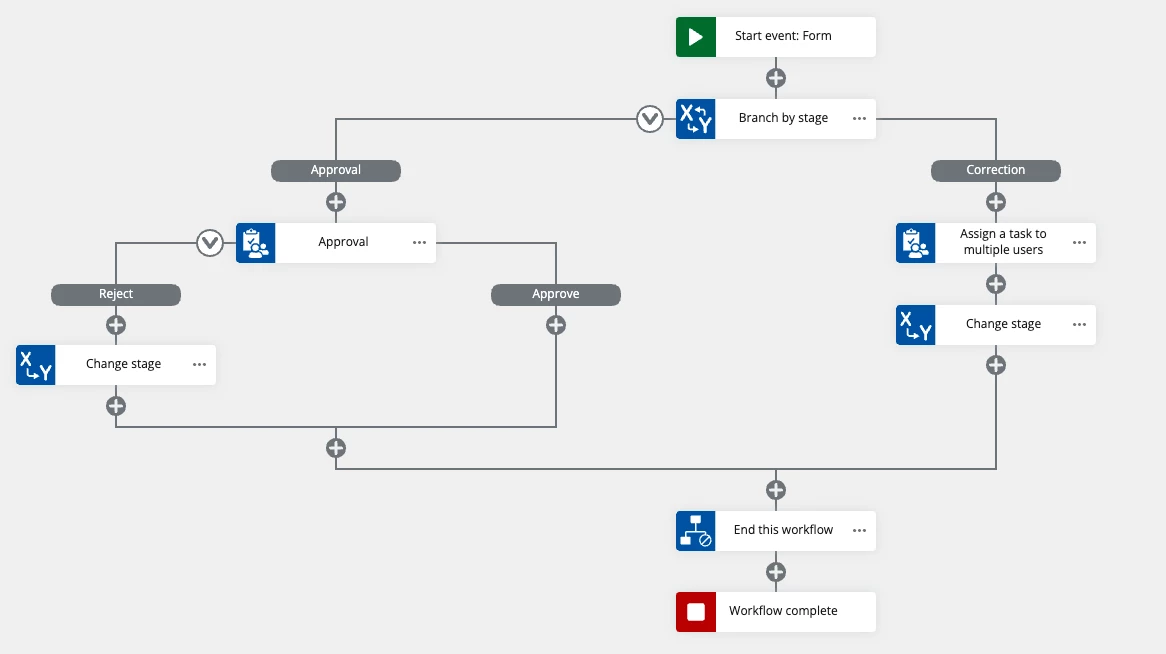
  1. One of the ways you can get the originator to edit is the form is by following method. I have also attached an illustration of a simple worklfow which might help with following context. 
    1. Using Branch by stage logic and flow action create “Approval” and “Correction” flow. Enable approval flow as your inital stage. You can add more as per your business process. When the initial form is submited, the workflow will navigate to the “Approval” flow.
    2. In the approval flow, assign the task to the subsequent user using Assign a task to multiple users action. Here you can use Task form to display the information as read only. If there are no errors, they will approve to move to next stage. If there are errors, they will reject the task. On rejection, use Change state action to send the workflow to “Correction” flow. 
    3. In the correction flow, use the same Assign a task to multiple users action where you can assign the task to the Workflow initiator using start event variable. Make sure you have disabled multiple outcomes, so this task is owned the orginator. Here you can use the task form and enable editing for the form controls you want the originator to be able to edit. Once the form is resubmitted, use “Change State” action to take the user back to the “Approval” flow if you want the subsequent user to verify and approve. You can also choose other path if you wish to skip assigning it back to the subsequent user in this instance. 
  1. Regarding, inside the workflow “assign a task to multiple users” doesn’t directly ref the table column - One of the way you can achieve this by is using table variables to map the information back to the form. You can find further information on how to acheive this on this help page.