Nintex Community Menu Bar
Question

Can only query the initial level of a JSON structure

  • January 15, 2026
  • 5 replies
  • 20 views

Forum|alt.badge.img+4

I am trying to get the file names of files in a collection that were created with Document Generation. I am looking at the file with the ‘Query JSON’ action, but am only able to parse the first level. To get the value of an object 3 levels down in the structure, I have to use 3 ‘Query JSON’ actions. Is this how it’s supposed to work?

5 replies

Forum|alt.badge.img+4
  • Author
  • Rookie
  • January 15, 2026

After a lot of experimenting, it appears the issue is that the collection of files is structured so that each file’s JSON is surrounded by double quotes making it a string.

Here’s what the collection of files looks like:
[
"{\"blob\":{\"name\":\"2dc8e53d-9612-4602-9781-a345fd0a40a1/045b90dd-c781-4b98-81d4-ad8de94134b5_0_5/3b5387ff-1957-4d38-a0e0-c3b2a0678c83-045b90dd-c781-4b98-81d4-ad8de94134b5_0_5-6/d5312179-5358-4dce-ab12-c49e9db95623\",\"fileName\":\"File1.pdf\"}}"
,
"{\"blob\":{\"name\":\"2dc8e53d-9612-4602-9781-a345fd0a40a1/045b90dd-c781-4b98-81d4-ad8de94134b5_0_5/3b5387ff-1957-4d38-a0e0-c3b2a0678c83-045b90dd-c781-4b98-81d4-ad8de94134b5_0_5-6/02e38a61-4002-420a-9ee7-762e94c1c202\",\"fileName\":\"File2.pdf\"}}"
,
"{\"blob\":{\"name\":\"2dc8e53d-9612-4602-9781-a345fd0a40a1/045b90dd-c781-4b98-81d4-ad8de94134b5_0_5/3b5387ff-1957-4d38-a0e0-c3b2a0678c83-045b90dd-c781-4b98-81d4-ad8de94134b5_0_5-6/e9866886-7122-4a48-8b17-24ac1f30db2d\",\"fileName\":\"File3.pdf\"}}"
]


With each element of the collection being a string, they cannot be parsed as JSON. However, when I parse each collection element separately, the double quotes surrounding the element is removed and the JSON is then able to be parsed.

Here’s a single element that has been extracted from the collection of files using the expression ‘$[0]’:

{"blob":{"name":"2dc8e53d-9612-4602-9781-a345fd0a40a1/045b90dd-c781-4b98-81d4-ad8de94134b5_0_5/3b5387ff-1957-4d38-a0e0-c3b2a0678c83-045b90dd-c781-4b98-81d4-ad8de94134b5_0_5-6/d5312179-5358-4dce-ab12-c49e9db95623","fileName":"File1.pdf"}}


It’s still odd that I cannot get ‘fileName’ from that JSON structure. ‘$.blob.fileName’ still returns nothing even though ‘$.blob’ gives me the blob value successfully.

Is there a problem with the JSON parsing or am I doing it wrong?

My guess is that I’m assuming the collection of files is supposed to be JSON, but it is actually just an array and each element of the array is the JSON text which I need to parse individually. But that still leaves the issue of not being able to get ‘fileName’ from the JSON structure containing ‘blob’.


Forum|alt.badge.img+11
  • Contributor
  • January 15, 2026

@LukeR 


I’ve also been annoyed with how/when NWC escapes things...


As you found, the collection returned by the Doc Gen action is a collection of strings, which are valid JSON strings once their un-escaped. That’s why you can’t query passed the initial collection layer. 


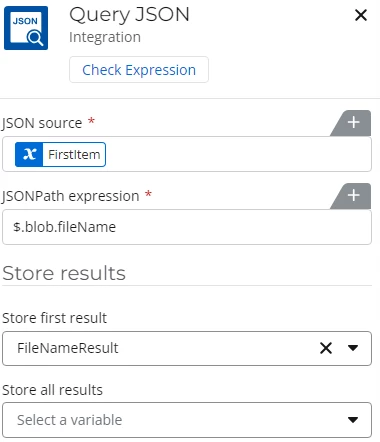
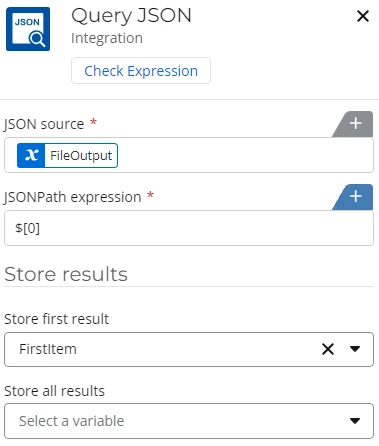
But, when you say that $.blob.fileName doesn’t return anything, is that when you’re using the full collection of files from the doc gen action, or just the specific item in that collection returned by $[0]? $.blob.fileName works for me when I’m doing it on the single item returned by $[0]
1st Query JSON


2nd Query JSON


Forum|alt.badge.img+4
  • Author
  • Rookie
  • January 16, 2026

It’s after I pull out $[0] into its own variable.

When I put it in its own variable, it looks like this:

{"blob":{"name":"2dc8e53d-9612-4602-9781-a345fd0a40a1/045b90dd-c781-4b98-81d4-ad8de94134b5_0_5/3b5387ff-1957-4d38-a0e0-c3b2a0678c83-045b90dd-c781-4b98-81d4-ad8de94134b5_0_5-6/d5312179-5358-4dce-ab12-c49e9db95623","fileName":"File1.pdf"}}


I would then expect to be able to use $.blob.fileName to get the filename. However it’s still blank. I have to pull out $.blob into a variable which gives me this:

{"name":"2dc8e53d-9612-4602-9781-a345fd0a40a1/045b90dd-c781-4b98-81d4-ad8de94134b5_0_5/3b5387ff-1957-4d38-a0e0-c3b2a0678c83-045b90dd-c781-4b98-81d4-ad8de94134b5_0_5-6/d5312179-5358-4dce-ab12-c49e9db95623","fileName":"File1.pdf"}

Then, I can get the filename using $.fileName.

It works as expected using their regex test api… Apply a regular expression | Platform Tools, but not in the Query JSON action. 


Forum|alt.badge.img+11
  • Contributor
  • January 16, 2026

Very odd! If I have the two actions setup like my screenshots in my first comment, the filename of the first file in the collection is extracted into the FileNameResult variable. I have no idea why it would behave differently for me than for you. 


If you want, below is an export key of a simple workflow that works for me. It’s not using the doc gen action, just a file upload in a form. 

NKJ4tuQBPqAiGvpBLw77JTUPbxNFNXQwCTJW1CZwWR7312sxE


Forum|alt.badge.img+4
  • Author
  • Rookie
  • January 16, 2026

Hmmm, after going through my tests again, I can now get the fileName with $.blob.fileName. I’m not sure if I had a typo before or what, but that didn't seem to work for me before. But I’m glad it is now. :) Thanks for talking through this with me, ​@bsikes . Sometimes that’s all that is needed!