



Topic
How to make a field required on a Nintex Form using a validation rule.
Instructions
1. Select the control that is to be required and select 'Add Rule' in the ribbon.
2. In the Rules pane on the right, select '+Add'
3. Set the rule
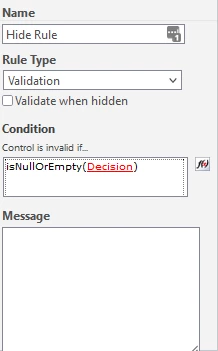
Classic Forms: Set the Rule Type to 'Validation' the Condition to 'IsNullOrEmpty(ControlName)'.
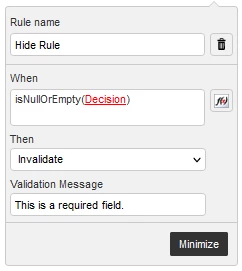
Responsive Forms: Set When to 'IsNullOrEmpty(ControlName)' and Then to 'Invalidate
Note: If a SharePoint column is required on a SharePoint list it will automatically be required on a Nintex Form. Some controls have a 'Validation' setting that can alternatively be used to validate a control. Although there are multiple ways to require or validate a field, it is best to use a single method to avoid conflicts in logic.