Nintex Community Menu Bar
Answer

How to use Query List on a multiple lookup Column with Filter Contains

  • November 6, 2025
  • 6 replies
  • 48 views

Forum|alt.badge.img+1

Hello,

on my onPrem SharePoint SE Farm, I have two lists. 

List 1 contains a lookup column with multiple entries that refer to List 2, “Other seminars.”

List 2 contains seminars with the field “Seminar title.”

For example, one entry in List 2 has “IT Workshop” as the seminar title. 

List 2 has the lookup value “IT Workshop” and others in the “Other seminars” field.

I would like to use Query List to obtain only the IDs of the entries in List 1 that contain “IT Workshop” in the “Other seminars” column.

My CAML is:

<Query>
  <Lists>
    <List ID="{75EBDC1E-BBDF-4383-BBAF-C61C019E8948}" />
  </Lists>
  <ViewFields>
    <FieldRef Name="ID" />
  </ViewFields>
  <Where>
    <Contains>
      <FieldRef Name="otherSeminars"  />
      <Value Type="Lookup">IT-Workshop</Value>
    </Contains>
  </Where>
</Query>
 

I also tried only the ID “13” of the IT Workshop and this: 13;#IT-Workshop. But anytime the same error.

I receive the following error message: Error retrieving list data. Exception from HRESULT: 0x80131904

How can I resolve this problem?

Thank you so much for your help.

Sabine
Best answer by Rainer-Straub

 Hi ​@SabineSchmidle,

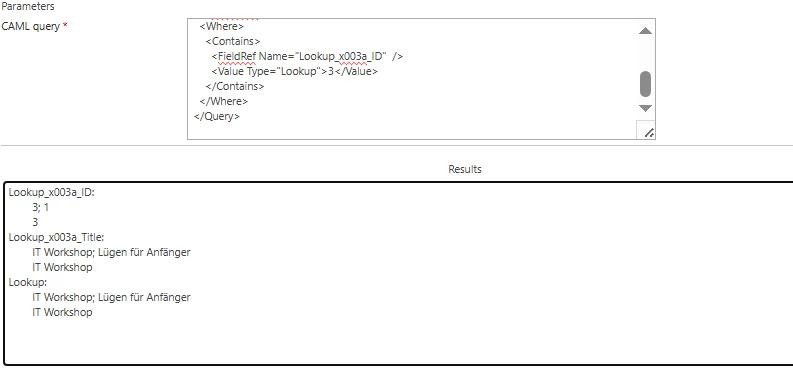
I rebuilt your requirement in my environment and on my side it works successfully. 

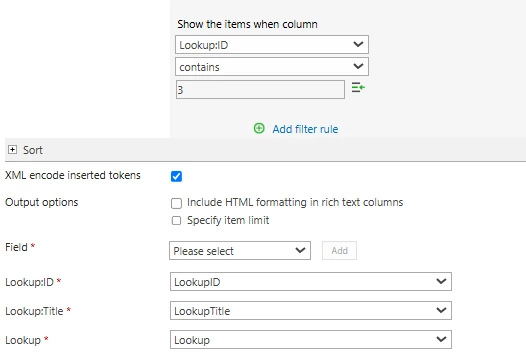
My query goes against the Lookup:ID column (it is important to select also the ID when you want to

make a query against it. In my case, ID 3 is IT Workshop. 


As you can see, I get all the values back that is needed

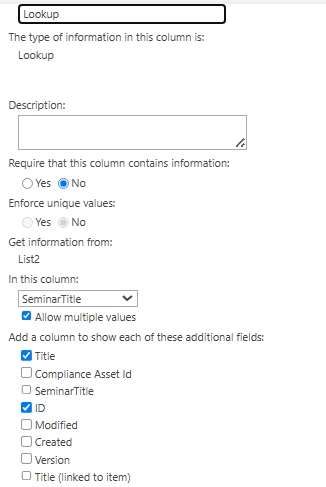
The lookup column configuration looks is as following:


I´ve also added / selected the Title and ID to ensure, that the values are available in List1. 

6 replies

SimonMuntz
Nintex Employee
Forum|alt.badge.img+23
  • Nintex Employee
  • November 10, 2025

Hi ​@SabineSchmidle 

Welcome to the community.
I Googled the error, and one of the responses mentions the list view threshold.
How many items are in the list that you are querying?


Forum|alt.badge.img+1

Hi ​@SimonMuntz 

thanks for your answer. It is a test-list and has only 3 items and the other list contains 18 docs. 


SimonMuntz
Nintex Employee
Forum|alt.badge.img+23
  • Nintex Employee
  • November 10, 2025

Hi ​@SabineSchmidle,

I just wanted to let you know that I am not a CAML query expert. I am just going off the MS documentation, etc.
From what I am reading, it does not look like a lookup field supports <Contains>. I think you have to use <Eq>
Additionally, when querying a lookup field, you must use the ID, as you have already tried, but you were using Contains and not Eq.


Forum|alt.badge.img+1

Hi ​@SimonMuntz

if I use Eq on another column, which has a 1:1 everything works.

But I have a lookup column with multiple entries, that's why an Eq doesn't work. The output is null.  


Forum|alt.badge.img+1
  • Nintex Employee
  • Answer
  • November 28, 2025

 Hi ​@SabineSchmidle,

I rebuilt your requirement in my environment and on my side it works successfully. 

My query goes against the Lookup:ID column (it is important to select also the ID when you want to

make a query against it. In my case, ID 3 is IT Workshop. 


As you can see, I get all the values back that is needed

The lookup column configuration looks is as following:


I´ve also added / selected the Title and ID to ensure, that the values are available in List1. 


Forum|alt.badge.img+1

Hallo ​@Rainer-Straub,

thank you very much for your message. In all these years, I have hardly ever worked with Lookup:ID, but that was the solution, it works. Thank you very much, you never stop learning.
Best regards