

Nintex Community Menu Bar
Question

Date difference formula

  • February 17, 2026
  • 6 replies
  • 43 views

Forum|alt.badge.img+11

Hello,

I have recently just come across an issue with the date difference formula I have used for a couple of years now.  Its been working until now. 

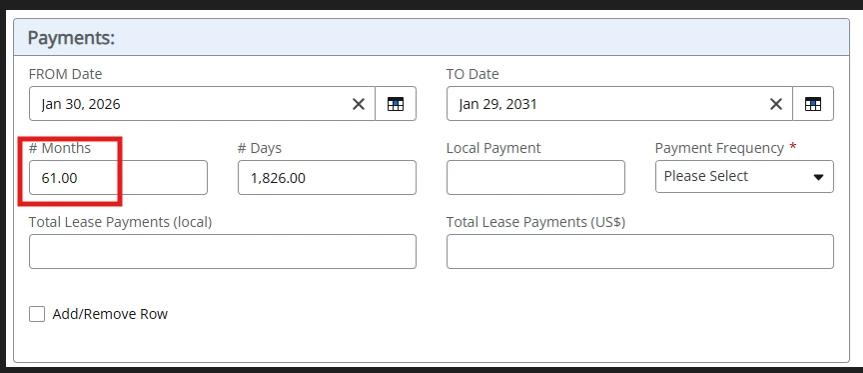
Below should be 60 months but instead is 61…

Here is the formula I am using:
dateDiff([Datetime].[TotalMonths],[Form].[fromDate_GP1],dateAdd("Months",1,[Form].[toDate_GP1]))


6 replies

  • February 19, 2026

With these things it matters whether you want to round up or down, what’s the intended behaviour? 


Forum|alt.badge.img+11
  • Author
  • Scout
  • February 19, 2026

@BobR ,


Hello! So I need to pull the months that stand between those two dates (the same happens in the days box) entered in the “from/to” date fields.

With the formula I am using, I notice with 1 I get 61 months and if I replace the 1 with 0, I get 59 months but never 60.


  • February 19, 2026

Well yeah, that’s because if you add one month to Jan 29th 2031, you end up at Feb 29th 2031 which doesn’t exist (2031 is not a leap year), so you end up on March 1st, so more than a month after Jan 31st. Which leads me back to my question, what is the intended behaviour because there often isn’t an exact integer number of months between two dates. Getting months difference in date calculations is often messy because the length of a month varies from month to month. 


tl;dr: From Jan 31st 2026 to Jan 29th 2031 is slightly shorter than 5 years. The system rounds down to 59 months. From Jan 31st 2026 to Mar 1st 2031 is slightly over 61 months (60 months is to Jan 31st 2031, then more than one month to Mar 1st), so you get 61 months as the system rounds down. 


Forum|alt.badge.img+11
  • Author
  • Scout
  • February 19, 2026

@BobR ,


Ok, so the only intentions is to find out how many months sit between those 2 dates. I’m not sure how much more to explain that or how to handle. I guess is there something wrong with the formula I’m using? Are there any suggestions? Should I look at another way of grabbing the number of months between those 2 date fields?


Thanks 


Forum|alt.badge.img+11
  • Author
  • Scout
  • February 20, 2026

@BobR ,


Hi! Just reaching out to see if you had any updates to my last response…do I need to raise a Nintex ticket?


Thanks


  • February 24, 2026

The issue is that “how many months sit between 2 dates" is not as simple of a question as you make it seem. How many months are between today and tomorrow? It’s often not a whole number. And even aside from that, not all months are equal. February is 28 days long, or 29 days on leap years. Some months are 30 days long, some are 31 days. 

You need to be aware of these issues if you want to actually get a good formula. Your current formula isn’t good, it doesn't give the amount of months between the two dates at all. It adds an extra month to the second date, and then takes the difference between the first date and whatever ends up on the “add another month to the second date”, and then rounds down. 

Simply adding another month to a date is actually not that trivial. What is a month after 29th January 2031? 29th February 2031 doesn’t exist. So you end up with issues here. 

In short, your issue isn’t with Nintex, it's with the calendar and how humanity at some point decided to do months with different lengths. You need to make a decision of how to deal with these edge cases before you can start to decide on what kind of formula you want.