Nintex Community Menu Bar
Answer

Is there still custom CSS and Javascript in new Responsive Nintex Forms?

  • August 16, 2017
  • 12 replies
  • 268 views

Forum|alt.badge.img+9

Is there still custom CSS and Javascript in new Responsive Nintex Forms coming out?


We just javascript to do things like "tabbed" forms, or queries to large data sets in CSVs

And all kinds of CSS for changing look and feel

Best answer by EuanGamble

Hi ‌,

JavaScript is not planned for Responsive Forms. You can still continue to use JavaScript in Classic forms, however Nintex does not support custom JavaScript.

We are still supporting Classic Forms and there is no end of life for this designer.

Regards,

Euan

12 replies

Forum|alt.badge.img+4

Hello,

in a show in Paris in june they said no css and javascript in v1 of responsive form

css will be in a v2

no javascript for the moment


Forum|alt.badge.img+2

HI Brent,

as you know you can still have the Pixel Perfect Forms where CSS and Java scripts are supported.


Forum|alt.badge.img+9
  • Author
  • August 17, 2017

Is there a thought/plan to eventually support JavaScript?  Or is it not even on the radar?

Is there an end of life for the Pixel Perfect ones?  Or will they be supported indefinitely?


EuanGamble
Nintex Employee
Forum|alt.badge.img+13
  • Nintex Employee
  • December 7, 2017

Hi ‌,

We dont have any plans to add CSS to the responsive designer. We are considering further style options based on customer feedback.

Cheers,

Euan


EuanGamble
Nintex Employee
Forum|alt.badge.img+13
  • Nintex Employee
  • Answer
  • December 7, 2017

Hi ‌,

JavaScript is not planned for Responsive Forms. You can still continue to use JavaScript in Classic forms, however Nintex does not support custom JavaScript.

We are still supporting Classic Forms and there is no end of life for this designer.

Regards,

Euan


Forum|alt.badge.img+9
  • Author
  • December 7, 2017

Thanks, biggest gap I have left then is large datasets, being able to do some kind of "lookup" to something like Customers or Products would be the biggest value add.  Managed Metadata is a start but super hard to maintain and doesnt work in mobile.  Otherwise, i'm quite happy with how I've been able to convert existing solutions into the new Responsive form, and dont really miss the CSS that much.


EuanGamble
Nintex Employee
Forum|alt.badge.img+13
  • Nintex Employee
  • December 8, 2017

Hi Brent Ellis‌,

Yep I hear that request loud and clear. I am getting this request from quite a few people and am currently considering what our options are in this space.

Cheers,

Euan 


Forum|alt.badge.img+1
  • February 19, 2018

I am trying to place some custom css on a responsive form for the print to pdf action.  Since custom css is not allowed on responsive forms I won't be able to change the print to pdf significantly enough so that I get a good print out.  I am forced to use classic forms.  Responsive forms don't seem to be of much use unless you just want to create a very basic form and you have no need to print it.


Forum|alt.badge.img+1
  • Rookie
  • November 14, 2019

I just found a quick fix to hide the Edit button when using Nintex Responsive Form (no sure if works on the later New Responsive Form).


Nintex removed the option to include CSS scripts in the Responsive Form therefore making it difficult to customize elements and controls inside the form. However, for this need, you should now be able to hide ribbon elements in the responsive forms for Sharepoint Online.


Here are the steps, Pretty simple.


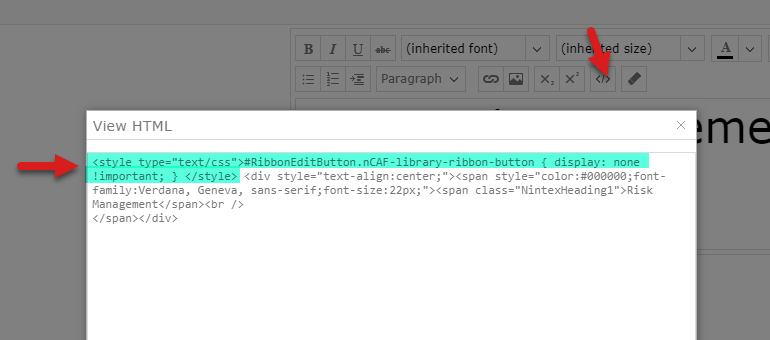
1. Use a label Control, go to Settings and click on the html icon to bring the html editor.

2. Paste the following CSS script: <style type="text/css">#RibbonEditButton.nCAF-library-ribbon-button { display: none !important; } </style>

3. Publish the form and you should see the Edit Button is not showing anymore.


So, by adding your custom CSS script inside the html content of the label control, you should be good. Of course, everyone has different needs, but you can give it a try! 


Now, for us this works perfect in situations where we don't want to allow users to edit content but still be able to view it.

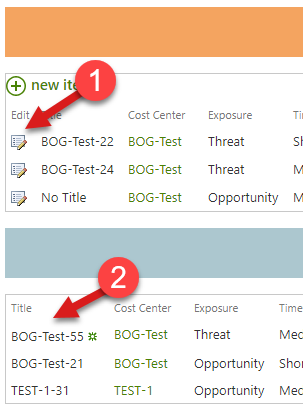
If they need to edit, we provide with the Edit option as you see in the image below.


We use a dashboard page where each person can take different types of actions. We filter items so those that might require edits, are shown on chart 1 and once edits are made and move along in the process, we don't what people to be able to edit them chart 2


Share your Kudos if this has helped you! > Thanks! :smileyhappy:
@jhonser 


  • February 19, 2020
Not exactly ideal, but this also allows you to inject JS if needed.

Forum|alt.badge.img+3
When i paste css in via the label -it works in Chrome and Firefox but not in IE.
Any ideas?

Forum|alt.badge.img+3
  • Rookie
  • June 24, 2020

 Do you have an ETA on when this functionality will be released?