This sounds pretty straight forward. If you have steps 1 and 2 already figured out, steps 3 and 4 would be configured as follows:
Query List action - Target the 'ID List' and filter using the variable created in step 2 and the column where the ID's are stored - Specify separate output per column (specify the list column where ID's are stored). This will output any values that match the filter to a collection variable
Check if Item Exists in Collection Action - Using the collection variable from the previous step as the Target Collection, use the formulated ID variable in the 'Value' - Output will be a boolean (yes/no) value (Yes if it exists, no if it doesn't)
Run If action - Specify if Boolean Variable = Yes for the run. This will run if the ID existed in the collection (meaning it existed in the list - Nest the actions to create the new ID in the run if
Create List Item Action (after Run If) - Create the unique ID in the ID list
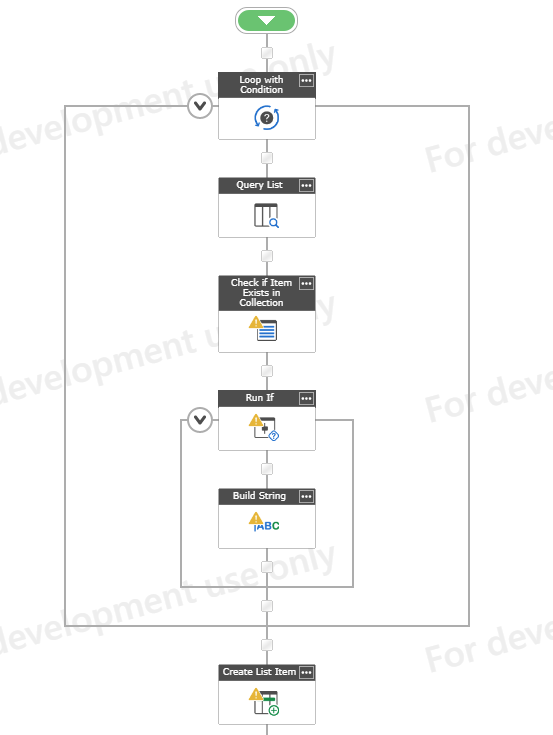
One note on this, if you want to ensure that the new ID's are not in use, you could nest steps 1-3 in a 'Loop with Condition' action and specify that it will loop until the Boolean variable equals no. The final steps for this configuration would look something like below:
This sounds pretty straight forward. If you have steps 1 and 2 already figured out, steps 3 and 4 would be configured as follows:
Query List action - Target the 'ID List' and filter using the variable created in step 2 and the column where the ID's are stored - Specify separate output per column (specify the list column where ID's are stored). This will output any values that match the filter to a collection variable
Check if Item Exists in Collection Action - Using the collection variable from the previous step as the Target Collection, use the formulated ID variable in the 'Value' - Output will be a boolean (yes/no) value (Yes if it exists, no if it doesn't)
Run If action - Specify if Boolean Variable = Yes for the run. This will run if the ID existed in the collection (meaning it existed in the list - Nest the actions to create the new ID in the run if
Create List Item Action (after Run If) - Create the unique ID in the ID list
One note on this, if you want to ensure that the new ID's are not in use, you could nest steps 1-3 in a 'Loop with Condition' action and specify that it will loop until the Boolean variable equals no. The final steps for this configuration would look something like below: