Nintex Community Menu Bar

Adding a rule with a cascading dropdown value?

  • February 20, 2020
  • 4 replies
  • 32 views

Forum|alt.badge.img+6

I need to make a Rule when a certain dropdown value is selected, another field becomes visible.  The dropdown is from a lookup list.


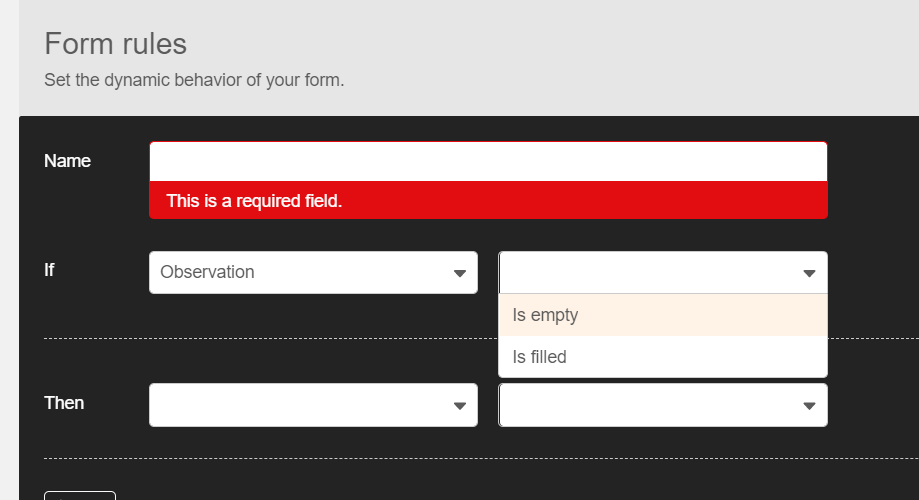
However, when I go to add the rule, I only have the "is empty" or "is filled" option.  I need the "equals" option.


How can I make that happen on Nintex Responsive Designer?6535iD02B396DE4D19EA0.png
4 replies

SimonMuntz
Nintex Employee
Forum|alt.badge.img+23
  • Nintex Employee
  • February 21, 2020

Hi,

What happens if you add the list lookup to a variable and then create a rule that says if the variable is equal to "value"

Then control Visible Yes.


Forum|alt.badge.img+6
  • Author
  • Novice
  • February 24, 2020

Doesn't seem to work.  Am I doing something wrong?

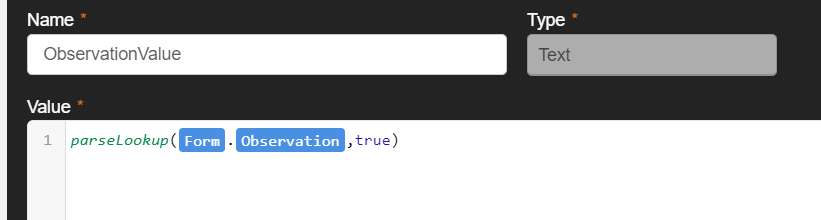
My variable and rule:


Forum|alt.badge.img+6
  • Author
  • Novice
  • February 24, 2020

Also tried this variable.  No dice.


nico
Forum|alt.badge.img+10
  • Rookie
  • February 25, 2020

You were close,


The only things that I have found to do the job is using the lookup fonction to set a variable, and use this variable in a rule.

You need to

- get the control value

- use the parseLookup fonction, to get the id

- cast in number

- use lookup fonction to get the text value


Like :

lookup("lookupListTitle","ID",convertToNumber(parseLookup([Form].[LookupControl],false)),"Title")


@anderj39 wrote:

Also tried this variable.  No dice.