



Topic
The Setup Manager freezes during upgrade after clicking on OK on the message prompt below:
"The K2 certificates are not in a valid state"
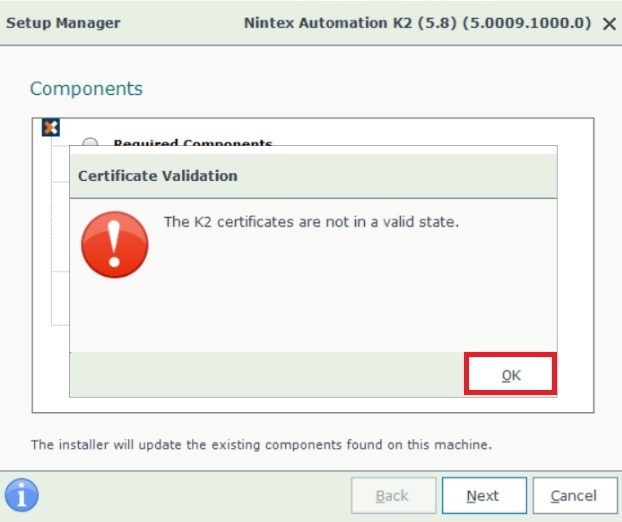
From the installer trace log, we could see that the validation fails due to invalid arguments passed. There were added " characters within the connection string making it invalid:
hh:mm:ss:>> CertificateValidation.Validate: Input args: -c:"Data Source="{SQL Server}\{Instance Name}, {SQL Port}";Initial Catalog={K2 Database};Integrated Security=True;Pooling=True;Encrypt=True;TrustServerCertificate=True" -u:{Domain}\{Username}
hh:mm:ss:>> ProcessWrapper.Execute: Start executing process: CertificateManager.exe
hh:mm:ss:>> ProcessWrapper.Execute: Arguments: validate -c:"Data Source="{SQL Server}\{Instance Name}, {SQL Port}";Initial Catalog={K2 Database};Integrated Security=True;Pooling=True;Encrypt=True;TrustServerCertificate=True" -u:{Domain}\{Username}
hh:mm:ss:>> ProcessWrapper.Execute: Timeout: 240000
hh:mm:ss:>> ProcessWrapper.Execute: Process Output:
hh:mm:ss:>> ProcessWrapper.Execute: Process Error: Could not 'validate' please provide valid parameters
Invalid arguments.
This was caused by a whitespace in between the comma after the {Instance Name} and the {SQL Port}:
{SQL Server}\{Instance Name}, {SQL Port}
Instructions
- Run the Setup Manager for your current, pre-upgrade version (K2 Five 5.6 or Nintex Automation 5.7) to perform a Configure.
- On the Database Configuration part, update the Server field to remove the space between the comma and the port.
eg. SERVER01\MyInstance,1234 - Re-install the fix pack that was last installed prior to performing a reconfigure.
- Run the Nintex Automation 5.8 installer to perform the upgrade.