Nintex Community Menu Bar
Question

Load items from a SharePoint List in a view and use a filter item from the list in another view

  • January 23, 2026
  • 2 replies
  • 11 views

Forum|alt.badge.img+1

Hello together,

I have a problem with load items in a SharePoint list. I have a form with two views. I load items in one view and i want to use a value from the dropdown list in a second view. I don’t know how to filter those data. I’ve managed to transfer the data from the first view dropdown to the form parameter and then I would like to use it in the second view as a filter, but it’s not working so far.

I hope you can help me!

Best regards

Matthias

2 replies

Forum|alt.badge.img+15
  • Scholar
  • January 23, 2026

Hi Matthias - to clarify, when you select an item in the first view, you want to filter what appears in the second view based on the selection?


ScottCaseIT
Forum|alt.badge.img+2
  • Novice
  • January 23, 2026

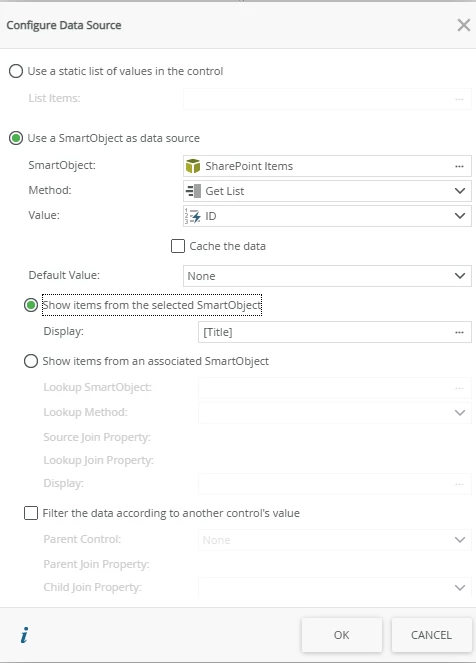
 Drop down lists aren’t populated from views, they have their own smart object attached to them. When you add a new drop down list to a view and configure it’s data source as SmartObject, there is a check box that asks if you want to automatically load the data. 

Configuring a drop-down list with a SmartObject data source.

In this case, you are going to ignore the “Filter the data according to another control” value check box as another view isn’t a control by which you can filter. However,….

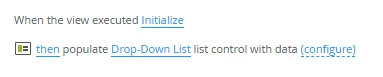
When you add a drop down, a rule is automatically added to the When the view initialize rule to populate the dropdown list data. You will want to remove or disable this rule.

Default data population rule

Instead, you will delay executing the “Populate drop-down list control action until some event occurs in your from. In this case, it sounds like from your description you will want to execute this action when you click on an item in your other view. Maybe?

On that other view, you will configure a rule that says “when something occurs” you will execute the populate data for the drop-down list on the second view like so…

View 1 populating data on the DDL on View 2

The filtering based on selection comes into play when you click “configure” There will be a tab for configuring a filter and you will be able to user a value from the selected row in view 1 to filter the drop-down list contents on the control on view 2.

In the following screen shot this filter is part of the configuration of the populate drop down list action, the property “Title” is property on the smart object that you configured as the data source for your drop-down list control when it was added (see first screen shot above). The “Description” property is a value from the smart object that is bound to your first view that contains the value by which you want to filter the drop-down list.

These steps or some combinations are going to be how you can use the values from View one to filter a drop-down list on a different view. 

Or if the inverse is required, you will delay loading values in a view, when the drop-down control in the first/parent view executes a change event, you will then call the List method of the second or Child view using the value selected from the drop-down control as the filter. The dialogue experiences for configure the List or Populate actions will be similar.