Nintex Community Menu Bar
Question

Create a swagger 2.0 file for SharePoint 2019 Rest SmartObject

  • January 15, 2026
  • 7 replies
  • 34 views

Forum|alt.badge.img+2

Hello together,

i have a problem with a swagger file.K2 Five shows the following error message.


I tried to call the a specific list and get the items in this list.


My swagger file looks like the following:


{

  "swagger": "2.0",

  "info": {

    "title": "SharePoint 2019 List Items API",

    "description": "Get SharePoint list items by site path and list title (for K2 Five SmartObject)",

    "version": "1.0.0"

  },

  "host": "test.host.de",

  "basePath": "",

  "schemes": [

    "https"

  ],

  "consumes": [

    "application/json"

  ],

  "produces": [

    "application/json"

  ],

  "paths": {

    "/{sitePath}/_api/web/lists/GetByTitle('{listTitle}')/items": {

      "get": {

        "summary": "Get list items",

        "operationId": "GetListItems",

        "parameters": [

          {

            "name": "sitePath",

            "in": "path",

            "description": "Site relative path",

            "required": true,

            "type": "string"

          },

          {

            "name": "listTitle",

            "in": "path",

            "description": "Title of the SharePoint list",

            "required": true,

            "type": "string"

          }

        ],

        "responses": {

          "200": {

            "description": "Success",

            "schema": {

              "$ref": "#/definitions/SharePointListItemsResponse"

            }

          },

          "401": {

            "description": "Unauthorized – authentication failed or missing"

          },

          "404": {

            "description": "Not Found – site or list does not exist"

          }

        }

      }

    }

  },

  "definitions": {

    "SharePointListItemsResponse": {

      "type": "object",

      "properties": {

        "value": {

          "type": "array",

          "items": {

            "$ref": "#/definitions/SharePointListItem"

          }

        }

      }

    },

    "SharePointListItem": {

      "type": "object",

      "properties": {

        "Id": {

          "type": "integer"

        },

        "Title": {

          "type": "string"

        }

      },

      "additionalProperties": true

    }

  }

}


and I get the following error message:
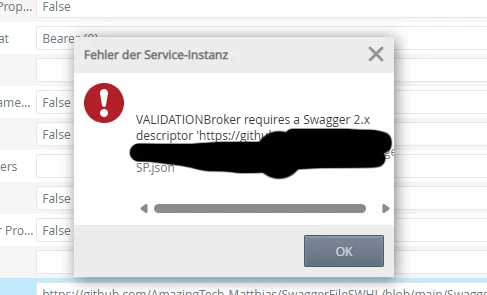
 

I hope you can help me to solve the problems.


Best regards

Matthias

7 replies

Forum|alt.badge.img+6
  • Nintex Employee
  • February 3, 2026

Can you try saving the swagger file on the k2 server and creating service instance from that?


ScottCaseIT
Forum|alt.badge.img+4
  • Novice
  • February 6, 2026

Can you try saving the swagger file on the k2 server and creating service instance from that?

I agree with Nik, start locally just to ensure it isn’t something weird GitHub is doing and not properly serving the raw JSON.


ScottCaseIT
Forum|alt.badge.img+4
  • Novice
  • February 10, 2026

Did you figure this out?


Forum|alt.badge.img+2

Hello Scott!

I solved the issue, but I’m still struggeling a little bit how I can use Swagger Files for creating new items in a sharepoint list.


Maybe you can also help!


Best regards


Matthias


ScottCaseIT
Forum|alt.badge.img+4
  • Novice
  • February 18, 2026

Hello Scott!

I solved the issue, but I’m still struggeling a little bit how I can use Swagger Files for creating new items in a sharepoint list.


Maybe you can also help!


Best regards


Matthias

Not sure why you are needing to use Swagger to create SharePoint list items. K2 provides Out of the Box integration with SharePoint to conduct all kinds of operations on Lists and Libraries. Are you dealing with an unsupported version of SharePoint or some other environmental limitation preventing you from using the provided integration capabilities? 


Forum|alt.badge.img+2

Hello Scott,

the problem is that I need to create and talk to the libraries on a different context. So everytime I have a different url and call different workflows.

If I use swagger I can talk to the rest API to different objects. If I create a SmartObject it is bind to a specific list or library.

I don’t need that binding. I need it in a more flexible way.

Best regards

Matthias


ScottCaseIT
Forum|alt.badge.img+4
  • Novice
  • February 19, 2026

Hello Scott,

the problem is that I need to create and talk to the libraries on a different context. So everytime I have a different url and call different workflows.

If I use swagger I can talk to the rest API to different objects. If I create a SmartObject it is bind to a specific list or library.

I don’t need that binding. I need it in a more flexible way.

Best regards

Matthias

If the structure of your lists and libraries are the same for each site, there is an option on the SharePoint integration that allows you to enable dynamic urls (not what the setting is called exactly I’m typing from memory), that allows you to specify a new site url when you want to make the call to your list or library.

Also, if memory serves, using the SharePoint steps that are enabled once SharePoint Feature is activated, they allow you to create references to previously created items expressly for the purpose of addressing scenarios where sites, lists and libraries are dynamic in nature.