

i want to add tasklist for me shown into an nintexapp like other component and if i approve then it will run workflow task thats what i want

- Home
- Forums
- Product Forums
- Nintex Apps
- Am I able to add tasklist into a Nintex
Question
Am I able to add tasklist into a Nintex
- June 10, 2025
- 14 replies
- 315 views
- Translate All
14 replies


 +18
+18- Nintex Employee
- June 18, 2025

Hi Saurav, apologies for the delay. Yes, you can create a table or list of tasks in Nintex Apps.
Here’s a template that shows how to set it up. You can use the same models setup, but different components based on the desired UI: https://gallery.nintex.com/t/nactaskmanagement
Translate
 +1
+1- Author
- Nintex Partner
- June 19, 2025
I HAVE one more problem i want to show data before user accept or reject i understand your project but sir how to show data of means which data that trigger this workflow i want to show that data and based on that data user can able to approve or reject any way to do that
Translate
+18- Nintex Employee
- July 7, 2025
Hi Saurav, I responded to your question in the related thread:
Translate
 +3
+3- Rookie
- August 14, 2025
Hi
I have set up some test pages and want to show all active tasks for the logged in user. However there seems to be a hard coded limit to the query of 20. I have tried to update it in the xml to 100, but it is still not bringing back all the active tasks, it’s only showing the latest ones.
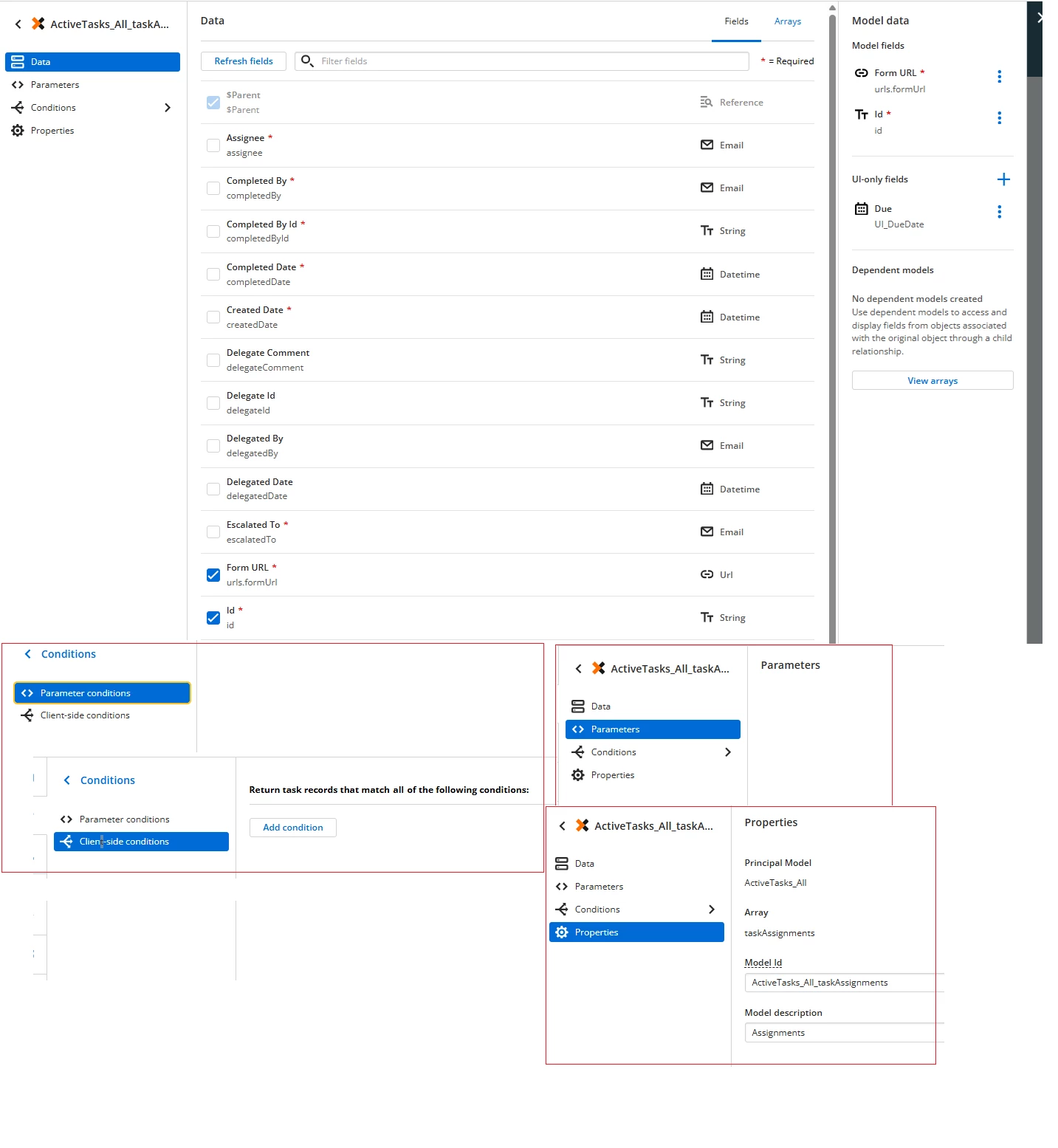
I have set up parameter conditions as per attached.
Can you please advise how to increase the query limit to 100?
Translate

 +1
+1- Novice
- August 15, 2025
I’m wondering if you're doing something a bit different though… since that model takes conditions as parameters and your screenshot is different.
Translate
+3- Rookie
- August 18, 2025
Hi
Yes using the task object from the workflow connector. I’ve just set up another very basic one, that should bring back all active tasks regardless of assigned to, but this is only showing 15.
Screenshots attached.
Maybe it’s an issue at the Nintex Workflow Tenant end? Let me know if you recommend logging a job to resolve.
Translate

 +6
+6- Nintex Employee
- August 19, 2025
Hello
Im working to support Mike and Anna on this one a bit. The List Tasks Api will only return the last 14 days of tasks if the “from” parameter is not specified. Can you try setting the “from” parameter and see if you’re able to pull back the list of tasks you’re expecting to see? Here’s a link to the documentation, and a screenshot with an example that should help show what this looks like:
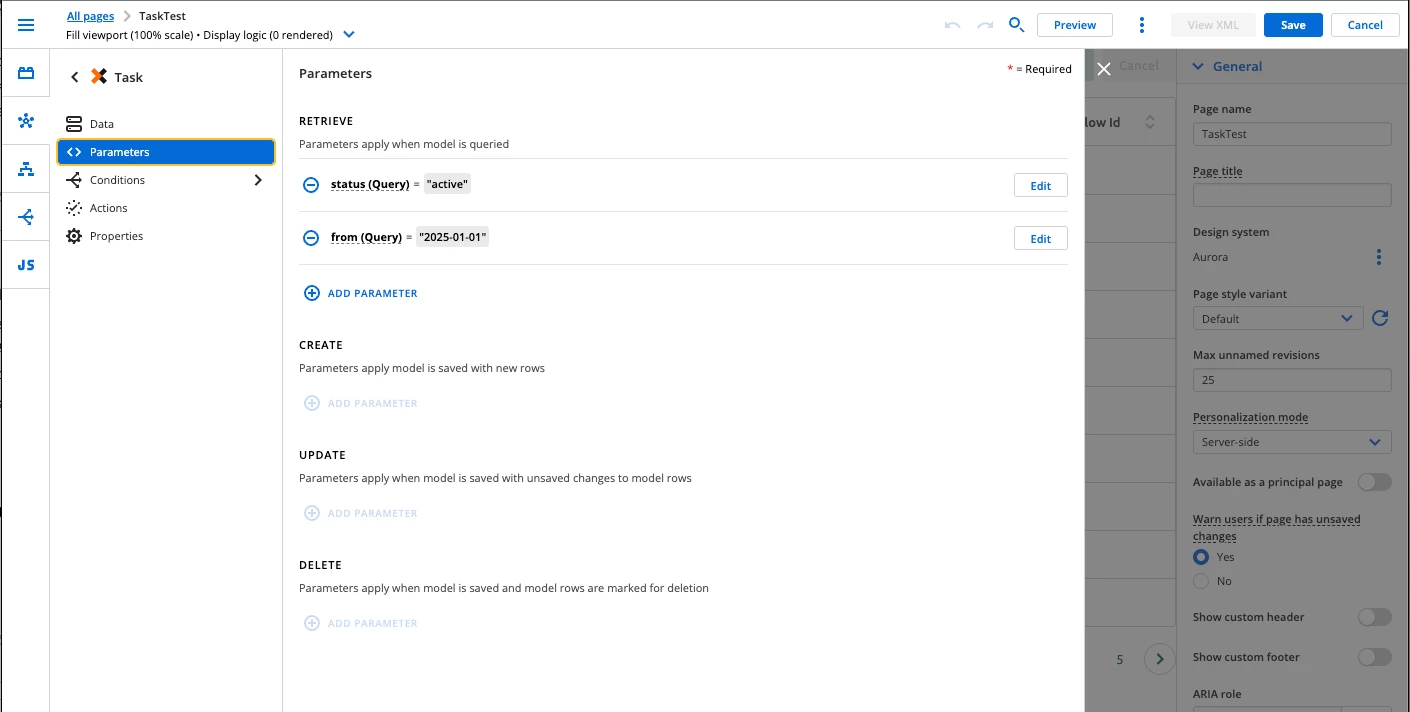
Hope this helps!
Translate
+3- Rookie
- August 19, 2025
Hi
Just while I have you, I still have a couple of problems with this page:
- Is it possible to sort the results on one of the fields?
I want to sort on Due Date so that the tasks that are due soon or are overdue appear at the top of the list. The ‘fields to order records by’ doesn’t appear as an option like the Nintex table models do. - See below screenshots of the use case and model set up.
In summary, I want the user to be able to click a button to open the task in Nintex Workflow. Like SS_1 and SS_2 below.
I set up a dependent model for taskAssignments to get the form url. It is working for most records. However on some records the form URL is not coming through.
Can you please let me know what I am doing wrong in the set up?
Thank you
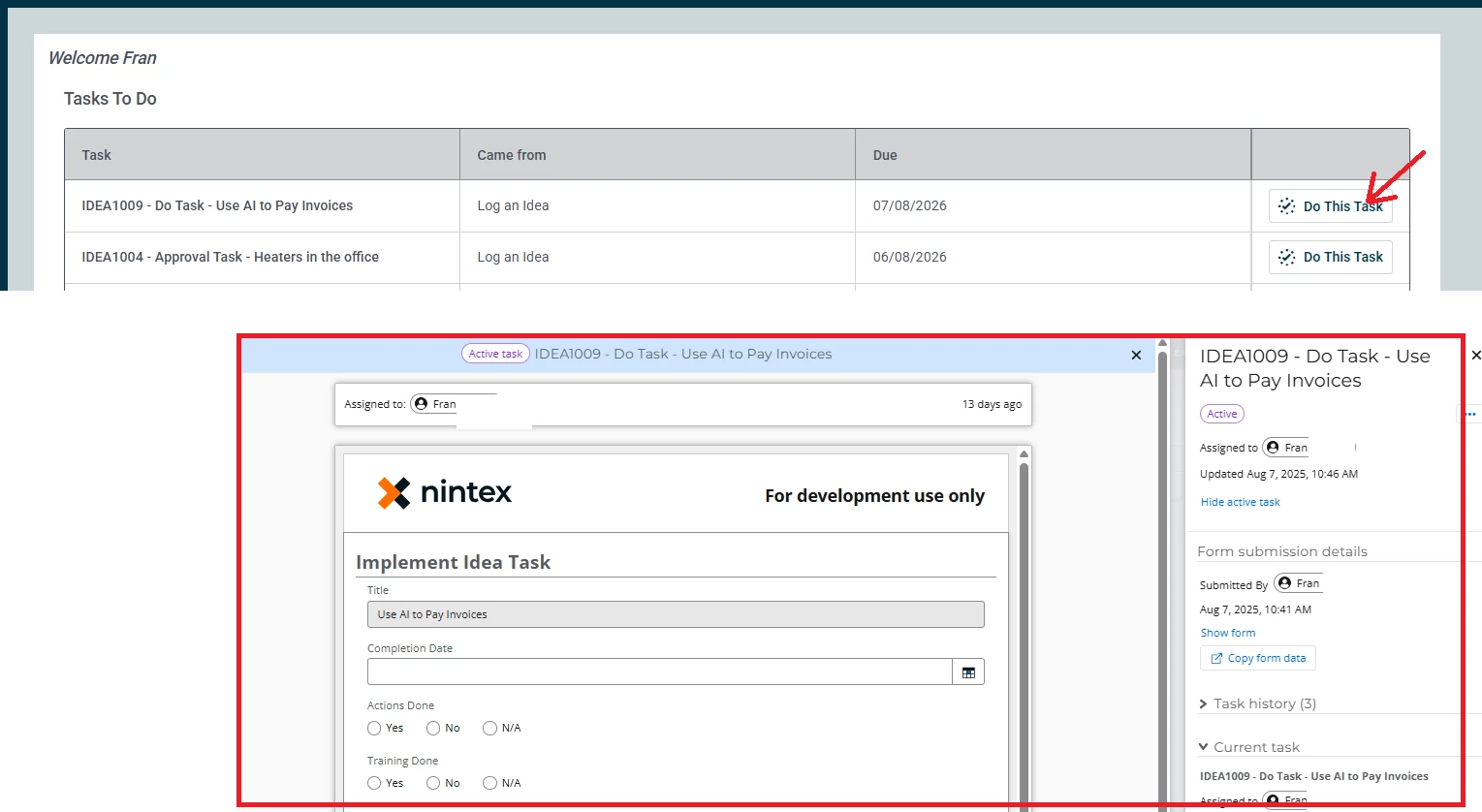
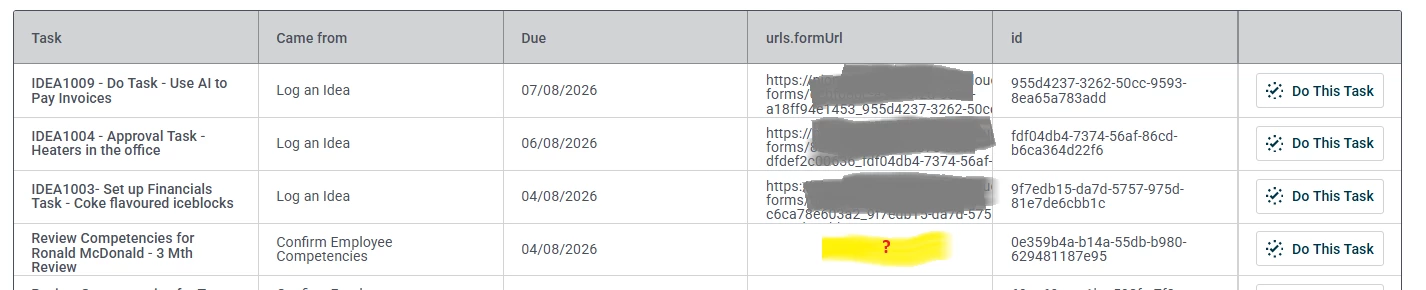
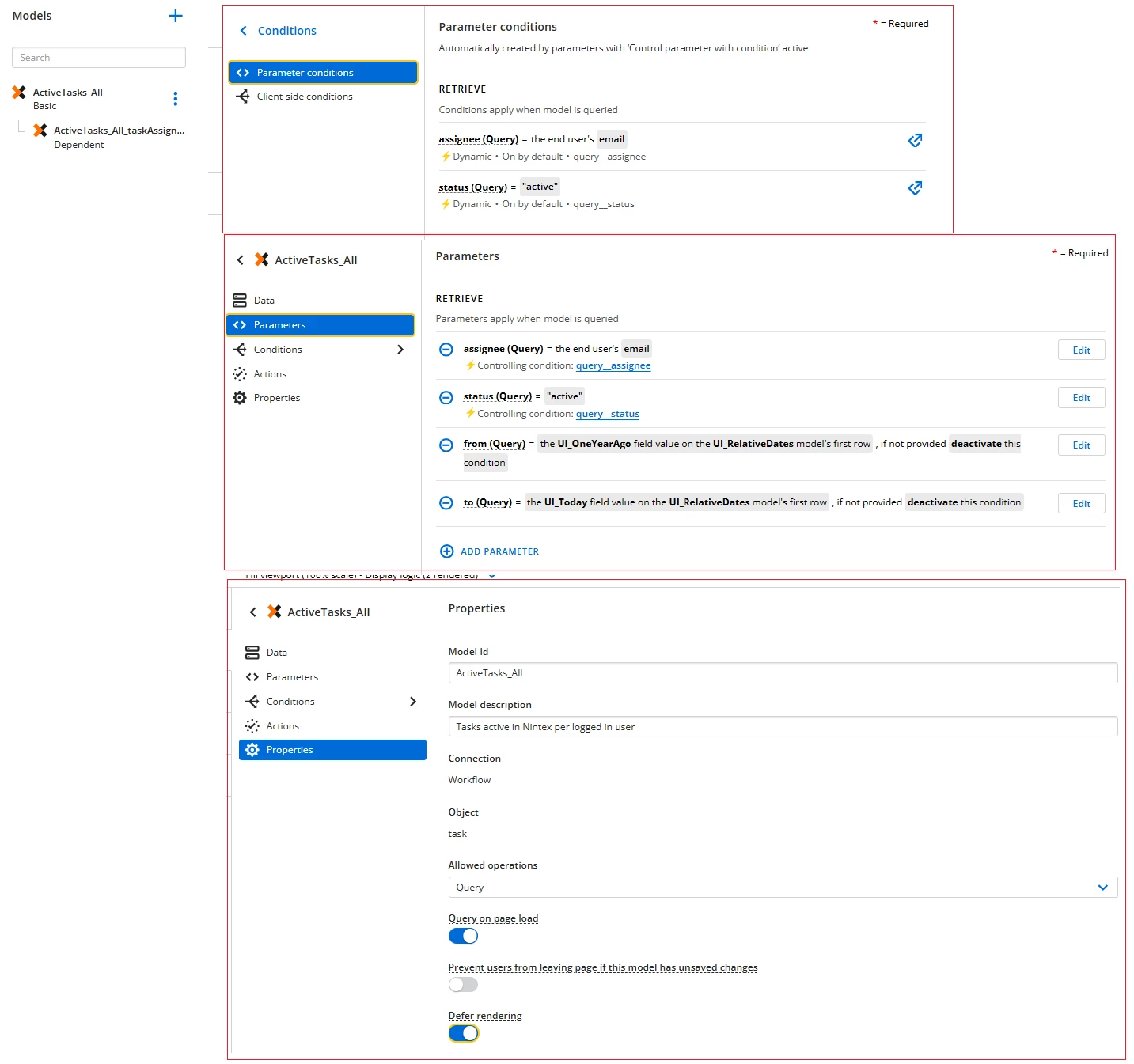
Translate
+6- Nintex Employee
- August 21, 2025
Hello!
Glad adding that parameter sorted out the original issue. In regards to your follow ups:
- Im double checking internally with our team that manages the APIs to see if there’s an order by or sort option of some sort. I’ll follow up once I confirm with more certainty!
- I believe your configuration seems correct. Im not sure about the details of the task assignments in your example, but if there is not a form associated with the task (like in an express approval scenario) then it will not have a link to a form.
Translate
+3- Rookie
- August 21, 2025
Thanks
Regarding 2. thank you, that was a penny drop moment. Yes - you are right, the ones with no URL are all express approval.
Translate
+6- Nintex Employee
- August 21, 2025
Thanks for your patience!
I was able to confirm there is not currently API support for ordering/sorting on the list tasks endpoint. However, I’ve raised that with the PM for evaluation for an improvement in the future.
In the meantime, I’ve got an option for how to sort using Apps. I’ve built a sample page that shows this (XML below). I’ll outline the steps below as well/
- Add a Page event to the page component.
- Select the page component in the index and at the bottom of the properties, under interactions, add an event and select “Page: Rendered”
-
Deselect “Query on page load” in your Task model
-
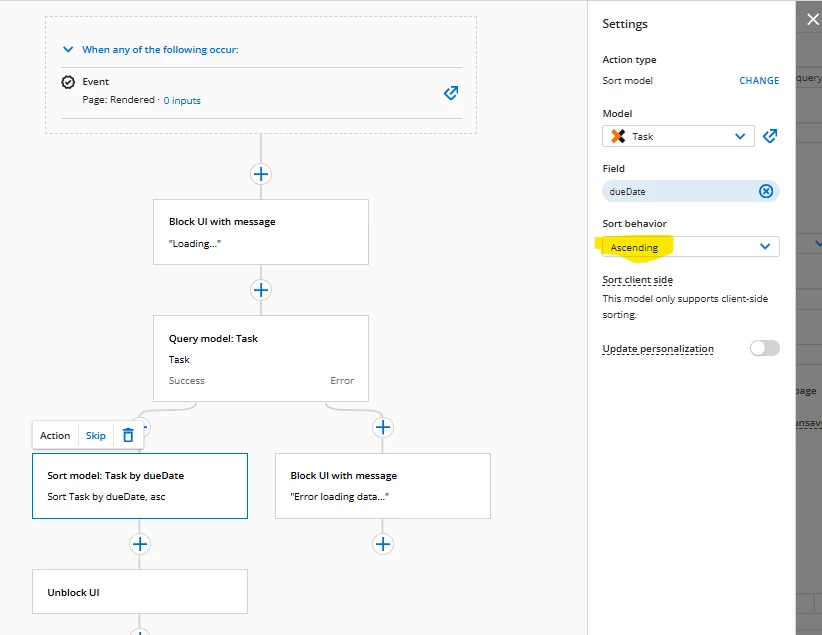
Add an action flow that queries the task model (using the query model action) and then sorts the model (using the “Sort Model” action). I selected the Due Date field and descending as the options in my example for the sort.
-
Note: I added some block UI and unblock UI actions to help the experience feel more cohesive in my example.
-
Its important to note that this is client side sorting, so its only sorting data thats returned in the query and it could be slow with large volumes of data.
<skuid__page unsavedchangeswarning="yes" personalizationmode="server" theme="Aurora" showsidebar="false" showheader="false">
	<models>
		<model id="Task" query="false" createrowifnonefound="false" datasource="ntx__Automation" sobject="task" rest-operations="query">
			<fields>
				<field id="description"/>
				<field id="id"/>
				<field id="name"/>
				<field id="status"/>
				<field id="subject"/>
				<field id="workflowId"/>
				<field id="workflowInstanceId"/>
				<field id="workflowName"/>
				<field id="dueDate"/>
				<field id="taskAssignments" type="array">
					<fields>
						<field id="id"/>
						<field id="urls.formUrl"/>
					</fields>
					<conditions>
						<class id="parameter"/>
						<class id="client"/>
					</conditions>
				</field>
			</fields>
			<conditions>
				<class id="parameter"/>
				<class id="client"/>
			</conditions>
			<actions/>
			<parameters>
				<request id="query">
					<parameter type="query" name="status" valuesource="fieldvalue" value="active"/>
					<parameter type="query" name="from" valuesource="fieldvalue" value="2025-01-01"/>
				</request>
				<request id="insert"/>
				<request id="update"/>
				<request id="delete"/>
			</parameters>
		</model>
		<dependentmodel id="Task_taskAssignments" principalmodel="Task" sourcefield="taskAssignments" sobject="task.taskAssignments">
			<conditions/>
		</dependentmodel>
	</models>
	<components>
		<skuid__table allowColumnFreezing="dragDrop" model="Task_taskAssignments" allowHTML="false" uniqueId="sk-3DJv-18455" mode="read" title="Task Assignment">
			<fields>
				<field id="urls.formUrl" uniqueId="fi-3DJz-37447"/>
				<field id="$Parent.dueDate" uniqueId="fi-3DJz-37448"/>
				<field id="$Parent.description" uniqueId="fi-3DJz-37449"/>
			</fields>
			<filtering enableSearch="false"/>
			<rowActions/>
			<massActions/>
			<exportProperties useTableColumns="true"/>
			<sorting enable="false"/>
			<interactions/>
			<renderConditions/>
			<styleVariantConditions/>
			<styles>
				<spacing top="4" right="4" bottom="4" left="4"/>
			</styles>
		</skuid__table>
	</components>
	<resources>
		<labels/>
		<javascript/>
		<actionsequences>
			<actionsequence reusable="true" id="af-3DKA-93418" label="Page Load">
				<actions>
					<action type="blockUI" message="Loading..." showPlaceholder="true"/>
					<action type="requeryModels" behavior="standard">
						<models>
							<model>Task</model>
						</models>
						<onerroractions>
							<action type="blockUI" timeout="3000" message="Error loading data..."/>
						</onerroractions>
					</action>
					<action type="sortModel" model="Task" client-side="true" method="desc" field="dueDate"/>
					<action type="unblockUI"/>
					<parameters/>
				</actions>
				<inputs/>
				<events>
					<event event-scope="component" event-name="page.rendered"/>
				</events>
			</actionsequence>
		</actionsequences>
		<statements/>
	</resources>
	<background/>
	<interactions/>
	<surfaces/>
</skuid__page>
Hope this helps get you unblocked and moving forward!
Translate
+3- Rookie
- August 21, 2025
Thanks
However I am still having some trouble.
In your xml the due date sorts by ‘Descending’. I updated it to ‘Ascending’ so that anything due today or overdue appears at the top. However the data is still sorting by descending in the UI.
Does this happen for you as well?
Translate
+3- Rookie
- February 10, 2026
Hi
Just picking up on this thread again, because I now have another issue with the Task List, and I appreciate your specific expertise!
I would like all users to see the same task list - ie all tasks active in Nintex Workflow, regardless of whether they initiated it, were assigned it, were a business owner or have nothing to do with it.
I have realised that different users see different number of records on the list. I see everything (I am assuming as an Admin). Standard users only see seem to see things they are either assigned or have initiated.
I think this is a recent problem, as I believe this wasn’t happening before.
Can you please advise how to resolve, is it via the query, or do I need to do something with permission settings either in Nintex Workflow or Nintex Apps?
Thank you!
Translate
+6- Nintex Employee
- February 12, 2026
Hello!
Apologies for the delay in response. But, I have an update on this that I hope is helpful!
A little context to start. The Workflow Connector in Nintex Apps uses User Context authentication to retrieve workflows, tasks, workflow instances, etc. within the permissions model defined in Nintex Workflow to provide the best guardrails for users/designers.
This connector uses the Nintex Task API and you’ll notice in the Task API documentation that the API will return different information based on the type of token being used to authenticate.
With Nintex Apps, we can create a REST Connector in Nintex Apps to use an alternative authentication method for a use case like this so that we can authenticate with a Service App to retrieve records outside of the standard user scoped context. You’ll notice in the Task API documentation that the API will return different information based on the type of token being used to authenticate.
In order to achieve your desired result, you will need to do the following:
- In Nintex Workflow: Setup a Service App and keep the Client ID and Secret handy for the following steps.
- IN Nintex Apps: Navigate to Connections and Create a new REST Connector
- Use the OAuth 2.0 authentication with Client Credentials grant type
- Set the URL/Endpoint to the appropriate API url. I believe yours is https://au.nintex.io/workflows/v2
- Add the Client ID and Client Secret and authorization token url for your service app.
- Save.
- Navigate back to the page designer, add a new model using the newly created datasource and configure the query method to the tasks endpoint (/tasks). I’ll add the model XML for my models below (NOTE: this may need to be updated based on your connection name).
- In order to use Task Assignments to get the form url, you will need a second model to support a MODEL_LOOKUP() formula. I’ll include this below as well.
- In the XML I was working off of, there is also a UI Model providing date values for the to and from parameters on the Task API query, so I’ll also include that to give a complete model setup.
This should be enough to get you going and support the ability to query for records outside of the scope of the running user! We’ll follow up in the support ticket as well with more specific information to your needs, but wanted to document some of this for others that may be interested in a similar use case.
Model XML:
<model id="All_Tasks_taskAssignments" query="true" createrowifnonefound="false" datasource="NWREST_V2" description="Task Assignments" type="readwrite">
<fields>
<field id="urls.formUrl" overridemetadata="true" includeunsavedchanges="true" displaytype="TEXT" defaultvaluetype="fieldvalue"/>
<field id="assignee" label="Assignee" ispolymorphic="false" isnamepointing="false" displaytype="STRING" accessible="true" filterable="true"/>
<field id="updatedDate" label="Updated Date" ispolymorphic="false" isnamepointing="false" displaytype="DATETIME" accessible="true" filterable="true"/>
<field id="status" label="Status" ispolymorphic="false" isnamepointing="false" displaytype="STRING" accessible="true" filterable="true"/>
<field id="outcome" label="Outcome" ispolymorphic="false" isnamepointing="false" displaytype="STRING" accessible="true" filterable="true"/>
<field id="id" label="Id" ispolymorphic="false" isnamepointing="false" displaytype="STRING" accessible="true" filterable="true"/>
<field id="escalatedTo" label="Escalated To" ispolymorphic="false" isnamepointing="false" displaytype="STRING" accessible="true" filterable="true"/>
<field id="createdDate" label="Created Date" ispolymorphic="false" isnamepointing="false" displaytype="DATETIME" accessible="true" filterable="true"/>
<field id="completedDate" label="Completed Date" ispolymorphic="false" isnamepointing="false" displaytype="DATETIME" accessible="true" filterable="true"/>
<field id="completedById" label="Completed By Id" ispolymorphic="false" isnamepointing="false" displaytype="STRING" accessible="true" filterable="true"/>
<field id="completedBy" label="Completed By" ispolymorphic="false" isnamepointing="false" displaytype="STRING" accessible="true" filterable="true"/>
<field id="comments" label="Comments" ispolymorphic="false" isnamepointing="false" displaytype="STRING" accessible="true" filterable="true"/>
</fields>
<conditions>
<class id="parameter">
<condition type="modelmerge" value="" sourceparam="from" sourcetype="param" operator="=" model="UI_RelativeDates" enclosevalueinquotes="true" novaluebehavior="deactivate" mergefield="OneYearAgo"/>
<condition type="modelmerge" value="" sourceparam="to" sourcetype="param" operator="=" model="UI_RelativeDates" enclosevalueinquotes="true" novaluebehavior="deactivate" mergefield="Today"/>
</class>
<class id="client"/>
</conditions>
<actions/>
<methods>
<method type="query" verb="GET" payloadcontenttype="JSON" endpoint="/tasks?from={{from}}&status=active&to={{to}}" pathtocontent="tasks.taskAssignments"/>
</methods>
</model>
<model id="All_Tasks" query="true" createrowifnonefound="false" datasource="NWREST_V2" type="readwrite">
<fields>
<field id="workflowName" label="Workflow Name" ispolymorphic="false" isnamepointing="false" displaytype="STRING" accessible="true" filterable="true"/>
<field id="name" label="Name" ispolymorphic="false" isnamepointing="false" displaytype="STRING" accessible="true" filterable="true"/>
<field id="taskAssignments.assignee"/>
<field id="taskAssignments" label="Task Assignments" ispolymorphic="false" isnamepointing="false" displaytype="ARRAY" rel="taskAssignments" ref="taskAssignments" accessible="true" filterable="true"/>
<field id="dueDate" label="Due Date" ispolymorphic="false" isnamepointing="false" displaytype="DATETIME" accessible="true" filterable="true"/>
<field id="description" label="Description" ispolymorphic="false" isnamepointing="false" displaytype="STRING" accessible="true" filterable="true"/>
<field id="assignmentBehavior" label="Assignment Behavior" ispolymorphic="false" isnamepointing="false" displaytype="STRING" accessible="true" filterable="true"/>
<field id="taskAssignments.urls"/>
<field id="taskAssignments.urls.formUrl"/>
<field id="taskFormURL_UI" uionly="true" displaytype="FORMULA" includeunsavedchanges="false" defaultvaluetype="fieldvalue" label="Task Form URL" ogdisplaytype="TEXT" returntype="TEXT" overridemetadata="true">
<formula>MODEL_LOOKUP("All_Tasks_taskAssignments","urls.formUrl","id",{{taskAssignments.id}})</formula>
</field>
<field id="taskAssignments.id"/>
</fields>
<conditions>
<class id="parameter">
<condition type="fieldvalue" enclosevalueinquotes="true" sourceparam="status" sourcetype="param" value="all"/>
<condition type="modelmerge" value="" sourceparam="from" sourcetype="param" operator="=" model="UI_RelativeDates" enclosevalueinquotes="true" novaluebehavior="deactivate" mergefield="OneYearAgo"/>
<condition type="modelmerge" value="" sourceparam="to" sourcetype="param" operator="=" model="UI_RelativeDates" enclosevalueinquotes="true" novaluebehavior="deactivate" mergefield="Today"/>
</class>
<class id="client"/>
</conditions>
<actions/>
<methods>
<method type="query" verb="GET" payloadcontenttype="JSON" endpoint="/tasks?from={{from}}&to={{to}}&status={{status}}&workflowName={{workflowName}}" pathtocontent="tasks"/>
</methods>
</model>
<model id="UI_RelativeDates" limit="20" query="true" createrowifnonefound="true" datasource="Ui-Only">
<fields>
<field id="Today" uionly="true" displaytype="FORMULA" defaultvaluetype="fieldvalue" ogdisplaytype="TEXT" returntype="DATETIME">
<formula>NOW()</formula>
</field>
<field id="OneYearAgo" uionly="true" displaytype="FORMULA" defaultvaluetype="fieldvalue" ogdisplaytype="TEXT" returntype="DATETIME">
<formula>DATE_ADD(Now(), -1, YEAR)</formula>
</field>
</fields>
<conditions/>
<actions/>
</model>
Thanks again, happy building!
Clark
Translate
Enter your E-mail address. We'll send you an e-mail with instructions to reset your password.