



Prepare now: Salesforce OAuth updates may affect DocGen package generation
Do you have Connected Apps and OAuth enabled in Salesforce?
In January 2026, all new Nintex DocGen for Salesforce releases will require OAuth authentication. Older authentication methods will no longer be supported.
Switch now to our supported authentication method, Connected Apps and OAuth, so you won’t experience service interruptions or last-minute issues during a future app upgrades.
What Customers Should Do Now
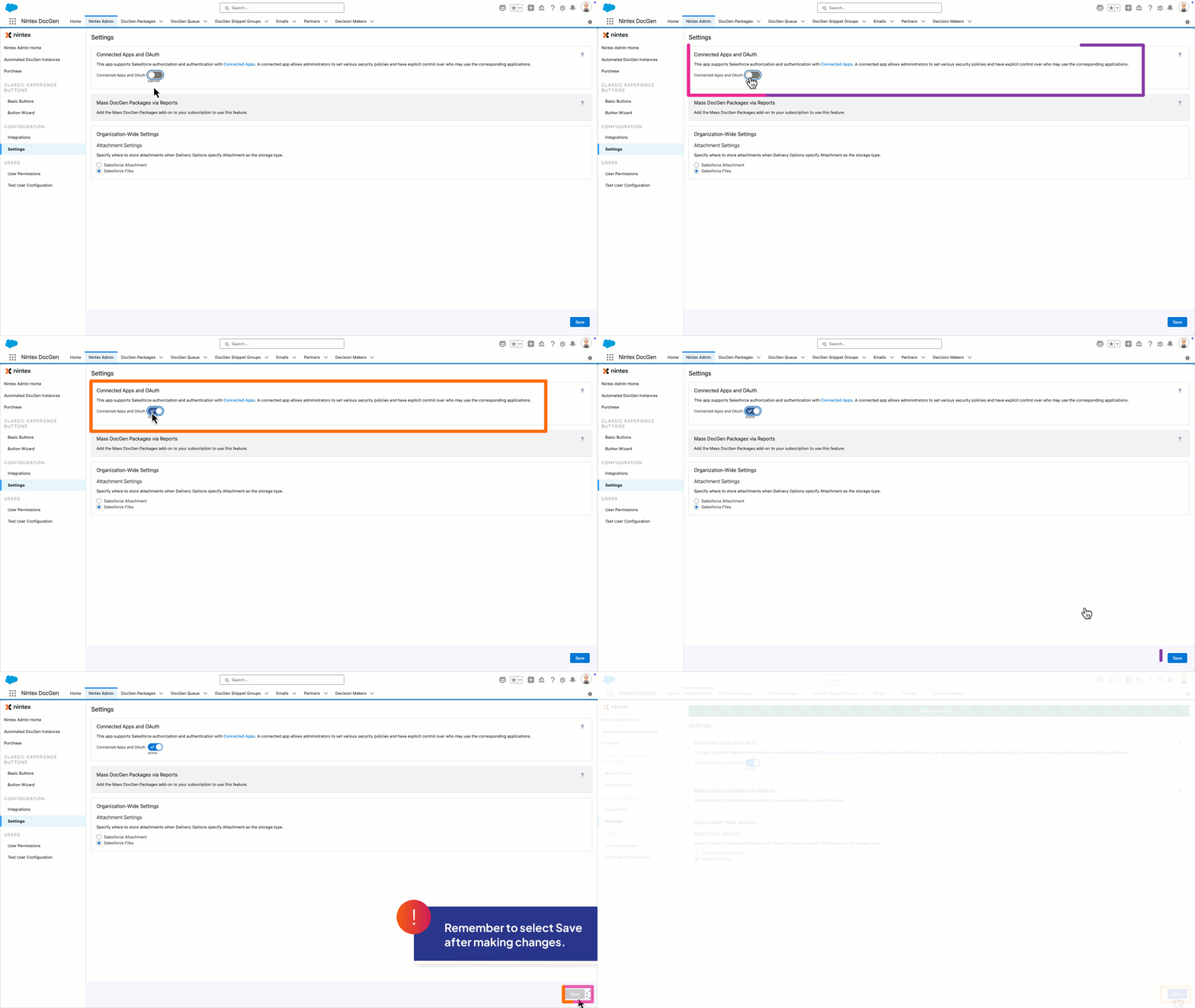
- Go to Nintex Admin → Settings in Salesforce
- Check the status of the Connected Apps and OAuth setting
- If the setting is already ON, no further action is needed. You’re already using Connected Apps and OAuth and are ready for future updates.
- If the setting is OFF, we recommend turning it ON at your earliest convenience
Follow these simple steps to turn it on.
After OAuth Is Enabled: What’s Different?
Manual runs
Users will see an Authorize and Run button the first time they generate a document.
Automated runs
Will continue to work if the automation user has already completed OAuth authorization. If not, these runs may fail until authorization happens.
How can users authorize?
You can manage how users authorize Nintex DocGen in Salesforce by adjusting the Permitted Users OAuth Policy for the Connected App.
There are two option
All users may self-authorize (Default)
Each user will be prompted to authorize the first time they run a DocGen Package
Admin approved users are pre-authorized
Only users with a specific Salesforce profile or permission set can run DocGen without needing to authorize manually
This video reviews the process to manage these settings.
Tip:
To avoid large numbers of users seeing authorization prompts, many customers choose Admin approved users are pre-authorized and then manage user access via Salesforce Profiles or Permission Sets.
For more specifics, see Salesforce Help: Manage OAuth Access Policies for a Connected App
Avoid last minute issues. Test the change in sandbox now, then roll it out to production.
Next Steps:
- Turn on Connected Apps and OAuth in Nintex Admin.
- Review and set your preferred Salesforce OAuth Policy for the Nintex DocGen Connected App.
- Have users (or automation accounts) complete OAuth authorization.
Doing this now ensures your DocGen for Salesforce processes keep running smoothly—even after your 2026 upgrade.
Here are some more helpful links related to OAuth Community articles: