Nintex Community Menu Bar
Question

Expiry Notifications by SMS

  • February 23, 2026
  • 6 replies
  • 22 views

Forum|alt.badge.img+1

In AssureSign, is there a setting for envelope expiry notifications to be sent to the signer when an envelope was sent via SMS?

6 replies

Forum|alt.badge.img+2
  • Nintex Employee
  • February 24, 2026

Yes there is.


If you want to do this for an individual Envelope or a Template, please do the following:

  1. Add your document, signer and an input field to the envelope designer. Ensure the signer has a mobile number defined (or a placeholder for a template).
  2. Click the “Notifications” button on the left hand menu to open up by the notification editor
  3. Click the “+ Add Notification” button
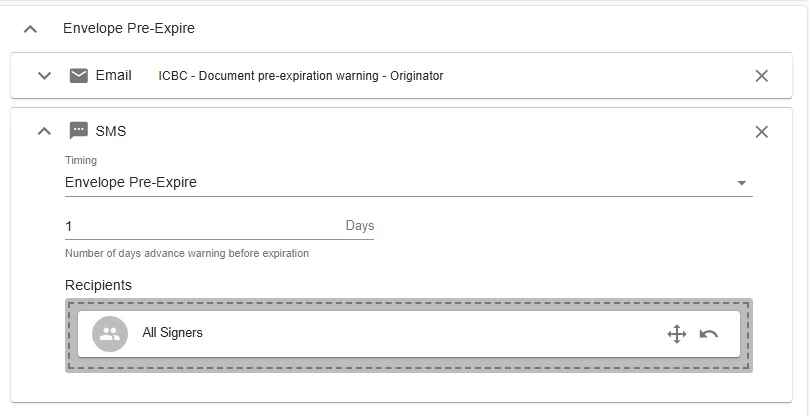
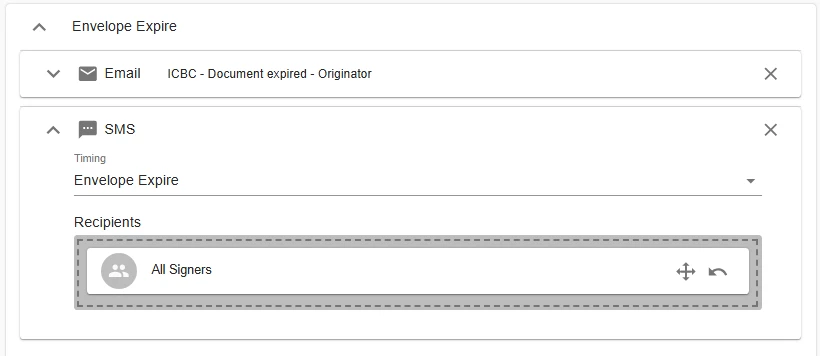
  4. Select SMS, and choose “Envelope Expire” as the stage
  5. Add the intended recipient from the list on the right hand of the screen

If you want to have this notification always exist by default when you create a new envelope or template:

  1. Navigate to Administration
  2. Choose “Email” under “Notifications”
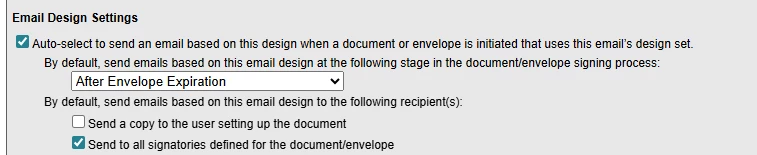
  3. Under Email Designers, find the Email Design called “Default Designs - Document expired”
  4. Click the “Edit” link
  5. Under “Email Design Settings” (found under the email body editor), click the checkbox labelled “Auto-select to send an email based on this design when a document or envelope is initiated that uses this email’s design set”
  6. Choose “After Envelope Expiration” from the drop down
  7. Check “Send to all signatories defined for the document/envelope”
  8. Then scroll back up to press Save


This is actually setting up an expired envelope Email notification to exist by default, but when you turn on SMS for a signer, the notifications section will auto fill in the SMS notifications to match the stages that would auto populate for an Email notification.


Hope that helps
​​​​​​​James


Forum|alt.badge.img+1

Thanks James,


I took a look and we have those set up, but they don’t seem to be happening

The signer is not receiving a text for the pre-expire or the expiry.


Let me know if there is something else we need to do.

Jennifer


Forum|alt.badge.img+9
  • Nintex Employee
  • February 24, 2026

Hi ​@jenniferlow600,

Are users receiving any SMS alerts at all?

  • If users aren’t receiving SMS texts on any event whatsoever, check Administration > Settings > Notifications (near the bottom of the page) > Enable SMS and ensure it’s set to ‘Yes’. 
  • It’s also important for users to reply “Yes” the the initial AssureSign SMS which requests consent to send SMS alerts.

Are users receiving some SMS, but just not SMS for Pre-Expire and Expire?

Next, I’d check the if the SMS was sent out at all from the envelope. To do so:

  1. Login to AssureSign.
  2. Select View Reports
  3. Select Envelope Search
  4. Enter the Creation Date From and To range
    • You can also select Switch to Advanced View here if you’d rather search by Envelope ID, Envelope Name, etc.
  5. Select Submit
  6. Select the Envelope in question

Here, there’s 2 places to check if the SMS went out:

Notifications > Envelope Expire > SMS. If anything is listed here, you can select View in the Attempts column, which will show the recipients phone number, attempts made, and last Date Sent. You should also see an option to “Resend”, perhaps if you’re one of the recipients, you can try sending one to yourself and see what happens.

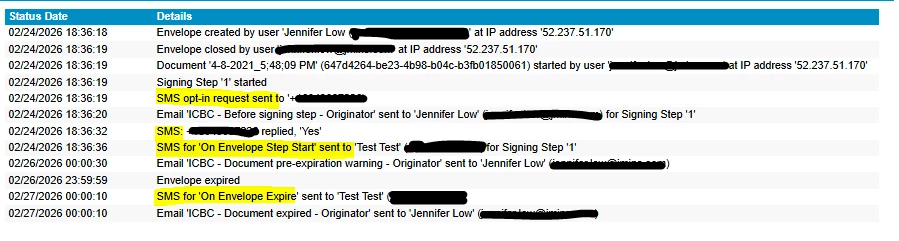
Envelope History

In this log of entries, look for a line stating “SMS for ‘On Envelope Pre-Expire’ sent to. . .” or “SMS for ‘On Envelope Expire’ sent to. . .” to further confirm or deny if an SMS was sent out.


Let me know what you find and we can try to make sense of it.


Forum|alt.badge.img+1

Ah, makes sense that they need to respond Yes to the first message. I will find out in 2 days if that was the issue. Thanks!


Forum|alt.badge.img+1

Getting closer, but still didn’t receive the pre-expiry SMS


Forum|alt.badge.img+9
  • Nintex Employee
  • March 2, 2026

Hi ​@jenniferlow600

It looks like:

  1. You receive the SMS at envelope start (i.e. document available to sign).
  2. You receive an email for Pre-expiry, but no SMS is sent, despite your configuration.
  3. You receive the SMS for expiration.

If that’s the case, it looks like it may be an issue outside of your direct control. Moving forward, I’d suggest reaching out to support@nintex.com to pursue a proper investigation. Feel free to point them toward this post to help give them further context.