



Issue
When a DocGen user performs an action that contacts the back end DocGen service, example: running a DDP or Document Package, an internal error occurs:
An error has occurred: a request was made without prior authorization. Please have your administrator reauthorize the document generation app. (AuthInvalid)
Resolution
Follow these steps to resolve this issue:
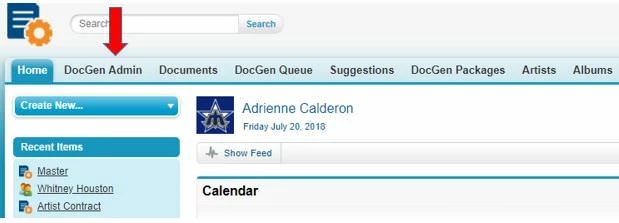
1. Navigate to the DocGen Admin Tab
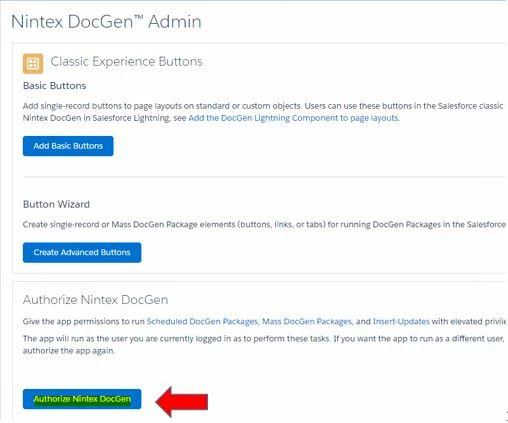
2. Scroll to the bottom of the page. Click the Authorize Nintex DocGen button.
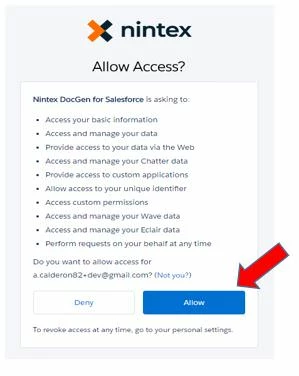
3. A pop-up window will appear. Click the Allow button
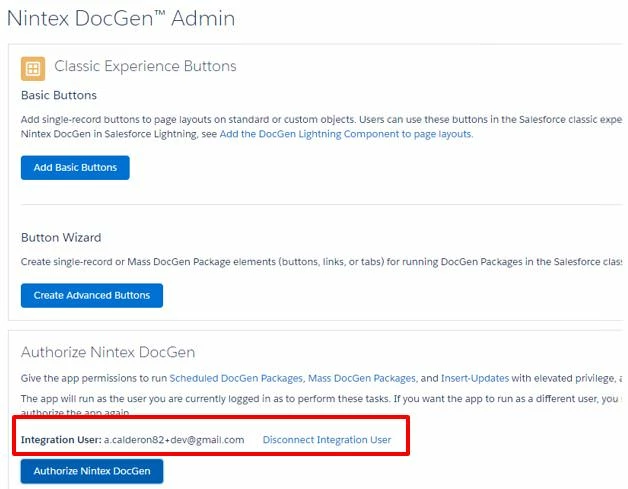
4. You should now see the username noted as the Integration User.
1. Navigate to the DocGen Admin Tab
2. Scroll to the bottom of the page. Click the Authorize Nintex DocGen button.
3. A pop-up window will appear. Click the Allow button
4. You should now see the username noted as the Integration User.
Error Code
AuthInvalid
Additional Information
You might encounter this error if the user generating documents needs to authorize the app, or the integration user needs to re-authorize the app.
Related Links