Topic
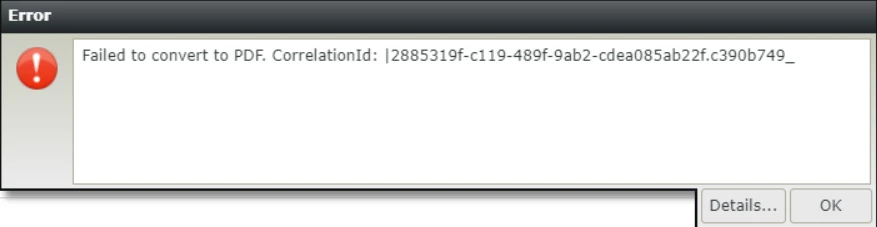
Save As PDF fails on runtime with the following error message:
Failed to convert to PDF. CorrelationId: {CorrelationIdValue}
The PDF Log located in {K2 Installation Folder}\K2 PDF Converter\Logs\ shows the following detailed error message:
CefBrowser LoadPage failed with exception Exception { TargetSite: Void Throw(), Message: "Load_Error (-9) - ERR_UNEXPECTED", Data: [], InnerException: null, HelpLink: null, Source: "System.Private.CoreLib", HResult: -2146233088, StackTrace: " at SourceCode.PdfConverter.Api.Converter.CefPdfConverter.LoadPage(ChromiumWebBrowser browser, Action`3 loadAction, String urlOrHtml, String baseUrl)" }
Instructions
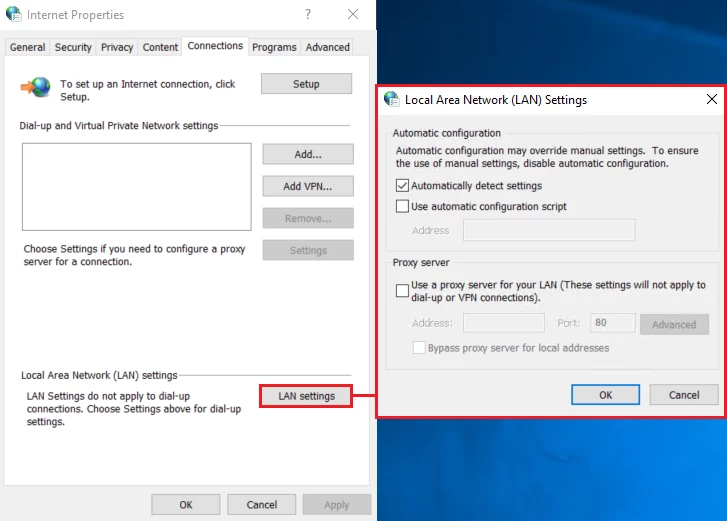
Disable proxy on the server where the K2 PDF Converter Service is running:
- Open Control Panel > Internet Options.
- Go to the Connections tab.
- Click LAN settings.
- Uncheck Use a proxy server for your LAN (These settings will not apply to dial-up or VPN connections), if applicable.
- Click OK to save the change