Nintex Community Menu Bar
Solved

Nintex Form Validate Attachment field

  • Mar 5, 2024 8:38 PM UTC
  • 4 replies
  • 262 views
  • Translate All

Forum|alt.badge.img+3

Hello - 

I used SP 2016 On-Premises, I would like to validate the attachments field if empty on the submit form. I used a validation rule below, but none of them are working. How can I validate if attachments empty on the submit form in Nintex New form? I’m appreciated for your help.

not(Attachments)

not({Self})

Attachments < 1

isNullOrEmpty(Attachments)
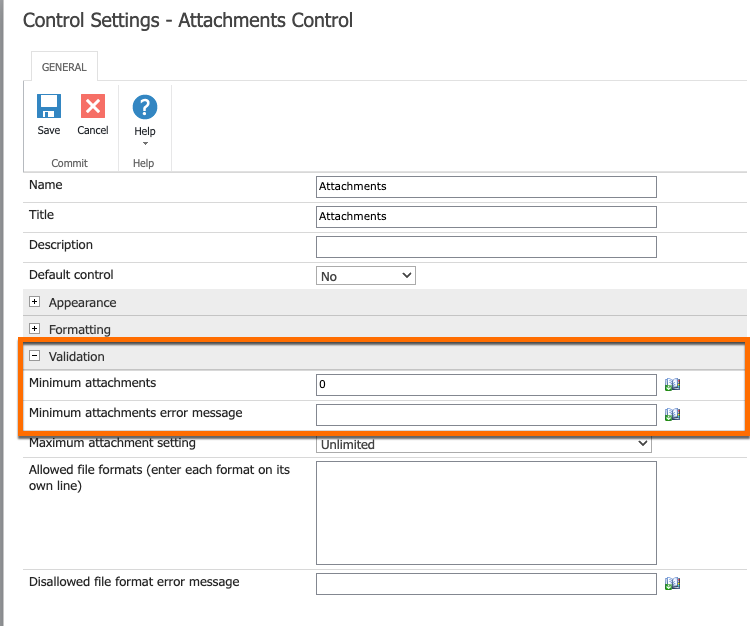


Best answer by Simon Muntz

Hi @YV,

Validation for the attachment control is done via the control configuration.


View original

4 replies

Simon Muntz
Nintex Partner
Forum|alt.badge.img+23
  • Nintex Partner
  • Answer
  • Mar 5, 2024 10:00 PM UTC

Hi @YV,

Validation for the attachment control is done via the control configuration.


Translate

Forum|alt.badge.img+3
  • Author
  • Rookie
  • Mar 5, 2024 10:21 PM UTC

Hi Simon Muntz - It works as expected. Thanks.

Translate

kpope
Forum|alt.badge.img+7
  • Apprentice
  • Mar 19, 2025 5:26 PM UTC

For SP/Nintex 2016 on prem, in a form, what is the rule formula to ensure attachments are added IF a certain field (which is named and inside a panel) is not null.  In other words, If the user enters data into a field (single line of text), Attachments are required.  Otherwise Attachments are not required. 


I created a rule on the SUBMIT button to Invalidate with the following formula but it’s not working as desired.

and(not(isNullOrEmpty({namedControl})), isNullOrEmpty({ItemProperty:Attachments})


Translate

Simon Muntz
Nintex Partner
Forum|alt.badge.img+23
  • Nintex Partner
  • Mar 19, 2025 10:41 PM UTC

Hi ​@kpope,

{ItemProperty:Attachments} looks at the SharePoint list attachment column and not the attachment control.

Translate