Nintex Community Menu Bar
Answer

Save Draft but the "My Forms" link not showing to allow edit the draft again

  • April 7, 2022
  • 2 replies
  • 33 views

Forum|alt.badge.img+2

Using Nintex 365 New Responsive form

I have added a Save button to the form and all works well.

But in order to get back to the form I had to create a VIEW where the "Connected to" field = "Draft" and Modified by="my name"

This is funky and I would like to use the "My Forms" link that I have read about that allows you to see all your draft forms but I have no such link showing???

Thanks
Best answer by rhia

Hi there, 

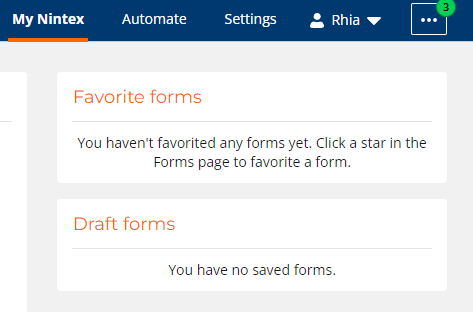
I think you might be thinking of Nintex Workflow Cloud, which does have a "My Forms" "Draft Forms' section in it.


For O365, it'll be in the SharePoint list you saved it in, unpublished. O365 doesn't have a "Draft Forms" capability to see all your drafts across the entire tenant. (It would be neat if I were proven wrong about this, though, that'd be a rad feature.) 

2 replies

rhia
Forum|alt.badge.img+15
  • Novice
  • Answer
  • April 10, 2022

Hi there, 

I think you might be thinking of Nintex Workflow Cloud, which does have a "My Forms" "Draft Forms' section in it.


For O365, it'll be in the SharePoint list you saved it in, unpublished. O365 doesn't have a "Draft Forms" capability to see all your drafts across the entire tenant. (It would be neat if I were proven wrong about this, though, that'd be a rad feature.) 


Forum|alt.badge.img+2
  • Author
  • Rookie
  • April 11, 2022

thanks for the fast response.