
Nintex Community Menu Bar
Answer

How can I autofill the beginning of a section with set characters?

  • August 8, 2023
  • 3 replies
  • 92 views

Iramos85
Forum|alt.badge.img+1

I have a form that will require users to input numbers on their forms but the beginning of each number will always be the same. Is there a way to set a default for where users just add the numbers and not the other characters?
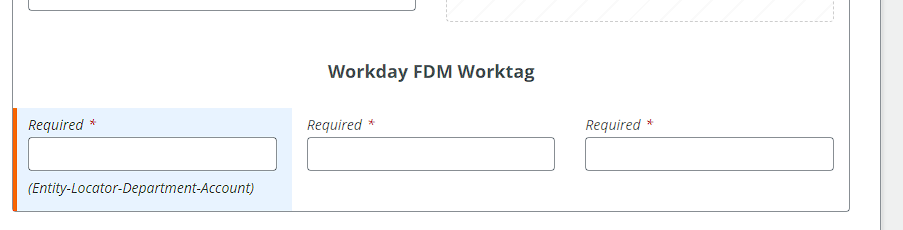
 

each of these Text-Short fields would start with a code -  CM, RD and CC respectively. The users would just responsible for inputting the numbers after that. 
Best answer by nico

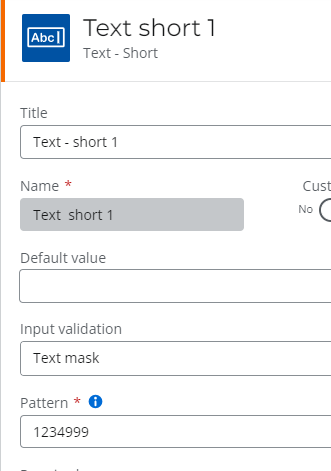
You can also use ‘text mask’ in the input validation :


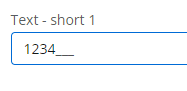
In the forms, this will display : 

And let my type just 3 numbers

3 replies

SimonMuntz
Nintex Employee
Forum|alt.badge.img+23
  • Nintex Employee
  • August 9, 2023

Hi @Iramos85,


In each of the controls you can set a default value in its configuration. So just set CM for the first one and so on.

Either that or let the users put their numbers in and then add the prefix via the workflow.


nico
Forum|alt.badge.img+10
  • Rookie
  • Answer
  • August 9, 2023

You can also use ‘text mask’ in the input validation :


In the forms, this will display : 

And let my type just 3 numbers


MillaZ
Nintex Employee
Forum|alt.badge.img+22
  • Nintex Employee
  • August 14, 2023

Hi @Iramos85 
Did these replies solve your question?