

Nintex Community Menu Bar
Solved

Nintex Cloud Form Repeating Section Issue

  • Jul 10, 2024 8:48 PM UTC
  • 5 replies
  • 184 views
  • Translate All

kmccool
Forum|alt.badge.img+9

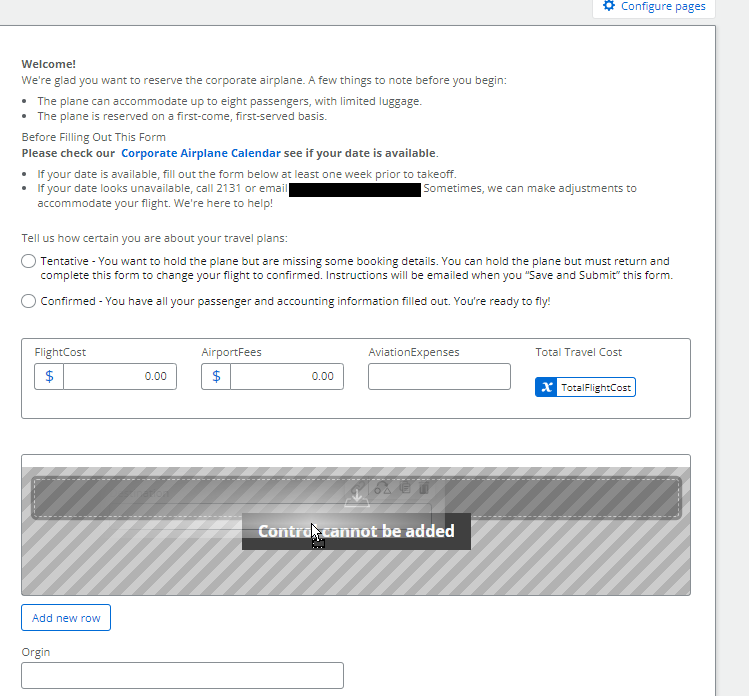
Hi all, I'm trying to build a form and the repeating section isn't letting me add any controls. What am I doing wrong? I’ve tried to drag every field to see if it was just an issue with these particular fields, no luck. Then I tried to add them manually from the list of fields on the left and still no luck. 
 

Best answer by kmccool

Okay, so we kind of figured it out. The fields are already connected to the column and that seems to be what’s preventing us from adding them to the repeating section. When we remove the connection, it works.

So, my next question is, where is it storing the data from the repeating section? I used to be able to set a multi-line of text field value with the blob of data from the repeater, then parse it out to look more friendly in the list. Where  do I get the blob of data now?

Thanks

Kassie

View original

5 replies

kmccool
Forum|alt.badge.img+9
  • Author
  • Scholar
  • Answer
  • Jul 10, 2024 9:50 PM UTC

Okay, so we kind of figured it out. The fields are already connected to the column and that seems to be what’s preventing us from adding them to the repeating section. When we remove the connection, it works.

So, my next question is, where is it storing the data from the repeating section? I used to be able to set a multi-line of text field value with the blob of data from the repeater, then parse it out to look more friendly in the list. Where  do I get the blob of data now?

Thanks

Kassie

Translate

kmccool
Forum|alt.badge.img+9
  • Author
  • Scholar
  • Jul 10, 2024 10:02 PM UTC

Ah! blob of data is stored to a text field we connect the repeating section to! Just answered my own questions I believe; I’ll update if I’m wrong. Otherwise, thank you for reading through all of this if you’re still here. 

Translate

poirisop
Forum|alt.badge.img+4
  • Rookie
  • Jul 29, 2026 8:12 PM UTC

Okay, so we kind of figured it out. The fields are already connected to the column and that seems to be what’s preventing us from adding them to the repeating section. When we remove the connection, it works.

So, my next question is, where is it storing the data from the repeating section? I used to be able to set a multi-line of text field value with the blob of data from the repeater, then parse it out to look more friendly in the list. Where  do I get the blob of data now?

Thanks

Kassie

Hi, I have the same issue, I cannot add a new field in my repeating section. What do you mean by removing the connection to the column? How?


Translate

Simon Muntz
Nintex Partner
Forum|alt.badge.img+23
  • Nintex Partner
  • Jul 30, 2026 12:01 AM UTC

Hi ​@poirisop (Sophie)

This post looks like it’s for Nintex Forms for Office 365.

In the app, you can connect controls to SharePoint columns, so the solution is not relevant to Nintex Workflow Cloud, as you do not have this capability.

Can you explain a little more about the issue you are having?
I have never seen an issue where you cannot add new controls to a repeating section unless those controls are not allowed to be in a repeating section.

Translate

poirisop
Forum|alt.badge.img+4
  • Rookie
  • Jul 30, 2026 1:06 PM UTC

Hi ​@Simon Muntz 

Finally, I figured out how to do it. I removed the repeating section in my approval form and dragged it in again in the approval form, from the Start Form fields.

Thanks!

Translate