Nintex Community Menu Bar
Solved

Create a folder and create a list in Sharepoint

  • Sep 14, 2022 1:06 PM UTC
  • 5 replies
  • 128 views
  • Translate All

Forum|alt.badge.img+7

Hi 

I am able to create a folder via Nintex and an item via Nintex.

Is it possible to create a link to the folder that can be reached by clicking the item in the list?


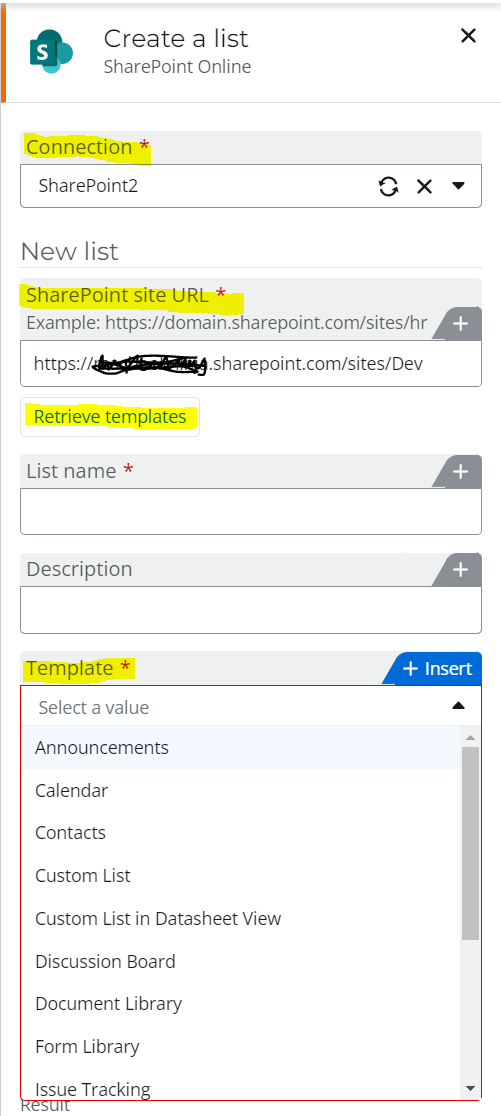
Also by creating a list in SP, it asks me for a template. How can i customize the template? I am not able to see the dropdown options.


Thanks.

Best answer by Garrett

Hi @mjliu 


Answering your 1st question,

A Folder is usually created in Document site.

An Item is usually create in a List site.


Is it possible to create a link to the folder that can be reached by clicking the item in the list? NO

However, you could store the folder URL in the Item fields. The Hyperlink type field will allow you to click and open the Folder URL.

View original

5 replies

Garrett
Forum|alt.badge.img+16
  • Scout
  • Sep 14, 2022 1:22 PM UTC

Hi @mjliu 


Answering your 2nd question - Template

Enter your SharePoint URL and click Retrieve templates.
Then the Template dropdown should be populated.


Translate

Forum|alt.badge.img+7
  • Author
  • Scholar
  • Sep 14, 2022 1:28 PM UTC
Hi Garrett,

Sorry my question is probably more of a Sp question, how can i create a template for use?
Translate

Garrett
Forum|alt.badge.img+16
  • Scout
  • Sep 14, 2022 1:53 PM UTC

Hey @mjliu 


I've not used that feature before.


I design List Columns/Fields in a similar fashion like Database Design. 

After I have reviewed the Requirement, I will write down the field names and types.

Then I create a new List. 

Then I create the fields.

This is usually a one-time task. 


Translate

Garrett
Forum|alt.badge.img+16
  • Scout
  • Answer
  • Sep 14, 2022 2:01 PM UTC

Hi @mjliu 


Answering your 1st question,

A Folder is usually created in Document site.

An Item is usually create in a List site.


Is it possible to create a link to the folder that can be reached by clicking the item in the list? NO

However, you could store the folder URL in the Item fields. The Hyperlink type field will allow you to click and open the Folder URL.

Translate

Forum|alt.badge.img+7
  • Author
  • Scholar
  • Sep 15, 2022 7:37 AM UTC
For reference, the URL will be text but it can be converted to Hyperlink from this link
https://lists.handsontek.net/convert-single-line-text-column-hyperlink-using-sharepoint-microsoft-lists-column-formatting/
Translate