Nintex Community Menu Bar

Product Dependent Terms

  • October 10, 2022
  • 6 replies
  • 39 views

I am having a hard time figuring out the proper way to have a line of text appear on our Sales Order only if and when a specific product is on our quote.  Some directional help would really be appreciated as I have had to make this optional and I know that this will not work long term.  I have looked but this does not seem to be a hot topic to search on.  Thank you!

6 replies

natsu_docs
Nintex Employee
Forum|alt.badge.img+8
  • Nintex Employee
  • October 11, 2022

This may depend on how you have your document setup, but the IF statement that can be used in Word template is one of the most common way to have certain text appear based on a condition: https://help.nintex.com/en-US/docgensf/Templates/ConditionalTextInWord.htm


Please let us know if the above documentation does not match what you are looking for.


  • Author
  • October 11, 2022

Thank you very much for this post.  This solution looks to be a one to one solution though, meaning if this particular box has a particular answer then do this....  The trigger I need to use is a Product line on a Sales Order.  The line could be anywhere on the table.  I predecessor had built it so that if this item came up added text was shown in our terms.  I am trying to emulate that but can't seem to figure out how he did it.


natsu_docs
Nintex Employee
Forum|alt.badge.img+8
  • Nintex Employee
  • October 13, 2022

Hi,


Do you have any screenshot of an example of what you are trying to achieve?


Thanks!


  • Author
  • October 13, 2022

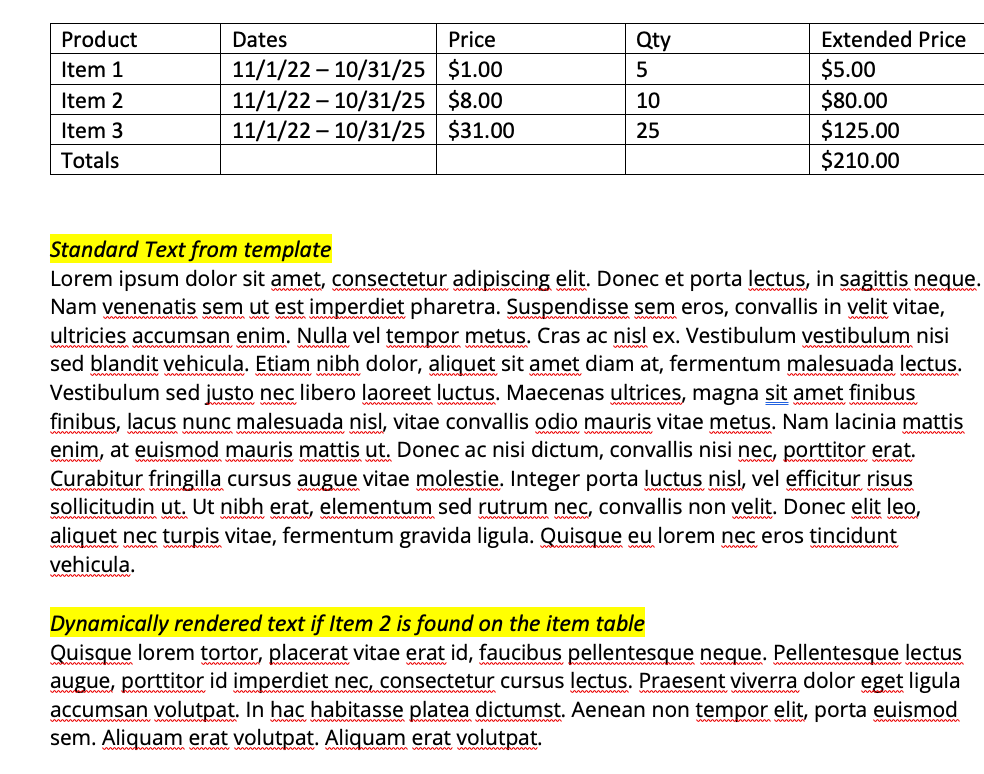
Below is a rudimentary showing of what I am talking about.  Thank you!!


natsu_docs
Nintex Employee
Forum|alt.badge.img+8
  • Nintex Employee
  • October 13, 2022

Hi,


You could bring in the paragraph using the component group but depending on the amount of products you have this could differ.


1 - If you have a lot of products, you could filter the component based on field that rolls up the product ID/codes up to your starting object. 


2 - If you only have a handful of products, then you could create a relationship that would filter it out for that single product and use that to filter weather the component should come in or not. If you have a lot of products, we don't recommend this as this can get out of hand and require a lot of relationships/queries.


  • Author
  • October 13, 2022

We have hundreds if not over a thousand products in SFDC.  However only a handfull maybe 3-5 would need this condition.  Thinking abut it I may be able to bring that down to only 1.  I have looked for documentation on the Component groups but have not been successful.  Is there a manual of some kind I can reference have not found one to date.  The videos that are online are good but do not dive into this use case.