
Nintex Community Menu Bar

Format date and time based on culture

  • Jun 27, 2019 8:56 AM UTC
  • 9 replies
  • 266 views
  • Translate All

I am usin K2 Five to designe a workflow.


I have a basic need, i have to put in a data filed a Date that is formated in a French culture.

If the date is 2019/3/31, then my data field has to be in the following format: mars 2019.

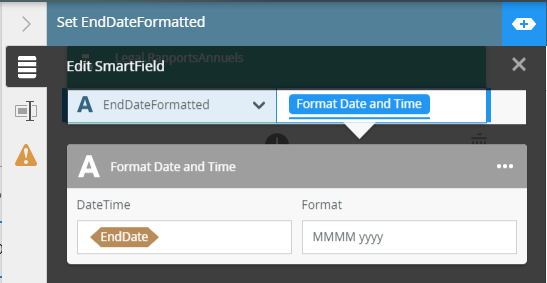
I am using the built-in fuction Format Date and Time and i set up the  format  to be MMMM yyyy.

This results with: March 2019. So i need this to be in French format.


Is there a way to do this?


13303iDC14B44B67C4E53E.png

9 replies

Forum|alt.badge.img+9

Hi ZoltanM


kindly see the following steps to change from English to french format.

Go to IIS > Navigate to .NET Globalization and change the UI culture to french or the needed UI Culture.

For more information on this issue, kindly see the attached link below:

http://help.k2.com/support-services/kbt130694

You need to do both IIS reset and K2 service restart and on the levels also you need change on Top Servicename level and k2 Site .


Should you find the information from the article useful or leading you to the answer please mark as "Solution and/or Kudo", as it will assist other k2 developers with relevant information in the near future.


Best Regards

Elvis


[K2 will not accept any liability for any issues arising from actions taken in respect of the information provided by any forum member]

Translate

  • Jun 27, 2019 9:21 AM UTC

Hi K2 Dev;


Please check out with this formal doc here(https://help.k2.com/onlinehelp/k2five/userguide/5.2/default.htm#create/k2designer/styles/styles.htm)


Regards;

Widson.

Translate

Forum|alt.badge.img+9

Hi ZoltanM


On Addition of what i said above if your using chrome you might have some difficulties because crome does not use geographic location like other browsers please see the link below

https://support.netdocuments.com/hc/en-us/articles/115000004283-Setting-Google-Chrome-to-show-region-specific-date-formats


Regards

Elvis

Translate

  • Author
  • Jun 27, 2019 9:26 AM UTC
Thanks for the answer.
This user guide is for views or forms.
I have this issue in K2 workflow design.
Translate

  • Author
  • Jun 27, 2019 9:29 AM UTC
Thanks for the answer.
At this moment this is not possible for me to change the IIS settings. Currently i am not sure how it would affect the services with the different culture.
Translate

  • Jun 27, 2019 9:37 AM UTC

Good day ZoltanM


Baced on my understanding of the issue, you would like fto format the date on the grounds of which culture is the user. For this I would suggest a Language pack, This view the language of the users browser and format accordingly. For more information view this article and give special attention to the "Note" block:

http://help.k2.com/onlinehelp/K2Five/ICG/5.3/default.htm#Install/Manual/Simple-Language.htm


If this response solved your problem please remember to mark it as a Kudo or Solution. This will show other users that this response is the answer to their question and they can just follow the solution accordingly.


Best Regards

Jacques.


[K2 will not accept any liability for any issues arising from actions taken in respect of the information provided by any forum member]

Translate

Forum|alt.badge.img+9

Hi  ZoltanM


IT seems like this idea is not yet implemented, You can vote for this Idea on the attached link below https://ideas.k2.com/ideas/APIT-I-165


Should you find the information from the article useful or leading you to the answer please mark as "Solution and/or Kudo", as it will assist other k2 developers with relevant information in the near future.


Best Regards

Elvis


[K2 will not accept any liability for any issues arising from actions taken in respect of the information provided by any forum member]


Translate

  • Author
  • Jun 27, 2019 12:01 PM UTC
It would be better if i could define the culture (like in one line in C# dateTime.ToString("MMMM yyyy", new CultureInfo("fr-FR"))), but yes, it can be based on users culture as well.
Unfortunately, there is no Language pack for K2 Five 5.3 in the download section...
Translate

  • Jun 27, 2019 1:41 PM UTC

Good day ZoltanM


The language pack is not K2 version specific according to our documentation(see compatibility matrix below).  You can navigate to this link and select download.


Compatability matrix:

https://help.k2.com/k2compatibilitysupportmatrix#Language


Hope this helps, if indeed so, you can mark this post as a Kudo as well.


Best Regards

Jacques.

Translate
