Nintex Community Menu Bar
Solved

FBA - A network-related or instance-specific error occurred while establishing a connection to SQL

  • January 5, 2020
  • 2 replies
  • 86 views

Forum|alt.badge.img+4

Hello,


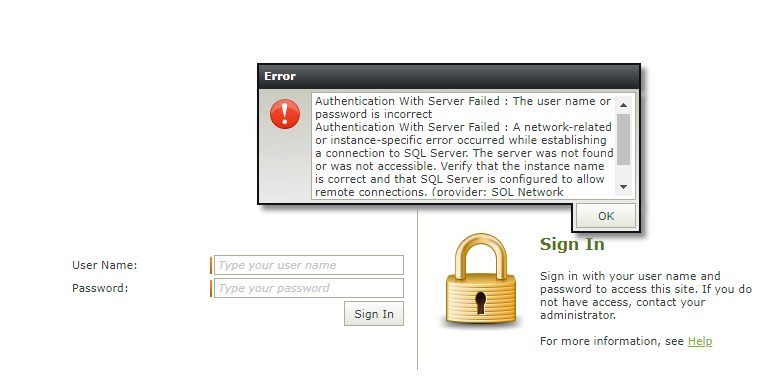
I'm getting below error while trying to login for FBA site.
11998i3DCBC79A9D9A852A.png

Error text:

------------------------------------------------------------------

- I'm passing correct username and password.


Architecture:

- Primary SF site (non-DMZ) for windows auth.

- Secondary SmartForm site (in DMZ) for FBA only - another IIS site.


How did I setup the site:

- Had setup the site referring K2 documentation


Am I missing sql conn string in any config file?


Thanks,

Nirav

Best answer by npatel

Solved the issue.


'A single comma/slash can give developer a hard time.'


There was an additional slash '' in host server config file for DB. Corrected it & now it's working.


I and my collegue have spent days for chasing this error. & in the end it's just a slash. :-/


My db server name is like "VT-XYZ-ABCK2DBServer". I had copy pasted like "VT-XYZ-ABCK2DBServer".

I had checked several times, but since C# lang. syntax in mind, this was always overlooked.


Anyway, was able to identify the error & now FBA site is working.


//Nirav

2 replies

Forum|alt.badge.img+4
  • Author
  • Rookie
  • Answer
  • January 5, 2020

Solved the issue.


'A single comma/slash can give developer a hard time.'


There was an additional slash '' in host server config file for DB. Corrected it & now it's working.


I and my collegue have spent days for chasing this error. & in the end it's just a slash. :-/


My db server name is like "VT-XYZ-ABCK2DBServer". I had copy pasted like "VT-XYZ-ABCK2DBServer".

I had checked several times, but since C# lang. syntax in mind, this was always overlooked.


Anyway, was able to identify the error & now FBA site is working.


//Nirav


Forum|alt.badge.img+4
  • Author
  • Rookie
  • October 7, 2020

Original text:


My db server name is like "VT-XYZ-ABCK2DBServer". I had copy pasted like "VT-XYZ-ABC\K2DBServer".


K2 Community site upgrade removed slash. I guess the same issue which I faced. ;)

