

Nintex Community Menu Bar

Identify "SharePoint 2013 in SharePoint 2010 Mode" workflows

  • June 28, 2018
  • 5 replies
  • 13 views

Forum|alt.badge.img+6

Hi -


I am upgrading to K2 Five and we have finally reached the point where this may actually have an impact on our legacy workflows utilizing SharePoint 2010-originated components.


We're on SharePoint 2013 and most of our projects have since "upgraded" to K2 for SharePoint, but I'm curious what would be the best way to identify any legacy components that were created on SharePoint 2010 integration that may be impacted today?  I know there are probably some workflows out there people have forgotten about but that are actually still used.



5 replies

Forum|alt.badge.img+6
  • Author
  • June 28, 2018

One idea I guess I have is to look at the old SharePoint Service V2 SmO definitions to see what SmO's are out there.


Forum|alt.badge.img+6
  • Author
  • June 28, 2018

But workflow?


Forum|alt.badge.img+16
  • June 28, 2018

Hi,


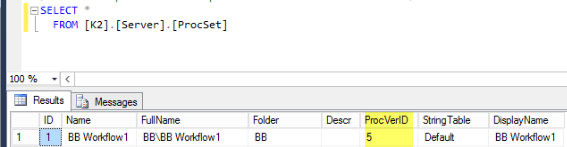
Perhaps you can take a look at the [Server].[ProcSet] table. All deployed workflows will show up in this table.


Forum|alt.badge.img+6
  • Author
  • June 28, 2018

This may help.  Any idea how I could find versioning information?  A great deal of information related to SP 2010 will be revealed by when it was deployed.  That probably gets me 95% there since i know any legacy workflows have not been updated for a long time.


Forum|alt.badge.img+16
  • June 29, 2018

Hi,


If the workflows were created in the SilverLight worklfow designer, then you migth be able to use the ProcVerID for the reference.


I just did a test, each deployment would update the ProcVerID