Nintex Community Menu Bar
Question

Update Out of Date Themes never finishes

  • Jul 11, 2024 1:12 PM UTC
  • 6 replies
  • 66 views
  • Translate All

Forum|alt.badge.img+7

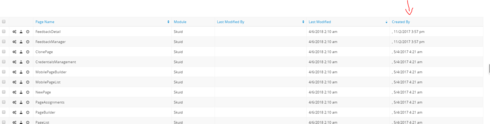
I have been having trouble anytime I update Out of Date Themes. At first it took a very long time to finish, now it doesn’t finish at all. The message on the screen is “updating version…” which seems to be the last step in the process. Let it run overnight, and still doesn’t finish. I pasted a screen shot below of Theme Page list, and the last column (created by) looks messed up, not sure if that has something to do with it. Any suggestions on this would be greatly appreciated

Thanks!
This topic has been closed for replies.

6 replies

Forum|alt.badge.img+20

Have you refreshed your screen after a couple of minutes. I often get the same message and it looks to be updated after refresh.

Translate

Forum|alt.badge.img+7
  • Author
  • Jul 11, 2024 1:51 PM UTC

I will try that next, thanks for the tip!

Translate

Forum|alt.badge.img+7
  • Author
  • Jul 11, 2024 1:51 PM UTC

Tried it again, and I refreshed page after about 10 mins and it looks like everything refreshed.  Thanks Pat!

Translate

Forum|alt.badge.img+11

I also have this issue. I’m getting a console error “unexpected u in JSON at position 0”


Translate

Forum|alt.badge.img+11

the unexpected u is that the snippet running is only yielding “undefined” 
there isn’t the right snippet available. 

Translate

Forum|alt.badge.img+10
  • Nintex Employee
  • Jul 11, 2024 1:51 PM UTC

Just to close the loop - From another thread, Jack and I found that one of his themes had become corrupted at some point. He was able to find the offending theme and remove it, and the Update Out Of Date Themes process then started working. Here’s that thread. To try and find out which theme is corrupted, try exporting each theme, and seeing if 1) the export fails or 2) the exported theme causes trouble in another throwaway org’s “update themes” process. 

Translate