Nintex Community Menu Bar
Question

Table filters not working with subquery conditions

  • Jul 10, 2024 4:11 PM UTC
  • 4 replies
  • 50 views
  • Translate All

Forum|alt.badge.img+10

Is there something special that has to be done to get a default off subquery condition to work with table filters?

If I turn the subquery condition to always on the information in the table is filtered correctly. When the subquery condition is set to default off and a value is entered through a table filter nothing happens. It is like the table is not being refreshed to pull the data in. 

Thanks!

4 replies

Forum|alt.badge.img+4
  • Jul 10, 2024 5:13 PM UTC

Hi Tami, could you post a screenshot of your filter set-up? 

Translate

Forum|alt.badge.img+10
  • Author
  • Jul 10, 2024 5:13 PM UTC

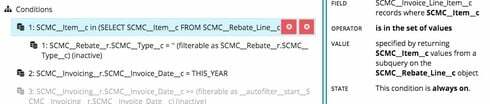
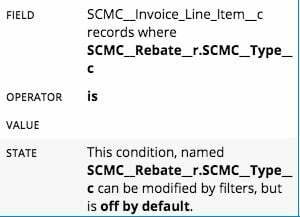
Here are screen shots of the setup.

The subquery setup:

The filter condition setup:

Translate

Forum|alt.badge.img+11
  • Jul 10, 2024 5:13 PM UTC

Tami, it looks like you need to make the primary condition filterable in order to affect it, as shown in this Community thread: https://community.skuid.com/t/cant-deactivate-filterable-sub-condition-on-subquery

Translate

Forum|alt.badge.img+10
  • Author
  • Jul 10, 2024 5:13 PM UTC

Matt,

Thanks for the input. That did not fix the issue. I moved to building a button based on the link you provided but it is not filtering the data properly in the subquery. Are there any field restrictions with sub query conditions?

Translate