Nintex Community Menu Bar
Question

tab navigation

  • Jul 10, 2024 8:44 PM UTC
  • 4 replies
  • 62 views
  • Translate All

Forum|alt.badge.img+7

Can I setup hotkeys to toggle between two tabs?


This topic has been closed for replies.

4 replies

Forum|alt.badge.img+8

Very interesting idea… I like it! Yes, i *think* you can.

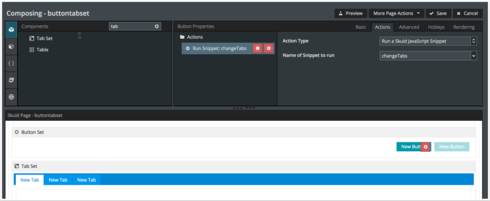
Although hotkeys won’t appear on the Tab Component, I would suggest creating a Button Set that is hidden with all of the hotkeys you need.

The buttons themselves would trigger a javascript snippet that flips the Tabs. Very similar to how in Chrome you can switch tabs using the “CTRL+1-9 or CMD+1-9” shortcuts.

There might be a better way I’m not thinking of.

Translate

Forum|alt.badge.img+8

As for the javascript itself, I think I just found it here: https://community.skuid.com/t/tabset-javascript-navigation

Haven’t tested to see if it works with newer versions of Skuid though. Hope it helps! 

Translate

Forum|alt.badge.img+10
  • Scholar
  • Jul 10, 2024 9:31 PM UTC

I can’t seem to get this javascript to activate the tab working. Is there an alternative method?

Translate

Forum|alt.badge.img+10
  • Scholar
  • Jul 10, 2024 9:31 PM UTC

Found a solution that works here (tabs are numbered in order, starting with 0):

skuid.$( "#taskssub" ).tabs( "option", "active", 1 );
Translate