Nintex Community Menu Bar
Question

Looking to embed an existing VF page on a skid page tab.

  • July 9, 2024
  • 4 replies
  • 35 views

Forum|alt.badge.img+1

Found some info on it but missing the basic starting point as to where to place a reference to the VF Page. I am totally new to Skuid. Basic starting as to what Component type is needed? Other basic starting points would be helpful.

Thanks!

This topic has been closed for replies.

4 replies

Forum|alt.badge.img+17
  • Nintex Employee
  • July 9, 2024

Forum|alt.badge.img+1

Very good, thanks Rob. I’ll dig into it.


Forum|alt.badge.img+1

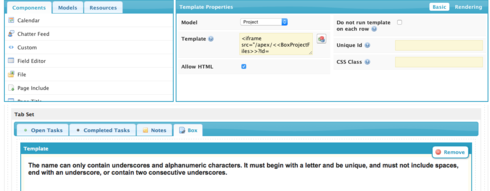
Hey Rob, I am getting this now, "
The name can only contain underscores and alphanumeric characters. It must begin with a letter and be unique, and must not include spaces, end with an underscore, or contain two consecutive underscores."

Here is the iframe I used from the thread you mentioned.

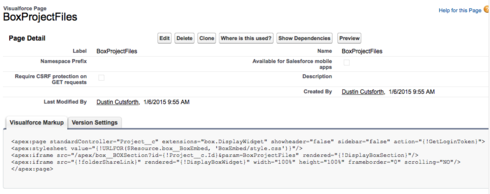
Here is a screen shot of the layout and referenced VF Page. Any quick ideas? Thanks again!

VF Page Referenced below.


Forum|alt.badge.img+17
  • Nintex Employee
  • July 9, 2024

Aha. Box.com. We’ve seen this before.

First. You don’t wrap your VF Page name in <> That is why you are getting the error message.

But Second. Because the VF page is really just generating an iFrame and passing parameters to it, you can bypass the VF page entirely and just put the iFrame with parameters into the template component in your Skuid page.

Here is another forum post where this is described: https://community.skuid.com/t/adding-a-box-custom-component-or-template-to-my-page

Cheers.