Nintex Community Menu Bar
Question

Lightning Component

  • Jul 11, 2024 2:53 PM UTC
  • 11 replies
  • 72 views
  • Translate All

Forum|alt.badge.img+7

(1) Lightning Component in Aura isn’t relaying the record IDs correctly. The code is below. What do I need to change here so that it pulls the record ID correctly?

11 replies

Forum|alt.badge.img+6
  • Nintex Employee
  • Jul 11, 2024 3:48 PM UTC

Hi, Allison. Quick question: are you basing that code on this Skuid documentation entry? If so, I think you’ve just found a issue in our documentation, because that markup needs to be changed slightly. Thank you for finding that, and we’ll get it patched up, but in the meantime, does it work if you use this instead?

<aura:component implements=“force:hasRecordId,flexipage:availableForRecordHome,lightning:actionOverride” access=“global”>
 <skuid:page page=“BWMContact__mobileLight” recordId=“{!v.recordId}”/> </aura:component> 
Basically, swap that id attribute out for recordId.

Translate

Forum|alt.badge.img+7
  • Author
  • Jul 11, 2024 3:48 PM UTC

I noticed this was marked as “solved” but the code you provided doesn’t work… see below for the SF error.  Can you advise on how I should edit?

Translate

Forum|alt.badge.img+6
  • Nintex Employee
  • Jul 11, 2024 3:48 PM UTC

Hmmmm… I’m not sure why that got marked as “solved,” to be honest. However, it looks like I misspoke: “recordId” isn’t the correct attribute after all. When you say that “Aura isn’t relaying the record IDs correctly,” what do you mean? Setting that “id” attribute should make the id value available for $Param merges, model conditions, etc.

Translate

Forum|alt.badge.img+7
  • Author
  • Jul 11, 2024 3:48 PM UTC

When using the native search in SF, it doesn’t pull up the searched record.  Instead, it just goes to the first record created in SF each time.  

Translate

Forum|alt.badge.img+13

Allison, the Skuid Page component automatically includes the context Record Id, you don’t need to specify it actually. This should be sufficient:


<aura:component implements="force:hasRecordId,flexipage:availableForRecordHome,lightning:actionOverride" access="global">
<skuid:page page="BWMContact__mobileLight"/> 

</aura:component>

Your Skuid Page may be where the problem is — I’m assuming you have at least one Model with a Condition on it? The Condition will need to be on the Id field, and it’s value source should be “Page / URL Parameter”, with the Parameter Name set to “id” (lowercase).

Translate

Forum|alt.badge.img+7
  • Author
  • Jul 11, 2024 3:48 PM UTC

I went back through the model conditions and the only one set to an outside source is ContactData, condition screenshot is below. All other models refer back to the ContactData model.

Also, can we get this thread marked as “unsolved”?

Translate

Forum|alt.badge.img+13

Allison, I’ve changed the status back to “In Progress”.

Can you explain exactly where this Skuid Page component is being used? You mentioned earlier the “native search in SF” — can you elaborate on that, perhaps post a screenshot of where you are using the Skuid Page component?

Translate

Forum|alt.badge.img+7
  • Author
  • Jul 11, 2024 3:48 PM UTC

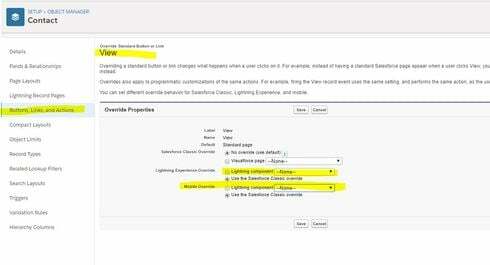
I’m using the Lightning Component as a “Buttons, Links, Action” override for Mobile. I also tested as a Lighting Experience Override to make sure our issue isn’t mobile-specific, but it doesn’t work there either.

Translate

Forum|alt.badge.img+13

Thanks Allison. And for completeness, can you post the code for the Lightning Component you are currently using that includes a <skuid:page /> component?

Translate

Forum|alt.badge.img+7
  • Author
  • Jul 11, 2024 3:49 PM UTC

Yes,

<aura:component implements=“force:hasRecordId,flexipage:availableForRecordHome,lightning:actionOverride” access=“global”>
<skuid:page page=“BWMContact__mobileLight”/>
</aura:component>

Translate

Forum|alt.badge.img+7
  • Author
  • Jul 11, 2024 3:49 PM UTC

Any luck on this?

Translate