

Nintex Community Menu Bar
Question

JavaScript code not working properly or broken on a Button

  • Jul 10, 2024 1:39 PM UTC
  • 7 replies
  • 52 views
  • Translate All

Forum|alt.badge.img+8

We have a button called refresh queue. This button is used to refresh the Cases queue on a skuid page.
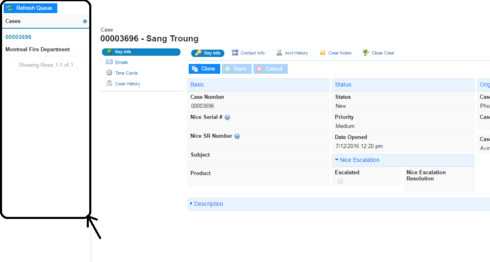
So to see the cases queue, instead refreshing the entire browser we had this button which refresh a part of the page. We had the following JavaScript code that we used to refresh the queue.

var params = arguments[0],
_ buttons = params.component.element.buttons,_
$ = skuid.$;

$.each(buttons, function(){
_ _
_ var myModel = skuid.model.getModel(‘Case’);_
myModel.updateData();
_ _
_ _
_ _
});

This piece of JavaScript code (On refresh queue button) used to work properly previously but now the button (refresh queue) is not working. I am unable to figure out on what is going wrong.

The snippet shown above is also taken from the community long ago. It worked properly at that time. Another problem is we didn’t use this page for the last month or more. So Can anyone help me on how to correct the code and make the button work again.

Thanks.

This topic has been closed for replies.

7 replies

Forum|alt.badge.img+18

Avinash,

Try eliminating everythign from your code except these two lines:

var myModel = skuid.model.getModel(‘Case’);
myModel.updateData();

That should do what you want.

Translate

Forum|alt.badge.img+18

Alternatively, you could just have the action framework query the Case model, instead of running javascript.

Translate

Forum|alt.badge.img+8

Thank you. It worked. But  I wanted what is going wrong with the above code. Can you tell me about it?

Translate

Forum|alt.badge.img+8

I tried action framework and had my button functioning properly. But I just wanted to know how a piece of code which used to work properly previously is not working now. What is cause of it? 

Translate

Forum|alt.badge.img+18

My guess is that you’re getting some kind of exception on the line 

buttons = params.component.element.buttons,

probably because something isn’t being passed in the arguments the way it was before.

Translate

Forum|alt.badge.img+13

Avinash, I’m not sure which Community post you were referring to where you made use of params.component.element.buttons, but that was using unsupported functionality. params.component.element.buttons was not supported for Page Title buttons - please see this article for a list of supported Snippet parameters:

http://help.skuid.com/m/11720/l/218337-page-title-component-custom-button-actions

Translate

Forum|alt.badge.img+8

Sure. I’ll go through the article.
Thanks Zach.

Translate