Nintex Community Menu Bar
Question

Is there a way to make sure events that span more than one day can be shown in a single row?

  • Jul 9, 2024 5:11 PM UTC
  • 3 replies
  • 54 views
  • Translate All

Forum|alt.badge.img+2

I am getting close to saying, we can actually buy this, but I have a small issue currently. The events we have in the calendar aren’t lining up properly. The one day event is in between two multiple day events and it looks ugly. Is there a way to make sure the events with the most days are at the top?

Scott


This topic has been closed for replies.

3 replies

Forum|alt.badge.img+17
  • Nintex Employee
  • Jul 9, 2024 7:02 PM UTC

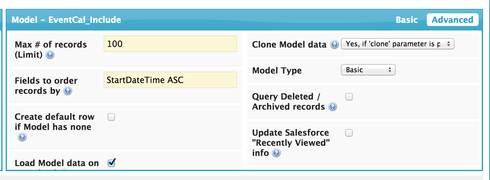
In my experience,  you can get the results you want by adding an “Order by” property to the model that is driving your calendar.  I typically use StartDateTime as shown below. 

2dcf5f351ab892aa22d842c0b26911176c21c2ef.png

Translate

Forum|alt.badge.img+2
  • Author
  • Jul 9, 2024 7:02 PM UTC

Thanks Rob, and sorry for the late reply.

I can change the order in the Model all I want and it has no effect on the order of the entries in the calendar at all. 

Scott

Translate

Forum|alt.badge.img+17
  • Nintex Employee
  • Jul 9, 2024 7:02 PM UTC

Scott, I was able to more relialby get an appropriate sort order when I sorted the model on the standard field “DurationInMinutes DESC”

Here is my test example:

Now if you have multiple event sources, I don’t think you will have any luck with this plan. In that case I don’t think I have a good answer for you.

Translate