Nintex Community Menu Bar
Question

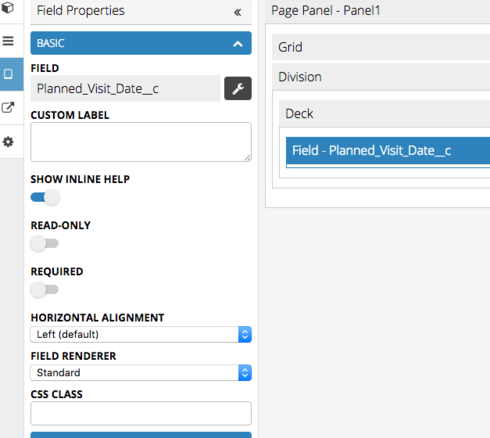
Can't turn the Read only" option off on a field in mobile editor =("

  • Jul 10, 2024 4:09 PM UTC
  • 7 replies
  • 48 views
  • Translate All

Forum|alt.badge.img+6

Hi everyone.

I am having issues with a field in my panel and im not sure why this is happening.

In a nut shell I need to be able to edit the field but can’t for some strange reason turn the “Read Only” option off.

Can anyone please advise me on why this would be happening?
This topic has been closed for replies.

7 replies

Forum|alt.badge.img+7

Hi Matt Have you checked the field security and accessibility options?

Translate

Forum|alt.badge.img+6
  • Author
  • Jul 10, 2024 5:00 PM UTC

Hi Gregg,

Thanks for the suggestion but it looks like this is not the root of the problem =/ 
Any other suggestions? 

Many thanks, 

Matt

Translate

Forum|alt.badge.img+7

Hi Matt
Do you have a Deck component on your page?

You need to place a deck in the division and then add the field there.

Translate

Forum|alt.badge.img+6
  • Author
  • Jul 10, 2024 5:00 PM UTC

Hi Gregg, 

Yes I can confirm that the field is located within the “Accounts Deck.”

Translate

Forum|alt.badge.img+7

Hi Matt

Can you share your XML with me.

I have recreated the scenario and I don’t have the same issue as you.

Also, what Skuid version are you on?

Have you been using mobile page builder for a while or is this a first app?

Translate

Forum|alt.badge.img+6
  • Author
  • Jul 10, 2024 5:00 PM UTC

Hi Gregg (and anyone else reading this),

I had come back to the problem this afternoon to find it is now functioning as desired and the problem is now absent.

Quite strange as I had not worked on this instance all day =/ 
Perhaps this was a bug, we may never know.

Special thanks for the suggestions made by Gregg.

Cheers, 

Matt

Translate

Forum|alt.badge.img+7

Hi Matt

Glad you got sorted out.

You are always welcome.

Happy Skuiding

Translate