Nintex Community Menu Bar
Question

Adding a Panel type box into an html template

  • Jul 10, 2024 6:37 PM UTC
  • 4 replies
  • 55 views
  • Translate All

Forum|alt.badge.img+7

Hello all, I’m trying to figure out if it is possible to add panels to the html of a template component to generate large. Here are some images to better explain.

I have a wraper component with a Page Title and Template components.

 ![](https://us.v-cdn.net/6032350/uploads/attachments/RackMultipart20161218-113190-1f9y8xl-2016-12-18_01-21-55_inline.jpg "Image: https://d2r1vs3d9006ap.cloudfront.net/s3\_images/1524897/RackMultipart20161218-113190-1f9y8xl-2016-12-18\_01-21-55\_inline.jpg?1482055212")

I would like to develop a way to pull in information as shown with the 9, 3, and 6 numbers.
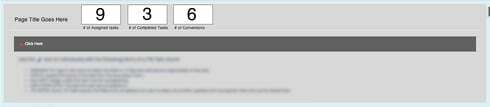
.

I’m looking to see what syntax I would use in the template; I could css it after if it is possible.

Thanks!

This topic has been closed for replies.

4 replies

Forum|alt.badge.img+10
  • Nintex Employee
  • Jul 10, 2024 7:04 PM UTC

Hello Nirouges,

Thank you for your question. You may be able to find what you’re looking for in this community post, which discusses calculating and displaying totals in a template component. 

- Mark

Translate

Forum|alt.badge.img+7
  • Author
  • Jul 10, 2024 7:04 PM UTC

I will try this out and let you know how it goes! Thank you!

Translate

Forum|alt.badge.img+7
  • Author
  • Jul 10, 2024 7:04 PM UTC

Didn’t work, but maybe needs a little more tweaking.

This is syntax used in the template and set to Allow HTML:

<a href="/500/o">You have {{$Model.countingrecords.data.length}} records</a> 

and the result was:

You have 0 records
Translate

Forum|alt.badge.img+7
  • Author
  • Jul 10, 2024 7:04 PM UTC

actually ,got it to work!

Translate