Nintex Community Menu Bar
Question

Action Framework: Create new row defaults can only add single value to multipicklist field

  • Jul 9, 2024 5:10 PM UTC
  • 4 replies
  • 77 views
  • Translate All

Forum|alt.badge.img+18

Is there a way we can add multiple values to a multiselect picklist using the action framework’s create new row default properties? Seems like my only options are ‘single specified value’ and ‘none’.
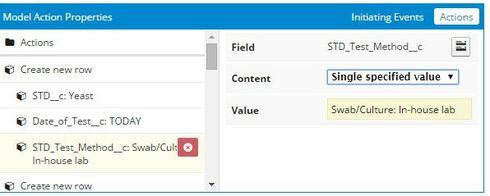

e08f6ea642ced503e9e35f668f56959af17cfbdf.jpg

4 replies

Forum|alt.badge.img+18
  • Author
  • Jul 9, 2024 6:29 PM UTC

Can I get around this in the XML?

Translate

Forum|alt.badge.img+18
  • Author
  • Jul 9, 2024 6:29 PM UTC

Like this?

<default type="fieldvalue" field="STD_Test_Method__c" enclosevalueinquotes="true">      <values>
          <value="Blood Test: Lab send-off" />
          <value="Visual Inspection" />
     </values>
</default>
Translate

Forum|alt.badge.img+13

There is a way to do this, but the node approach you suggested does not currently work, although it makes sense and will probably work in the future if we implement support for Multiple Specified Values for Create new row defaults.

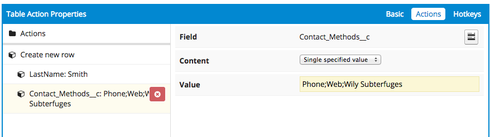
For Multi-Select Picklist fields, you can set multiple default values by using “Content: Single specified value” and then for “Value”, separate the desired values with a semicolon, like this:

Blood Test: Lab send-off;Visual Inspection

Translate

Forum|alt.badge.img+18
  • Author
  • Jul 9, 2024 6:29 PM UTC

Sweet. Thanks, Zach

Translate