

Nintex Community Menu Bar
Solved

ODBC connection string correct format

  • Aug 19, 2021 6:53 AM UTC
  • 4 replies
  • 1013 views
  • Translate All

Pyae
Forum|alt.badge.img+5

I am trying to use the execute SQL action for ODBC connection. The system DNS setup is done and tested the connection successfully in ODBC Data Source.

When I trying to test the connection in Execute SQL, it does not success and showing "Error testing ODBC connection".
This is the connection string that I use : "Driver ={Oracle in OraClient19Home1}; Dbq=Name; Uid=User; Pwd=Password;"

I would like to know, is it the right connection string format or not. Appreciate for your kind advise. Thanks.
Best answer by Pyae

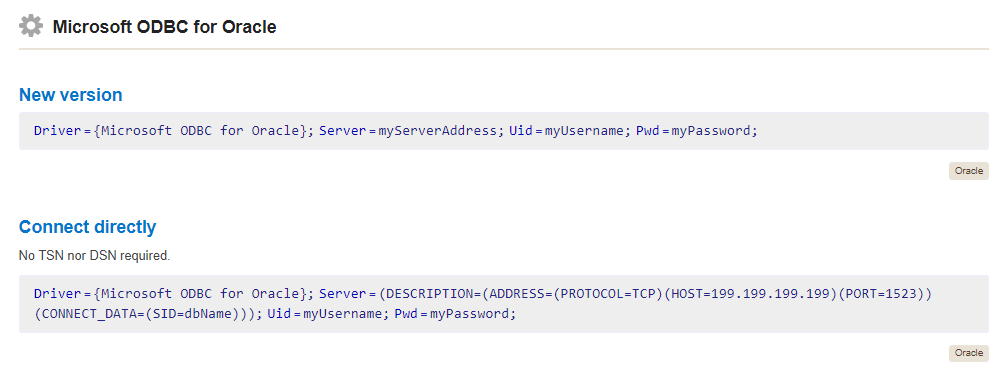
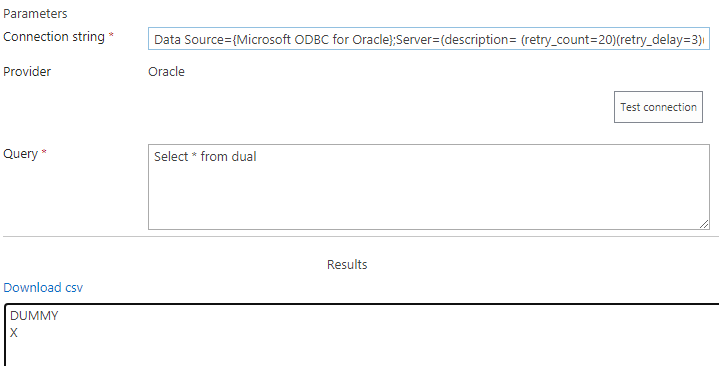
I found below one (Connect directly) in the connection strings website and it works for me. This is connecting to the Oracle Cloud.

View original

4 replies

vadim_tabakman
Forum|alt.badge.img+11

Do you have the Oracle client installed on all WFEs and APP servers?

Cheers,
Vadim

Translate

Pyae
Forum|alt.badge.img+5
  • Author
  • Scholar
  • Aug 20, 2021 8:01 PM UTC

Hi Vadim,
Yes, Oracle client is installed in WFE only. Does it require to install in App Server?
Thanks,
Pyae

Translate

Pyae
Forum|alt.badge.img+5
  • Author
  • Scholar
  • Answer
  • Aug 21, 2021 7:58 AM UTC

I found below one (Connect directly) in the connection strings website and it works for me. This is connecting to the Oracle Cloud.

Translate

vadim_tabakman
Forum|alt.badge.img+11
that's awesome. I'm glad you got it working!!
Translate