Nintex Community Menu Bar

Nintex Form for office 365 with Nintex Sign

  • November 9, 2021
  • 5 replies
  • 35 views

I am using nintex for office 365 and need approval base with nintex sign on form. It seems to me that this is not possible. Can anyone suggest me how we can achieve this? any blog or example will 

5 replies

Garrett
Forum|alt.badge.img+16
  • Scout
  • November 9, 2021

Can you clarify what you want to do step by step? Not sure whether its the Routing or Signature issue for your case.


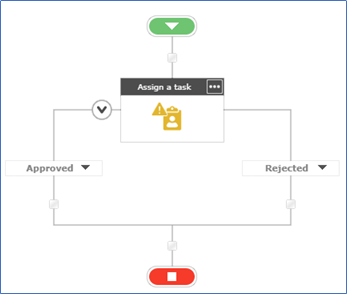
1. User apply for "something" by filling Form

2. Form routes to Supervisor for Approval

3. Require Supervisor's Signature


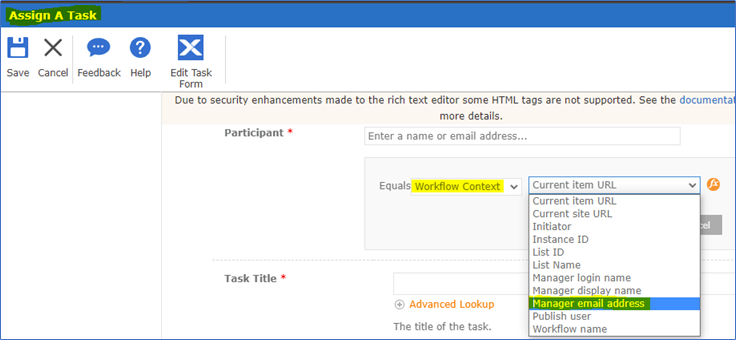
How to route to Manager or Supervisor?

Workflow Context - Manager (This has to be define in your AD Infrastructure)
Otherwise you need (hard-coded) assign to a User - HR Manager. 


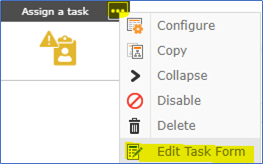
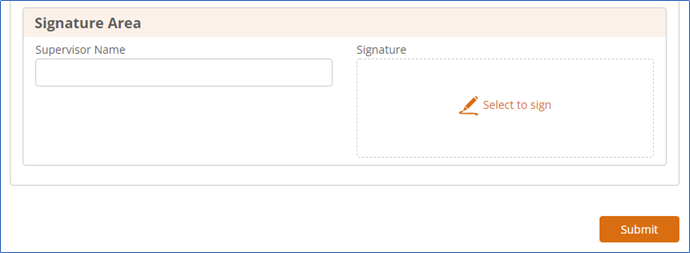
How to put Manager/Supervisor signature?
Click the 3 dots, click "Edit Task Form". 
Select "New Responsive Form"

Add the Signature item


  • Author
  • November 9, 2021

Thanks a lot brother.


You explained each steps in details. I want to use the Nintex Sign (with adobe) in Signature item. Is that possible?


nico
Forum|alt.badge.img+10
  • Rookie
  • November 9, 2021

Nintex Sign (provide by adobe sign) is for capture electronic signature on document. So you can only add signature on documents. It's not an approval.


So, if you want to "approve" with Nintex Sign, you need to have a document to send for signature.


  • Author
  • November 10, 2021

Thanks @nico 


Yes, it seems, i need to use document generation for this.


nico
Forum|alt.badge.img+10
  • Rookie
  • January 10, 2022

@amurtaza don't forget to marke this question as Solved