Nintex Community Menu Bar
Answer

New responsive form - List look up returning list position number as well as text

  • September 16, 2022
  • 2 replies
  • 102 views

Hi all, 


I am really new to Nintex forms but am quite savvy however i am running into trouble with a list lookup.

when using the list lookup to a SharePoint list the value is coming across fine, however if i want to use that value in a variable i am see not only the value but the row number in the list. For example:


List Columns

Fruit       Type of Fruit

Yes         Apple

Yes         Orange

No           Potato


If i want to pull back for example 'Orange' the word Orange is showing in my list look up form value perfectly. But pulling that value into a variable i get '2;#Orange' because it's in row 2. How do i just get the value?

Best answer by Garrett

Hi @Rancea 


If you are pulling the the value into a variable,

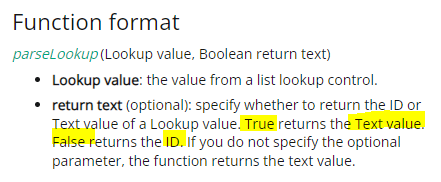
just use the parseLookup function to perform the clean.

This should set the variable value to "Orange"


Parselookup Reference

https://help.nintex.com/en-US/office365/Designer/Functions/parseLookup.htm

2 replies

Garrett
Forum|alt.badge.img+16
  • Scout
  • Answer
  • September 18, 2022

Hi @Rancea 


If you are pulling the the value into a variable,

just use the parseLookup function to perform the clean.

This should set the variable value to "Orange"


Parselookup Reference

https://help.nintex.com/en-US/office365/Designer/Functions/parseLookup.htm


  • Author
  • September 20, 2022

Fantastic. Thank you it works perfectly 🙂